EasyManua.ls Logo

Sony SLV-286EE - Recording TV Programmes

Sony SLV-286EE
112 pages
Print Icon
To Next Page IconTo Next Page
To Previous Page IconTo Previous Page
Loading...
LS
Oe
EL
Playing
a
tape
(continued)
Note
»
Depending
on
your
TV,
the
following
may
occur
while
playing
an
NTSC-recorded
tape:
~
The
picture
becomes
black
and
white.
The
picture
shakes.
~
No
picture
appears
on
the
TV
screen
~
Black
streaks
appear
horizontally
on
the
TV
screen.
-
The
colour
density
increases
or
decreases.
Notes
*
The
display
will
not
appear
while
playing
an
NTSC-
recorded
tape.
©
The
display
will
not
appear
during
still
mode
or
slow-
motion
playback.
Notes
¢
When
a
tape
is
reinserted,
the
counter
returns
to
“QHOOMOOS.”
*
The
counter
will
not
work
on
tape
portions
with
no
recording.
*
Ifa
tape
has
portions
recorded
in
both
PAL
and
NTSC
systems,
the
time
counter
reading
will
not
be
correct.
This
discrepancy
is
due
to
the
difference
between
the
counting
cycles
of
the
two
video
systems.
16
|}
Basic
Operations
To
set
the
colour
system
If
streaks
appear
during
playback,
set
the
COLOR
SYSTEM
switch
on
the
VCR
to
conform
to
the
system
that
the
tape
was
recorded
in.
(The
normal
setting
is
AUTO.)
When
your
tape
was
recorded
in
Set
COLOR
SYSTEM
to
PAL PAL
or
PAL/MESECAM
NTSC
NTSC
MESECAM
PAL/MESECAM
To
play
an
NTSC-recorded
tape
Set
the
NTSC
PB
switch
on
the
VCR
according
to
the
colour
system
of
your
TV.
gay
When
your
TV
is
Set
NTSC
PB
to
PAL
ON
PAL
TV
NTSC
4.43
NTSC
4.43
NTSC
3.58
NTSC
3.58
Displaying
the
remaining
tape
length
and
time
counter
Press
DISPLAY
to
turn
the
display
on
or
off.
(sss)
(SP)
(0:00"
22)
Remaining
tape
length
The
white
bar
represents
the
approximate
length
of
tape
remaining.
Time
counter
Tape
speed
Using
the
time
counter
At
the
point
on
a
tape
that
you
want
to
find
later,
press
COUNTER
RESET
to
reset
the
counter
to“OHOOMO00S.”
When
you
rewind
or
advance
the
tape
to
this
point,
refer
to
the
counter.
Recording
TV
programmes
Note
*
If
you
insert
a
tape
with
its
safety
tab
removed,
the
VCR
starts
playing.
To
record
on
this
tape,
cover
the
tab
hole.
Tips
*
To
select
programme
positions,
you
can
also
use
the
number
buttons
on
the
remote
commander.
For
two-digit
numbers,
press
the
-/--
(ten's
digit)
button
followed
by
the
number
buttons.
*
To
record
NTSC
Programmes,
connect
the
TV
or
other
VCR
to
this
VCR‘s
LINE
IN
jacks
and
press
UNPUT
SELECT
to
select
line
input.
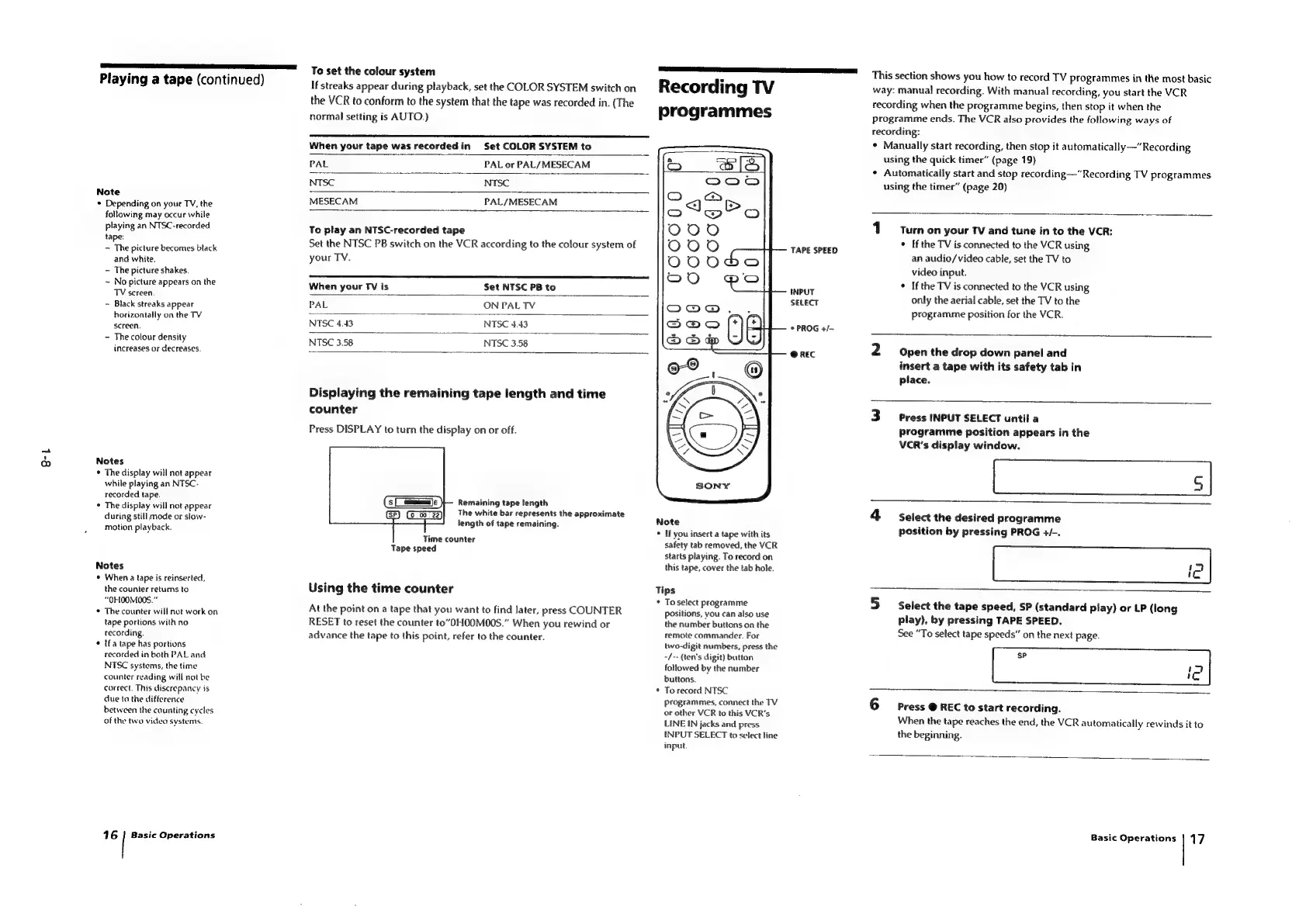
TAPE
SPEED
(INPUT
SELECT
*
PROG
+/-
@
REC
This
section
shows
you
how
to
record
TV
programmes
in
the
most
basic
way:
manual
recording.
With
manual
recording,
you
start
the
VCR
recording
when
the
programme
begins,
then
stop
it
when
the
programme
ends.
The
VCR
also
provides
the
following
ways
of
recording:
*
Manually
start
recording,
then
stop
it
automatically—“
Recording
using
the
quick
timer”
(page
19)
*
Automatically
start
and
stop
recording—“Recording
TV
programmes
using
the
timer”
(page
20)
Turn
on
your
TV
and
tune
in
to
the
VCR:
*
Ifthe
TV
is
connected
to
the
VCR
using
an
audio/video
cable,
set
the
TV
to
video
input.
*
Ifthe
TV
is
connected
to
the
VCR
using
only
the
aerial
cable,
set
the
TV
to
the
programme
position
for
the
VCR.
Open
the
drop
down
panel
and
insert
a
tape
with
its
safety
tab
in
place.
Press
INPUT
SELECT
until
a
programme
position
appears
in
the
VCR's
display
window.
4
Select
the
desired
programme
position
by
pressing
PROG
4+/-.
Select
the
tape
speed,
SP
(standard
play)
or
LP
(long
play),
by
pressing
TAPE
SPEED.
See
“To
select
tape
speeds”
on
the
next
page.
sp
'C
Press
@
REC
to
start
recording.
When
the
tape
reaches
the
end,
the
VCR
automatically
rewinds
it
to
the
beginning.
Basic
Operations
|
17

Table of Contents

Related product manuals