EasyManua.ls Logo

Sony SLV-286EE - Connecting the VCR

Sony SLV-286EE
112 pages
Print Icon
To Next Page IconTo Next Page
To Previous Page IconTo Previous Page
Loading...
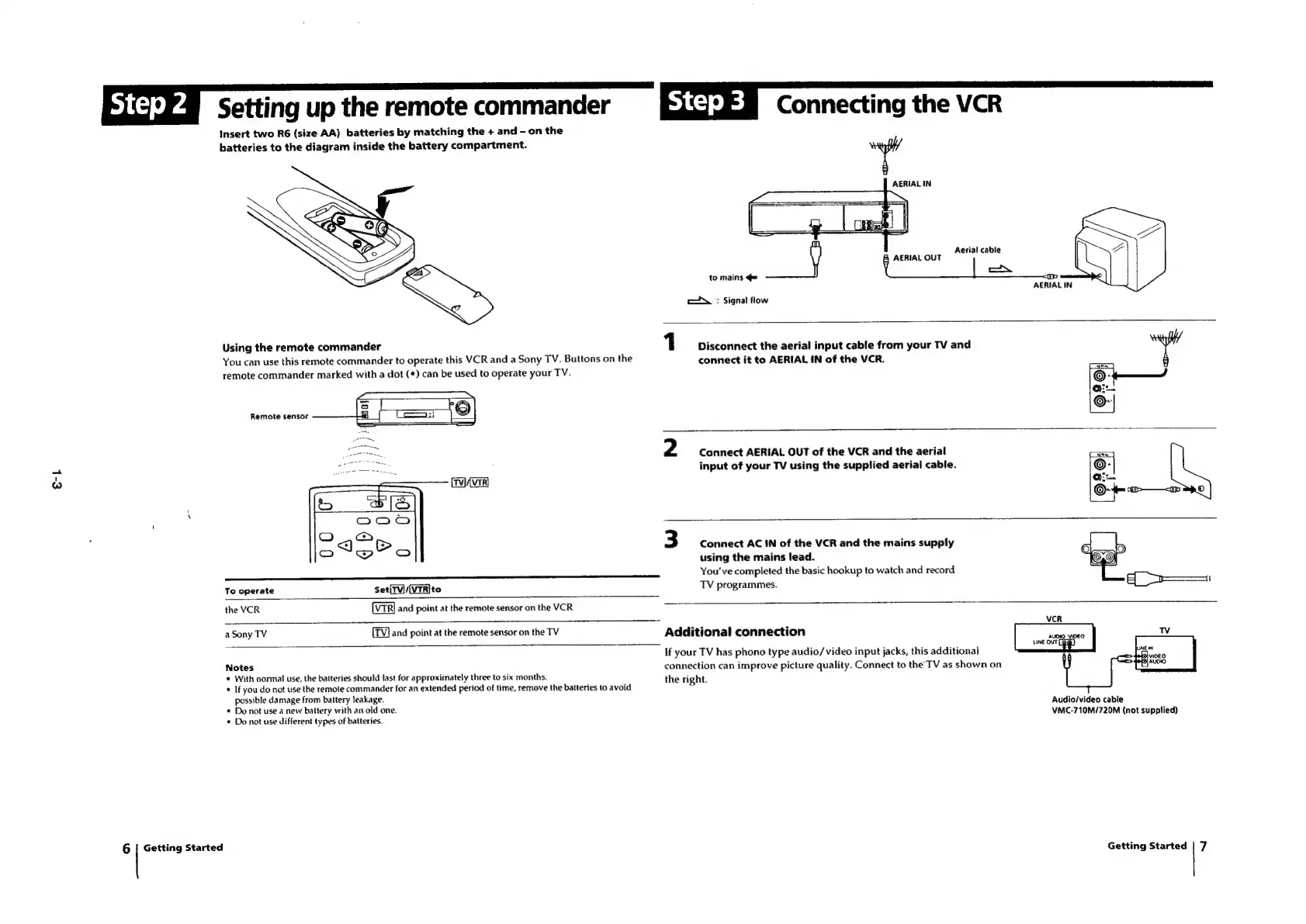
Setting
up
the
remote
commander
insert
two
R6
(size
AA)
batteries
by
matching
the
+
and
-
on
the
batteries
to
the
diagram
inside
the
battery
compartment.
Connecting
the
VCR
AERIAL
IN
co.
:
Signal
flow
Aerial
cable
AERIAL
OUT
|
ang
to
mains
¢=
o
AERIAL
IN
Using
the
remote
commander
1
Disconnect
the
aerial
input
cable
from
your
TV
and
You
can
use
this
remote
commander
to
operate
this
VCR
and
a
Sony
TV.
Buttons
on
the
connect
it
to
AERIAL
IN
of
the
VCR.
remote
commander
marked
with
a
dot
(¢)
can
be
used
to
operate
your
TV.
Remote
sensor
2
Connect
AERIAL
OUT
of
the
VCR
and
the
aerial
input
of
your
TV
using
the
supplied
aerial
cable.
3
Connect
AC
IN
of
the
VCR
and
the
mains
supply
using
the
mains
lead.
You've
completed
the
basic
hookup
to
watch
and
record
To
operate
Set(TV)/(VTR]to
TV
programmes.
the
VCR
and
point
at
the
remote
sensor
on
the
VCR
a
Sony
TV
and
point
at
the
remote
sensor
on
the
TV
Additional
connection
If
your
TV
has
phono
type
audio/video
input
jacks,
this
additional
Notes
connection
can
improve
picture
quality.
Connect
to
the’
TV
as
shown
on
*
With
normal
use,
the
batteries
should
last
for
approximately
three
to
six
months.
the
right.
*
If
you
do
not
use
the
remote
commander
for
an
extended
period
of
time,
remove
the
batteries
to
avoid
possible
damage
from
battery
leakage.
*
Do
not
use
a
new
battery
with
an
old
one.
*
Do
not
use
different
types
of
batteries.
6
|
Getting
Started
Audio/video
cable
VMC-710M/720M
(not
supplied)
Getting
Started
7

Table of Contents

Related product manuals