EasyManua.ls Logo

Sony SLV-286EE - Upper Drum Replacement

Sony SLV-286EE
112 pages
Print Icon
To Next Page IconTo Next Page
To Previous Page IconTo Previous Page
Loading...
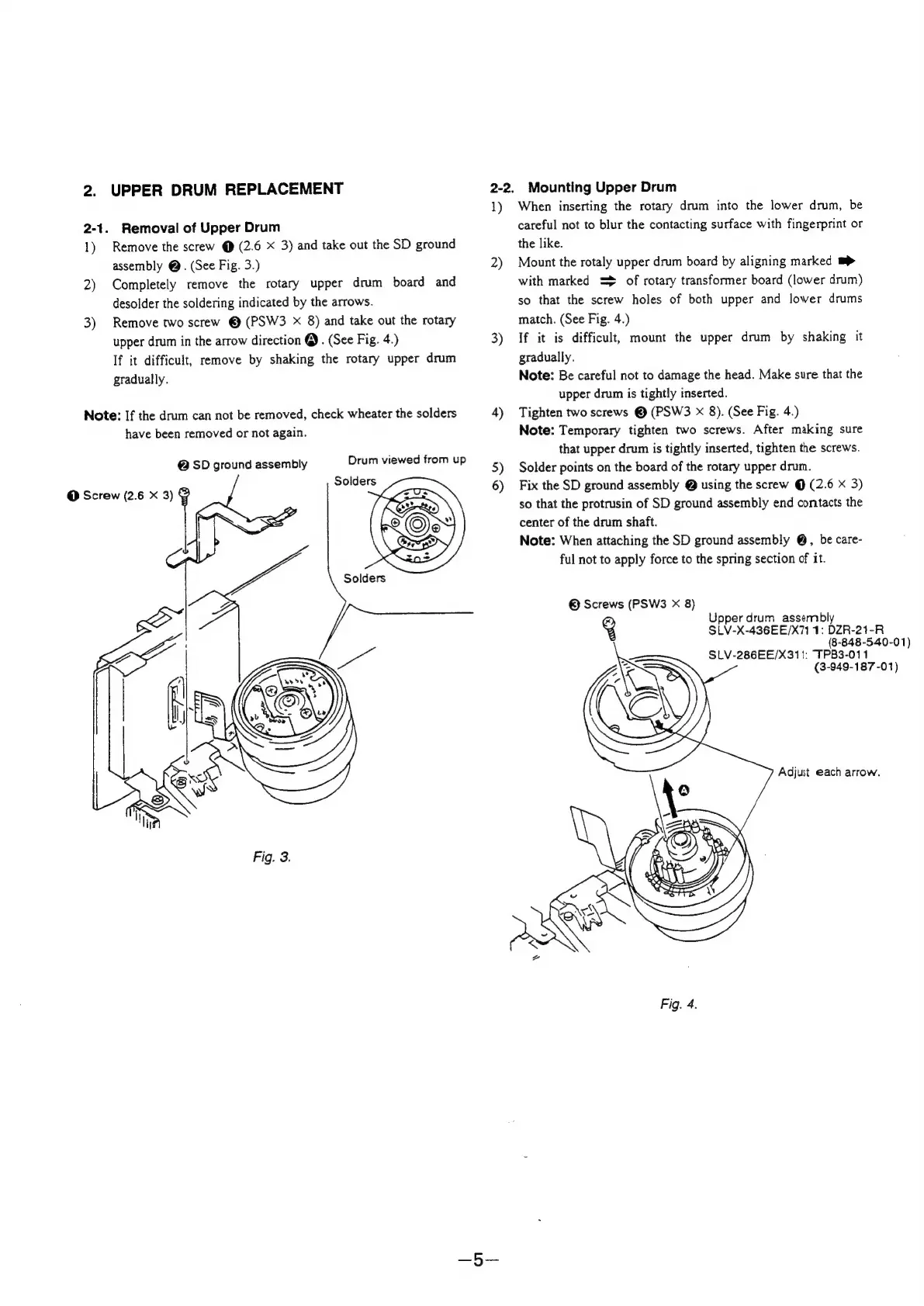
2.
UPPER
DRUM
REPLACEMENT
2-1.
Removal
of
Upper
Drum
1)
Remove
the
screw
@
(2.6
x
3)
and
take
out
the
SD
ground
assembly
@.
(See
Fig.
3.)
2)
Completely
remove
the
rotary
upper
drum
board
and
desolder
the
soldering
indicated
by
the
arrows.
3)
Remove
two
screw
©
(PSW3
X
8)
and
take
out
the
rotary
upper
drum
in
the
arrow
direction
@.
(See
Fig.
4.)
If
it
difficult,
remove
by
shaking
the
rotary
upper
drum
gradually.
Note:
If
the
drum
can
not
be
removed,
check
wheater
the
solders
have
been
removed
or
not
again.
@
SD
ground
assembly
Drum
viewed
from
up
Solders
@
Screw
(2.6
X
3)
2-2.
Mounting
Upper
Drum
1)
2)
3)
4)
5)
6)
When
inserting
the
rotary
drum
into
the
lower
drum,
be
careful
not
to
blur
the
contacting
surface
with
fingerprint
or
the
like.
Mount
the
rotaly
upper
drum
board
by
aligning
marked
mp>
with
marked
=>
of
rotary
transformer
board
(lower
drum)
so
that
the
screw
holes
of
both
upper
and
lower
drums
match.
(See
Fig.
4.)
If
it
is
difficult,
mount
the
upper
drum
by
shaking
it
gradually.
Note:
Be
careful
not
to
damage
the
head.
Make
sure
that
the
upper
drum
is
tightly
inserted.
Tighten
two
screws
©
(PSW3
x
8).
(See
Fig.
4.)
Note:
Temporary
tighten
two
screws.
After
making
sure
that
upper
drum
is
tightly
inserted,
tighten
the
screws.
Solder
points
on
the
board
of
the
rotary
upper
drum.
Fix
the
SD
ground
assembly
@
using
the
screw
@
(2.6
x
3)
so
that
the
protrusin
of
SD
ground
assembly
end
contacts
the
center
of
the
drum
shaft.
Note:
When
attaching
the
SD
ground
assembly
@,
be
care-
ful
not
to
apply
force
to
the
spring
section
of
it.
©
Screws
(PSW3
X
8)
Upper
drum
assembly
SLV-X-436EE/X71
1:
DZR-21-R
(8-848-540-01)
SLV-286EE/X311:
TPB3-011
(3-949-187-01)
Adjust
each
arrow.
Fig.
4.

Table of Contents

Related product manuals