EasyManua.ls Logo

Sony SLV-286EE - Cleaning Lever Assy

Sony SLV-286EE
112 pages
Print Icon
To Next Page IconTo Next Page
To Previous Page IconTo Previous Page
Loading...
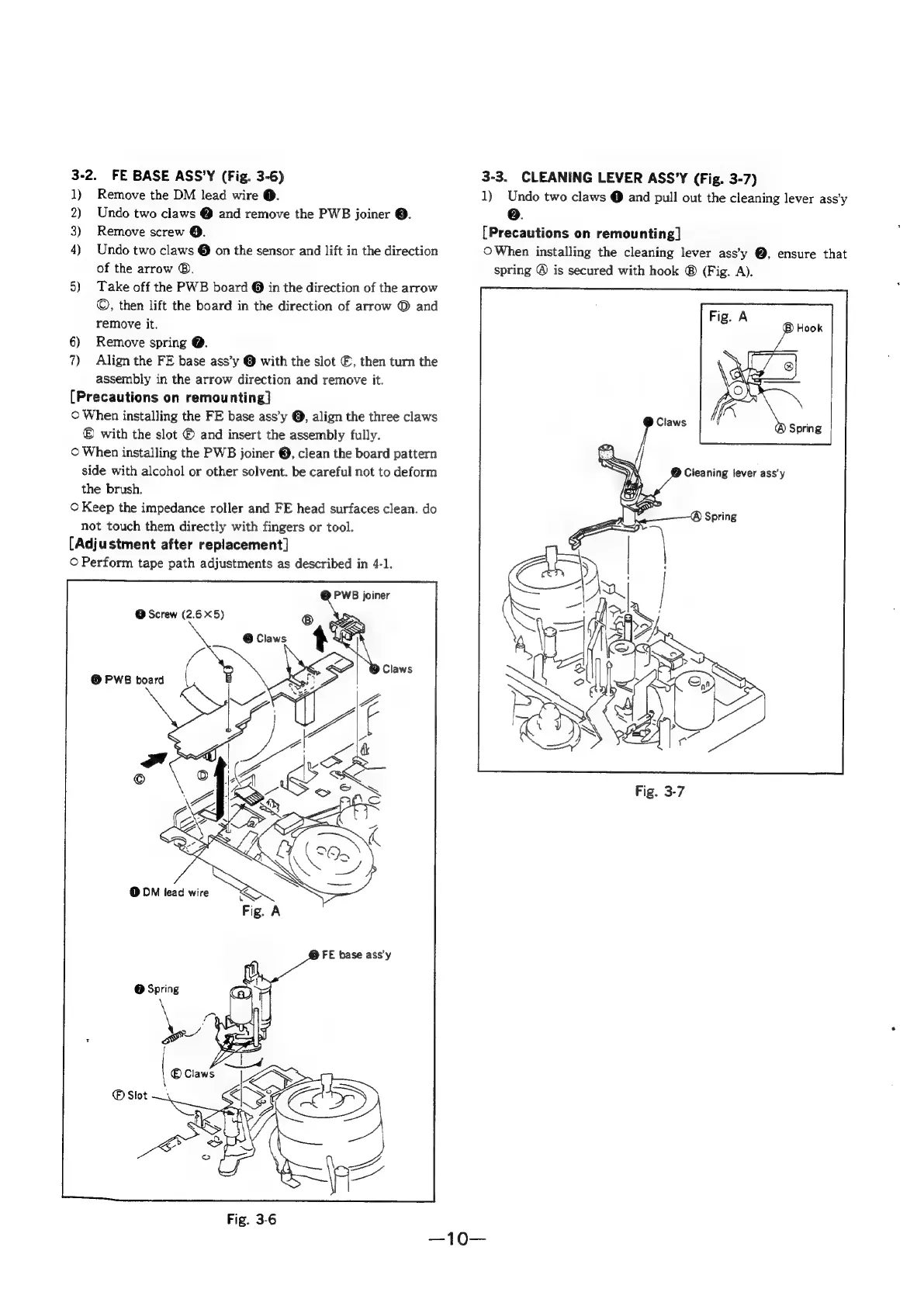
3-2.
FE
BASE
ASS'Y
(Fig.
3-6)
1)
Remove
the
DM
lead
wire
@.
2)
Undo
two
claws
@
and
remove
the
PWB
joiner
©.
3)
Remove
screw
@.
4)
Undo
two
claws
@
on
the
sensor
and
lift
in
the
direction
of
the
arrow
®.
5)
Take
off
the
PWB
board
@
in
the
direction
of
the
arrow
©,
then
lift
the
board
in
the
direction
of
arrow
®
and
remove
it.
6)
Remove
spring
@.
7)
Align
the
FE
base
ass’y
@
with
the
slot
©,
then
turn
the
assembly
in
the
arrow
direction
and
remove
it.
[Precautions
on
remounting]
©
When
installing
the
FE
base
ass’y
@,
align
the
three
claws
©
with
the
slot
©
and
insert
the
assembly
fully.
©
When
installing
the
PWB
joiner
@,
clean
the
board
pattern
side
with
alcohol
or
other
solvent.
be
careful
not
to
deform
the
brush.
©
Keep
the
impedance
roller
and
FE
head
surfaces
clean.
do
not
touch
them
directly
with
fingers
or
tool.
[Adjustment
after
replacement]
©
Perform
tape
path
adjustments
as
described
in
4-1.
PWB
joiner
@
Screw
(2.65)
@
PWB
board
(
)
FE
base
ass'y
Fig.
3-6
3-3.
CLEANING
LEVER
ASS’Y
(Fig.
3-7)
1)
Undo
two
claws
@
and
pull
out
the
cleaning
lever
ass’y
oe.
[Precautions
on
remounting]
O
When
installing
the
cleaning
lever
ass’y
@,
ensure
that
spring
@
is
secured
with
hook
®
(Fig.
A).

Table of Contents

Related product manuals