EasyManua.ls Logo

Sony SLV-286EE - Adjusting the Picture; Adjusting the Tracking

Sony SLV-286EE
112 pages
Print Icon
To Next Page IconTo Next Page
To Previous Page IconTo Previous Page
Loading...
Adjusting
the
picture
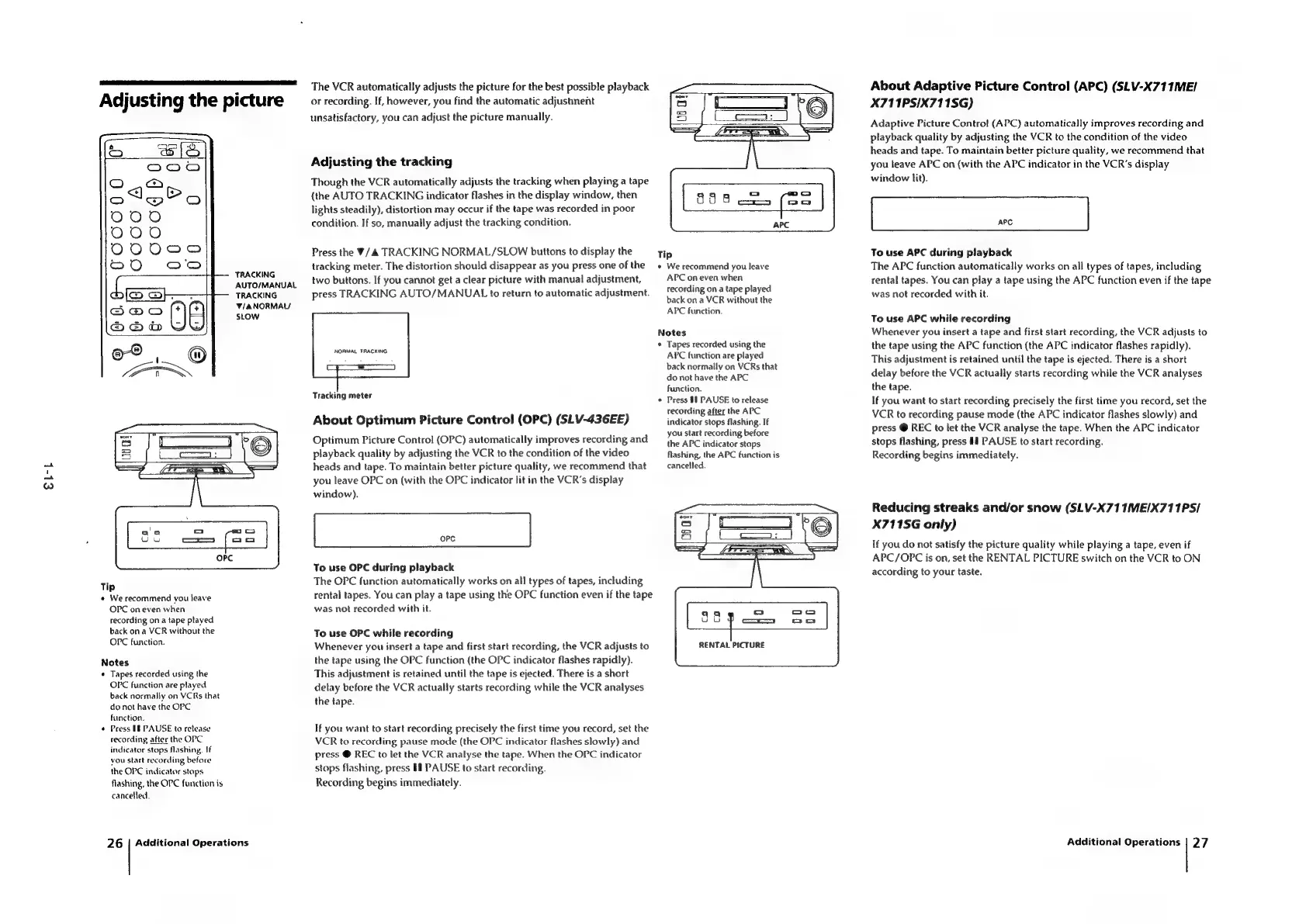
TRACKING
AUTO/MANUAL
TRACKING
V/ANORMAU
SLOW
EL-k
Tip
¢
We
recommend
you
leave
OPC
on
even
when
recording
on
a
tape
played
back
on
a
VCR
without
the
OPC
function.
Notes
¢
Tapes
recorded
using
the
OPC
function
are
played
back
normally
on
VCRs
that
do
not
have
the
OPC
function.
*
Press
18
PAUSE
to
retease
recording
after
the
OPC
indicator
stops
flashing.
If
you
start
recording
before
the
OPC
indicator
stops
flashing,
the
OPC
function
is
cancelled.
26
|
Additional
Operations
The
VCR
automatically
adjusts
the
picture
for
the
best
possible
playback
or
recording.
If,
however,
you
find
the
automatic
adjustment
unsatisfactory,
you
can
adjust
the
picture
manually.
Adjusting
the
tracking
Though
the
VCR
automatically
adjusts
the
tracking
when
playing
a
tape
{the
AUTO
TRACKING
indicator
flashes
in
the
display
window,
then
lights
steadily),
distortion
may
occur
if
the
tape
was
recorded
in
poor
condition.
If
so,
manually
adjust
the
tracking
condition.
Press
the
W/&
TRACKING
NORMAL/SLOW
buttons
to
display
the
tracking
meter.
The
distortion
should
disappear
as
you
press
one
of
the
two
buttons.
If
you
cannot
get
a
clear
picture
with
manual
adjustment,
press
TRACKING
AUTO/MANUAL
to
return
to
automatic
adjustment.
NORMAL
TRACKING
Tracking
meter
About
Optimum
Picture
Control
(OPC)
(SLV-436EE)
Optimum
Picture
Control
(OPC)
automatically
improves
recording
and
playback
quality
by
adjusting
the
VCR
to
the
condition
of
the
video
heads
and
tape.
To
maintain
better
picture
quality,
we
recommend
that
you
leave
OPC
on
(with
the
OPC
indicator
tit
in
the
VCR's
display
window).
oPpc
To
use
OPC
during
playback
The
OPC
function
automatically
works
on
all
types
of
tapes,
including
rental
tapes.
You
can
play
a
tape
using
the
OPC
function
even
if
the
tape
was
not
recorded
with
it.
To
use
OPC
while
recording
Whenever
you
insert
a
tape
and
first
start
recording,
the
VCR
adjusts
to
the
tape
using
the
OPC
function
(the
OPC
indicator
flashes
rapidly).
This
adjustment
is
retained
until
the
tape
is
ejected.
There
is
a
short
delay
before
the
VCR
actually
starts
recording
while
the
VCR
analyses
the
tape.
If
you
want
to
start
recording
precisely
the
first
time
you
record,
set
the
VCR
to
recording
pause
mode
(the
OPC
indicator
flashes
slowly)
and
press
@
REC
to
let
the
VCR
analyse
the
tape.
When
the
OPC
indicator
stops
flashing,
press
If
PAUSE
to
start
recording.
Recording
begins
immediately.
Tip
¢
We
recommend
you
leave
APC
on
even
when
recording
ona
tape
played
back
ona
VCR
without
the
APC
function.
Notes
*
Tapes
recorded
using
the
APC
function
are
played
back
normally
on
VCRs
that
do
not
have
the
APC
function.
«
Press
§1
PAUSE
to
release
recording
after
the
APC
indicator
stops
flashing.
If
you
start
recording
before
the
APC
indicator
stops
flashing,
the
APC
function
is
cancelled.
RENTAL
PICTURE
About
Adaptive
Picture
Control
(APC)
(SLV-X711ME/
X711PS/X711SG)
Adaptive
Picture
Control
(APC)
automatically
improves
recording
and
playback
quality
by
adjusting
the
VCR
to
the
condition
of
the
video
heads
and
tape.
To
maintain
better
picture
quality,
we
recommend
that
you
leave
APC
on
(with
the
APC
indicator
in
the
VCR’s
display
window
lit).
To
use
APC
during
playback
The
APC
function
automatically
works
on
all
types
of
tapes,
including
rental
tapes.
You
can
play
a
tape
using
the
APC
function
even
if
the
tape
was
not
recorded
with
it.
To
use
APC
while
recording
Whenever
you
insert
a
tape
and
first
start
recording,
the
VCR
adjusts
to
the
tape
using
the
APC
function
(the
APC
indicator
flashes
rapidly).
This
adjustment
is
retained
until
the
tape
is
ejected.
There
is
a
short
delay
before
the
VCR
actually
starts
recording
while
the
VCR
analyses
the
tape.
If
you
want
to
start
recording
precisely
the
first
time
you
record,
set
the
VCR
to
recording
pause
mode
(the
APC
indicator
flashes
slowly)
and
press
@
REC
to
let
the
VCR
analyse
the
tape.
When
the
APC
indicator
stops
flashing,
press
PAUSE
to
start
recording.
Recording
begins
immediately.
Reducing
streaks
and/or
snow
(SLV-X71
1ME/X711PS/
X711SG
only)
If
you
do
not
satisfy
the
picture
quality
while
playing
a
tape,
even
if
APC/OPC
is
on,
set
the
RENTAL
PICTURE
switch
on
the
VCR
to
ON
according
to
your
taste.
Additional
Operations
|
27

Table of Contents

Related product manuals