EasyManua.ls Logo

Sony SLV-286EE - Page 19

Sony SLV-286EE
112 pages
Print Icon
To Next Page IconTo Next Page
To Previous Page IconTo Previous Page
Loading...
A3vbtk
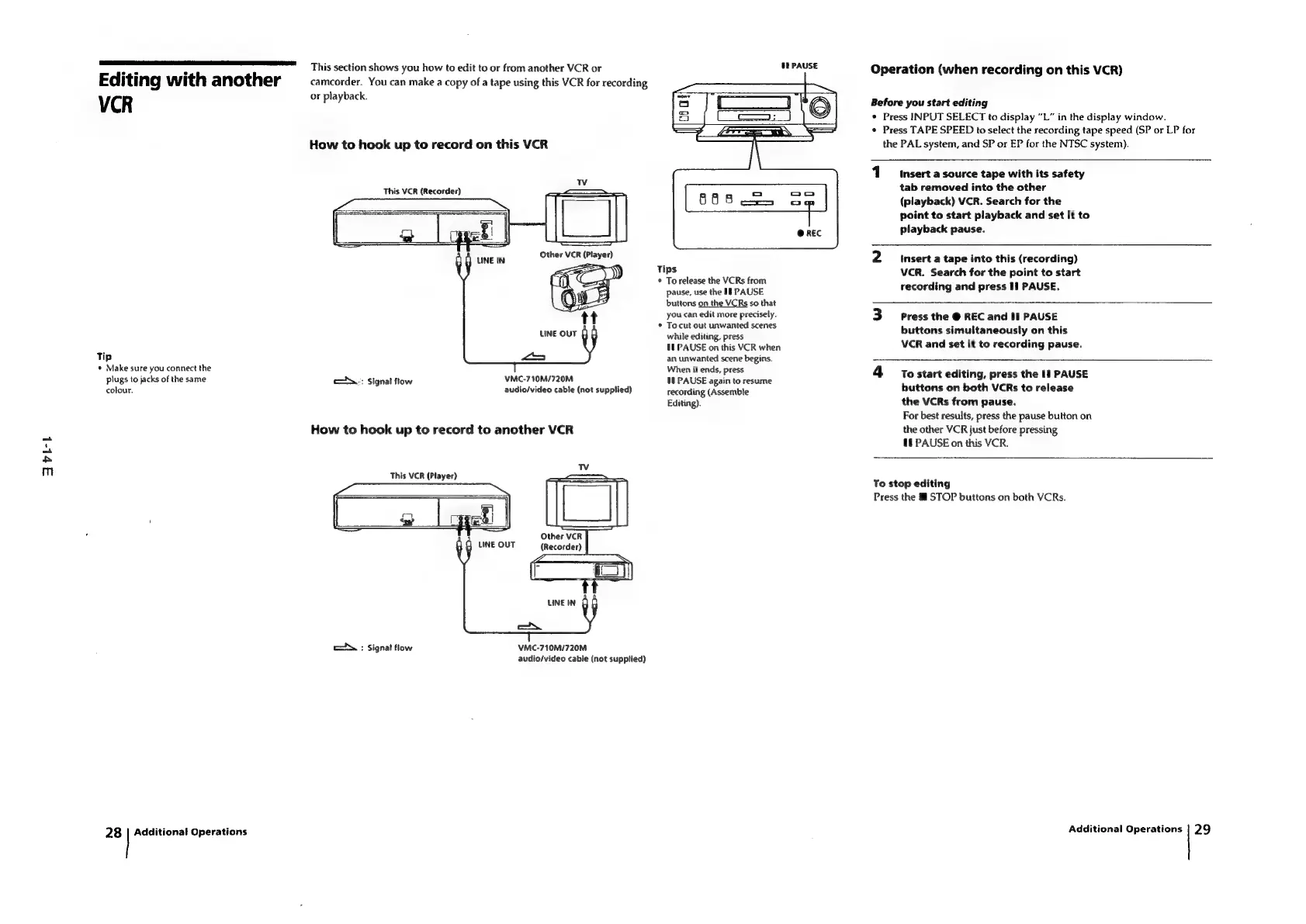
This
section
shows
you
how
to
edit
to
or
from
another
VCR
or
Editing
with
another
VCR
or
playback.
How
to
hook
up
to
record
on
this
VCR
This
VCR
(Recorder)
LINE
IN
Other
VCR
(Player)
LINE
OUT
Tip
«
Make
sure
you
connect
the
plugs
to
jacks
of
the
same
a
VMC-710M/720M
colour.
audio/video
cable
(not
supplied)
c\
:
Signal
flow
How
to
hook
up
to
record
to
another
VCR
This
VCR
(Player)
Other
VCR
LINE
OUT
(Recorder)
LINE
IN
=.
c.
:
Signal
flow
VMC-710M/720M
audio/video
cable
(not
supplied)
28
|
Additional
Operations
camcorder.
You
can
make
a
copy
of
a
tape
using
this
VCR
for
recording
Tips
To
release
the
VCRs
from
pause,
use
the
If
PAUSE
buttons
on
the
VCRs
so
that
you
can
edit
more
precisely.
To
cut
out
unwanted
scenes
while
editing,
press
11
PAUSE
on
this
VCR
when
an
unwanted
scene
begins.
When
it
ends,
press
Ut
PAUSE
again
to
resume
recording
(Assemble
Editing).
Operation
(when
recording
on
this
VCR)
Before
you
start
editing
*
Press
INPUT
SELECT
to
display
“L”
in
the
display
window.
¢
Press
TAPE
SPEED
to
select
the
recording
tape
speed
(SP
or
LP
for
the
PAL
system,
and
SP
or
EP
for
the
NTSC
system).
1
Insert
a
source
tape
with
its
safety
tab
removed
into
the
other
(playback)
VCR.
Search
for
the
point
to
start
playback
and
set
it
to
playback
pause.
2
Insert
a
tape
into
this
(recording)
VCR.
Search
for
the
point
to
start
recording
and
press
Il
PAUSE.
3
Press
the
@
REC
and
II
PAUSE
buttons
simultaneously
on
this
VCR
and
set
it
to
recording
pause.
4
tostart
editing,
press
the
If
PAUSE
buttons
on
both
VCRs
to
release
the
VCRs
from
pause.
For
best
results,
press
the
pause
button
on
the
other
VCR
just
before
pressing
tl
PAUSE
on
this
VCR.
To
stop
editing
Press
the
@
STOP
buttons
on
both
VCRs.
Additional
Operations
|
29

Table of Contents

Related product manuals