EasyManua.ls Logo

Sony SLV-286EE - Adjustment; ACE Head Tilt Adjustment

Sony SLV-286EE
112 pages
Print Icon
To Next Page IconTo Next Page
To Previous Page IconTo Previous Page
Loading...
4-1-7.
Roller
Post
(L,R)
Height
Adjustment
(Fig.
4-6)
Measuring
HiFi
alignment
tape
(HiFi
400Hz)
instrument
Measuring
CH-1:
RF
pin
of
connector
PB
for
RF
Point
board
check
CH-2:
SWP
pin
of
connector
RF
for
RF
‘Adjustment
locations
board
check
[Adjustment
method]
1)
Tracking
(playback):
Turn
off
Auto
Tracking,
and
set
to
the
center
position
(by
pressing
the
tracking
buttons[
V
|
and
[A]
simultaneously).
(When
performing
this
adjustment
after
replacing
the
drum,
place
Tracking
in
the
position
where
the
RF
output
is
at
maximum.)
2)
Fully
tighten
the
height
adjustment
screw
and
slowly
loosen
the
screw
to
adjust
so
that
the
waveform
of
the
RF
output
is
flat.
3)
Tracking
buttons
(playback):
Alternately
press
[
V
]
and
4)
Confirm
that
drops
observed
in
the
RF
output
are
equal
at
its
lead
and
trail.
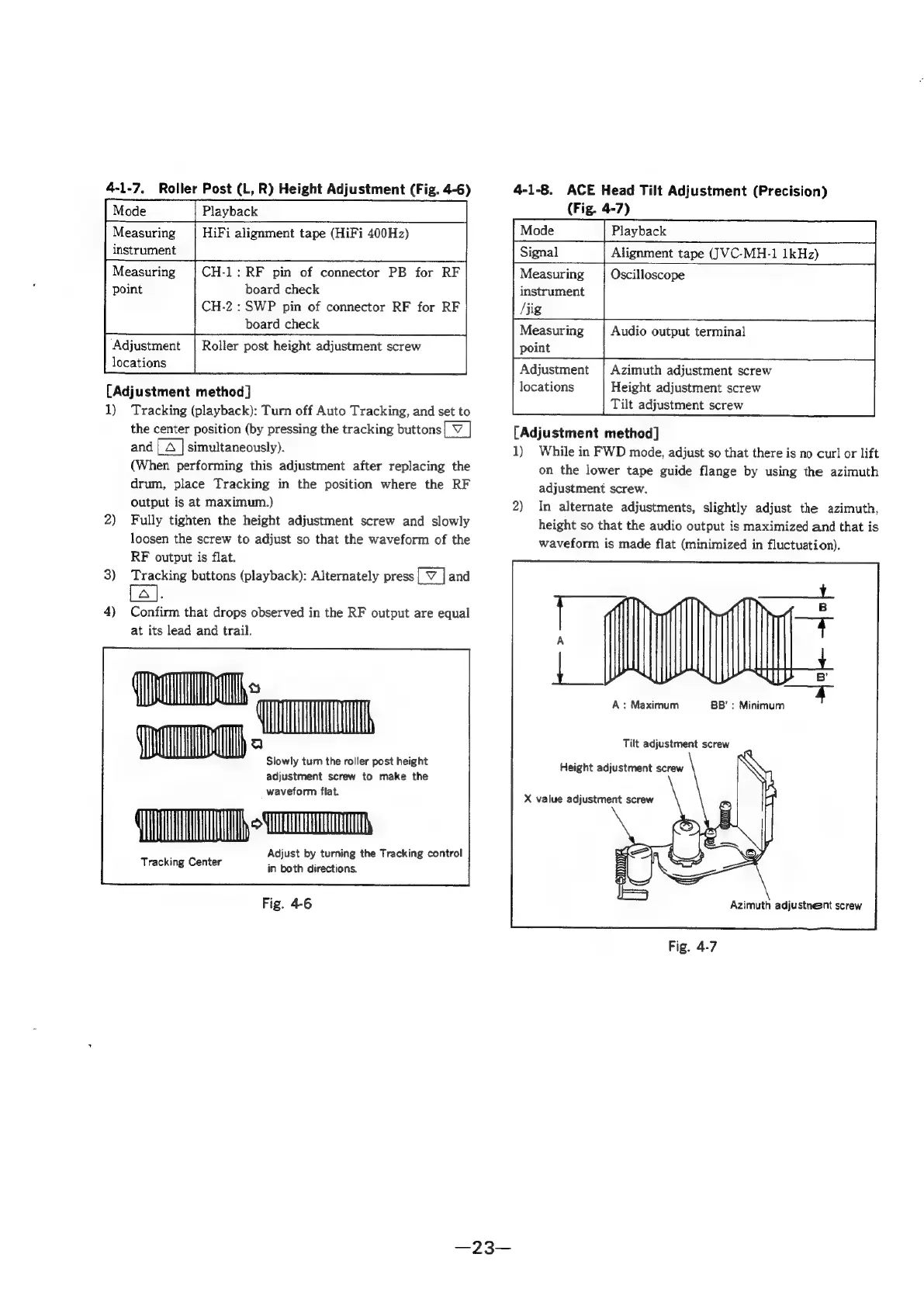
Slowly
tum
the
roller
post
height
adjustment
screw
to
make
the
waveform
flat.
TT}
io,
Adjust
by
turning
the
Tracking
control
‘Teak
ing
Center.
in
both
directions.
Fig.
4-6
4-1-8.
ACE
Head
Tilt
Adjustment
(Precision)
(Fig.
4-7)
Plavback
Alignment
tape
(JVC-MH-1
1kHz)
Measuring
Oscilloscope
instrument
/jig
Measuring
Audio
output
terminal
point
Adjustment
|
Azimuth
adjustment
screw
locations
Height
adjustment
screw
Tilt
adjustment
screw
[Adjustment
method]
1)
While
in
FWD
mode,
adjust
so
that
there
is
no
curl
or
lift
on
the
lower
tape
guide
flange
by
using
the
azimuth
adjustment
screw.
2)
In
alternate
adjustments,
slightly
adjust
the
azimuth,
height
so
that the
audio
output
is
maximized
and
that
is
waveform
is
made
flat
(minimized
in
fluctuation).
HY
BB’:
Minimum
Tilt
adjustment
screw
Height
adjustment
screw
X
value
adjustment
screw
Azimuth
adjustneent
screw
Fig.
4-7

Table of Contents

Related product manuals