EasyManua.ls Logo

Sony SLV-286EE - VCO Adjustment; Secam; Audio System Adjustments Crrtssrrst; Normal Audio System Adjustment

Sony SLV-286EE
112 pages
Print Icon
To Next Page IconTo Next Page
To Previous Page IconTo Previous Page
Loading...
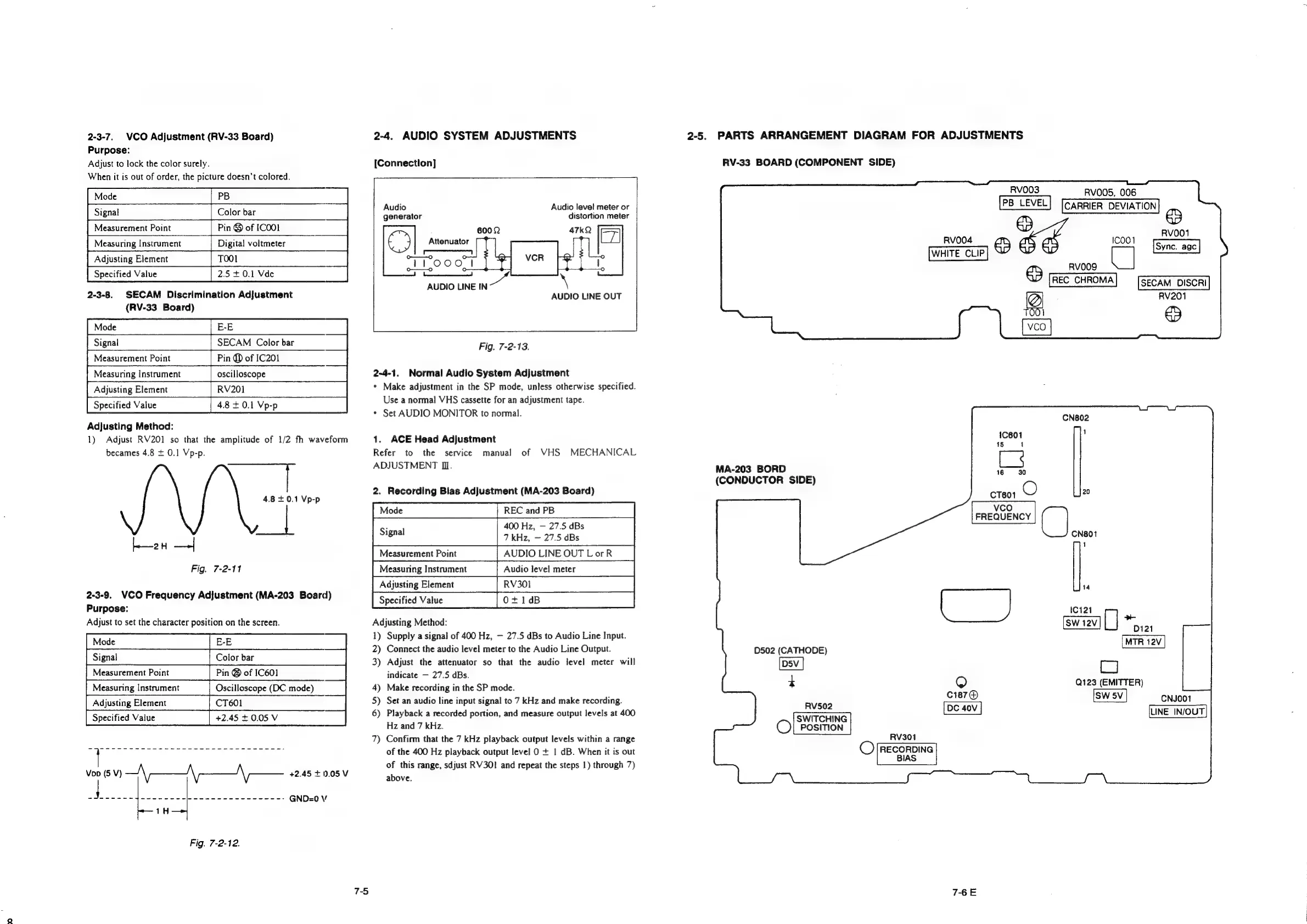
2-3-7.
VCO
Adjustment
(RV-33
Board)
Purpose:
Adjust
to
lock
the
color
surely.
When
it
is
out
of
order,
the
picture
doesn’t
colored.
Fin
of
(COO
Adjusting
Element
TOO1
Specified
Value
2.5
+0.1
Vde
2-3-8.
SECAM
Discrimination
Adjustment
(RV-33
Board)
Adjusting
Method:
1)
Adjust
RV201
so
that
the
amplitude
of
1/2
fh
waveform
becames
4.8
+
0.1
Vp-p.
2
—+|
Fig.
7-2-11
SECAM
Color
bar
Pin
QD
of
IC201
oscilloscope
2-3-9.
VCO
Frequency
Adjustment
(MA-203
Board)
Purpose:
Adjust
to
set
the
character
position
on
the
screen.
Color
bar
Pin
@
of
IC601
Oscilloscope
(DC
mode)
+2.45
+
0.05
V
Vop
(5
V)
—\—_\|-__\\-—-
+2.45
+
0.05V
Mowe
ane
ee
eeed
ie
ceeee
wees:
GND=0
V
1H
Fig.
7-2-12.
75
2-4.
AUDIO
SYSTEM
ADJUSTMENTS
[Connection]
Audio
Audio
level
meter
or
generator
distortion
meter
|
|
oo——-oO
AUDIO
LINE
IN
AUDIO
LINE
OUT
Fig.
7-2-13.
2-4-1.
Normal
Audio
System
Adjustment
*
Make
adjustment
in
the
SP
mode,
unless
otherwise
specified.
Use
a
normal
VHS
cassette
for
an
adjustment
tape.
*
Set
AUDIO
MONITOR
to
normal.
1.
ACE
Head
Adjustment
Refer
to
the
service
manual
ADJUSTMENT
II.
of
VHS
MECHANICAL
2.
Recording
Bias
Adjustment
(MA-203
Board)
REC
and
PB
400
Hz,
27.5
dBs
7
kHz,
27.5
dBs
AUDIO
LINE
OUT
LorR
Audio
level
meter
RV301
O+1dB
Measurement
Point
Measuring
Instrument
Adjusting
Element
Specified
Value
Adjusting
Method:
1)
Supply
a
signal
of
400
Hz,
27.5
dBs
to
Audio
Line
Input.
2)
Connect
the
audio
level
meter
to
the
Audio
Line
Output.
3)
Adjust
the
attenuator
so
that
the
audio
level
meter
will
indicate
27.5 dBs.
4)
Make
recording
in
the
SP
mode.
5)
Set
an
audio
line
input
signal
to
7
kHz
and
make
recording.
6)
Playback
a
recorded
portion,
and
measure
output
levels
at
400
Hz
and
7
kHz.
7)
Confirm
that
the
7
kHz
playback
output
levels
within
a
range
of
the
400
Hz
playback
output
level
O
+
1
dB.
When
it
is
out
of
this
range,
sdjust
RV301
and
repeat
the
steps
|)
through
7)
above.
2-5.
PARTS
ARRANGEMENT
DIAGRAM
FOR
ADJUSTMENTS
RV-33
BOARD
(COMPONENT
SIDE)
MA-203
BORD
(CONDUCTOR
SIDE)
D502
(CATHODE)
D5V
t
RV502
SWITCHING
©)
Position
RV301
©)
[RECORDING
BIAS
RVO003
oe
©
ste)
VCO
RV004
15
1
=
16
30
CT601
O
vco
FREQUENCY
(|
RVOOS,
006
ICOO1
wooo
_\
|
REC
CHROMA
20
CN801
1
@
RV001
SECAM
DISCRI|
DISCRI
RV201
©
LU
fe)
c187@
7-6E
14
C121
on
cj
Q123
(EMITTER)
CNJOO1
LINE
IN/OUT

Table of Contents

Related product manuals