EasyManua.ls Logo

Sony SLV-286EE - Additional Operations

Sony SLV-286EE
112 pages
Print Icon
To Next Page IconTo Next Page
To Previous Page IconTo Previous Page
Loading...
SP
a
ER
Checking/changing/cancelling
timer
settings
(continued)
Case
1
Programme
1
(listed
first)
10:00
10:50
Programme
2
Oe
(listed
next)
Will
be
cleared
11:30
Case
2
20
seconds
will
not
be
Programme
1
recorded
10:00
10:50
Programme
2
11:40
Case
3
Will
be
cut
off
Programme
1
ee:
10:00
:
14.30
Programme
2
¢
10:40
11:45
Sobek
24
Basic
Operations
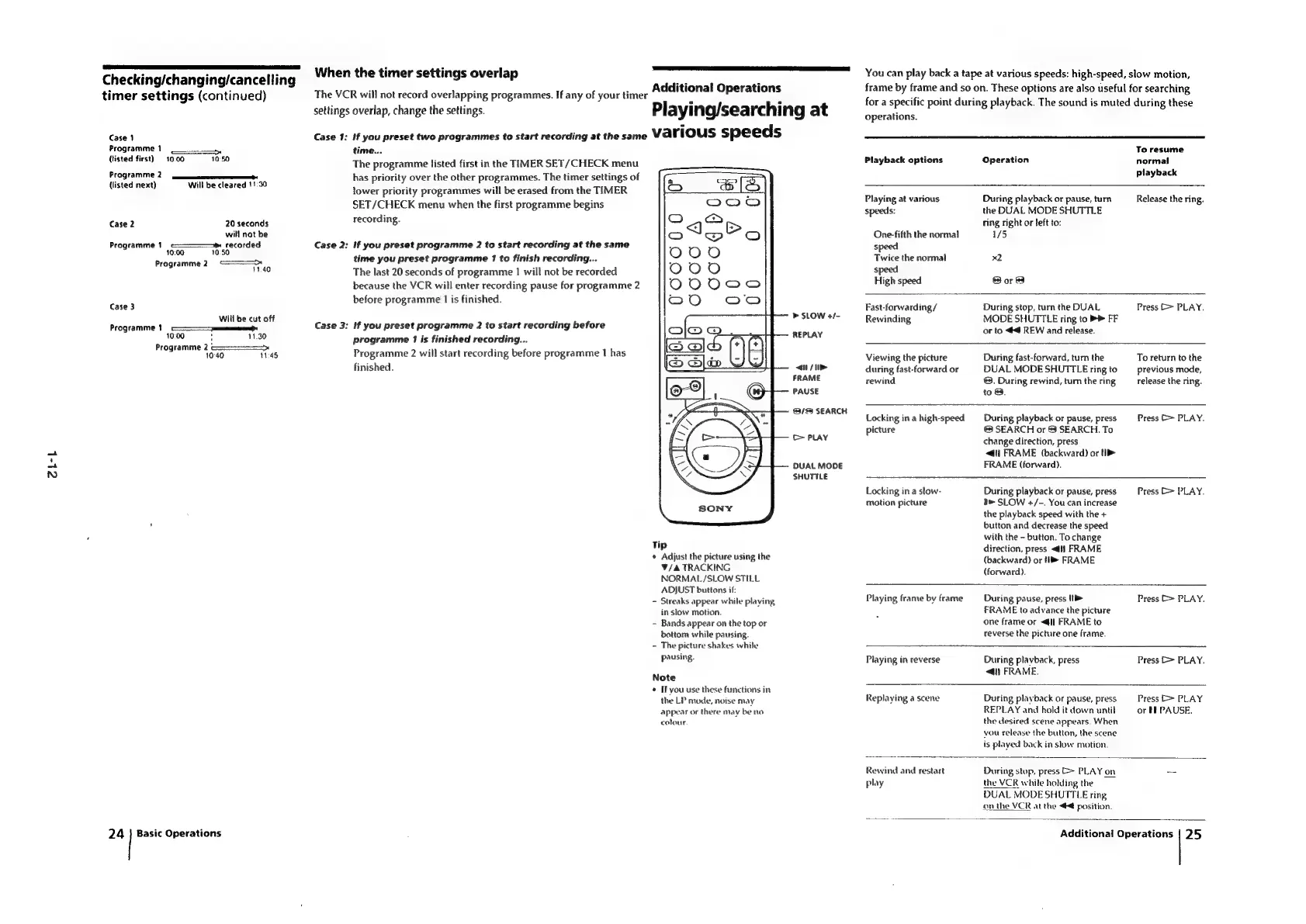
When
the
timer
settings
overlap
The
VCR
will
not
record
overlapping
programmes.
If
any
of
your
timer
settings
overlap,
change
the
settings.
Case
1:
Case
2:
Case
3:
Additional
Operations
Playing/searching
at
if
you
preset
two
programmes
to
start
recording
at
the
same
various
speeds
time...
The
programme
listed
first
in
the
TIMER
SET/CHECK
menu
has
priority
over
the
other
programmes.
The
timer
settings
of
lower
priority
programmes
will
be
erased
from
the
TIMER
SET/CHECK
menu
when
the
first
programme
begins
recording.
if
you
preset
programme
2
to
start
recording
at
the
same
time
you
preset
programme
1
to
finish
recording...
The
last
20
seconds
of
programme
1
will
not
be
recorded
because
the
VCR
will
enter
recording
pause
for
programme
2
before
programme
1
is
finished.
>
SLOW
+/-
if
you
preset
programme
2
to
start
recording
before
programme
17
is
finished
recording...
Programme
2
will
start
recording
before
programme
1
has
finished.
REPLAY
</>
FRAME
PAUSE
3/83
SEARCH
>
PLAY
DUAL
MODE
SHUTTLE
Tip
*
Adjust
the
picture
using
the
V/&
TRACKING
NORMAL/SLOW
STILL
ADJUST
buttons
if:
-
Streaks
appear
while
playing,
in
stow
motion.
-
Bands
appear
on
the
top
or
bottom
while
pausing.
-
The
picture
shakes
while
pausing.
Note
¢
If
you
use
these
functions
in
the
LP
mode,
noise
may
appear
or
there
may
be
no
colour.
You
can
play
back
a
tape
at
various
speeds:
high-speed,
slow
motion,
frame
by
frame
and
so
on.
These
options
are
also
useful
for
searching
for
a
specific
point
during
playback.
The
sound
is
muted
during
these
operations.
Playback
options
Operation
To
resume
normal
playback
Playing
at
various
speeds:
One-fifth
the
normal
S|
Twice
the
normal
speed
High
speed
During
playback
or
pause,
turn
the
DUAL
MODE
SHUTTLE
Ting
right
or
left
to:
1/5
x2
Sore
Release
the
ring.
Fast-forwarding
/
Rewinding
During
stop,
turn
the
DUAL
MODE
SHUTTLE
ring
to
>>
FF
or
to
4
REW
and
release.
Press
>
PLAY.
Viewing
the
picture
during
fast-forward
or
rewind
During
fast-forward,
turn
the
DUAL
MODE
SHUTTLE
ring
to
®.
During
rewind,
tum
the
ring
to
3.
To
return
to
the
previous
mode,
release
the
ring.
Locking
in
a
high-speed
picture
Locking
in
a
slow-
motion
picture
During
playback
or
pause,
press
©
SEARCH
or
$3
SEARCH.
To
change
direction,
press
<i)
FRAME
(backward)
or
(>
FRAME
(forward).
During
playback
or
pause,
press
SLOW
+/-.
You
can
increase
the
playback
speed
with
the
+
button
and
decrease
the
speed
with
the
~
button.
To
change
direction,
press
<q]
FRAME
(backward)
or
i
FRAME
(forward).
Press
C
PLAY.
Press
b>
PLAY.
Playing
frame
by
frame
During
pause,
press
1
FRAME
to
advance
the
picture
one
frame
or
<I
FRAME
to
reverse
the
picture
one
frame.
Press
>
PLAY.
Playing
in
reverse
During
playback,
press
<4)
FRAME.
Press
E>
PLAY.
Replaying
a
scene
During
playback
or
pause,
press
REPLAY
and
hold
it
down
until
the
desired
scene
appears.
When
you
release
the
button,
the
scene
is
played
back
in
slow
motion.
Press
[>
PLAY
or
TE
PAUSE.
Rewind
and
restart
play
During
stop,
press
>
PLAY
on
the
VCR
while
holding
the
DUAL
MODE
SHUTTLE
ring
on
the
VER
at
the
¢
position.
Additional
Operations
25

Table of Contents

Related product manuals