EasyManua.ls Logo

Sony SLV-286EE - Page 16

Sony SLV-286EE
112 pages
Print Icon
To Next Page IconTo Next Page
To Previous Page IconTo Previous Page
Loading...
LE-k
Recording
TV
programmes
using
the
timer
(continued)
Daily/weekly
recording
the
current
date
SUN-SAT
MON-SAT
MON-FRt
EVERY
SAT
EVERY
MON
EVERY
SUN
1
month
later
{cycles
backward)
22
|
Basic
Operations
To
use
the
VCR
while
recording.
You
can
do
the
following
tasks
during
timer
recording.
Checking/changing/
cancelling
timer
To
Press
Reset
the
counter
to
“OHOOMO00S”
COUNTER
RESET
settings
Display
tape
information
on
the
TV
DISPLAY
screen
Check
the
timer
settings
MENU
and
select
TIMER
SET/CHECK
TIMER
REC
CLEAR
TIMER
REC
ON/OFF
Watch
another
TV
programme
See
“Watching
a
TV
programme
while
recording
another”
on
page
19.
EXECUTE
Using
the
VCR
before
timer
recording
begins
Press
TIMER
REC
ON/OFF
to
turn
off
the
TIMER
REC
indicator
on
the
VCR,
then
press
POWER.
The
VCR
is
ready
for
use.
CURSOR
MENU
After
using
the
VCR,
press
TIMER
REC
ON/OFF
again
to
turn
on
the
TIMER
REC
indicator
on
the
VCR.
Remember
to
reset
the
VCR
to
stand
by
for
recording
before
the
time
you've
set
the
VCR
to
start
recording,
or
the
timer
setting
will
be
cancelled.
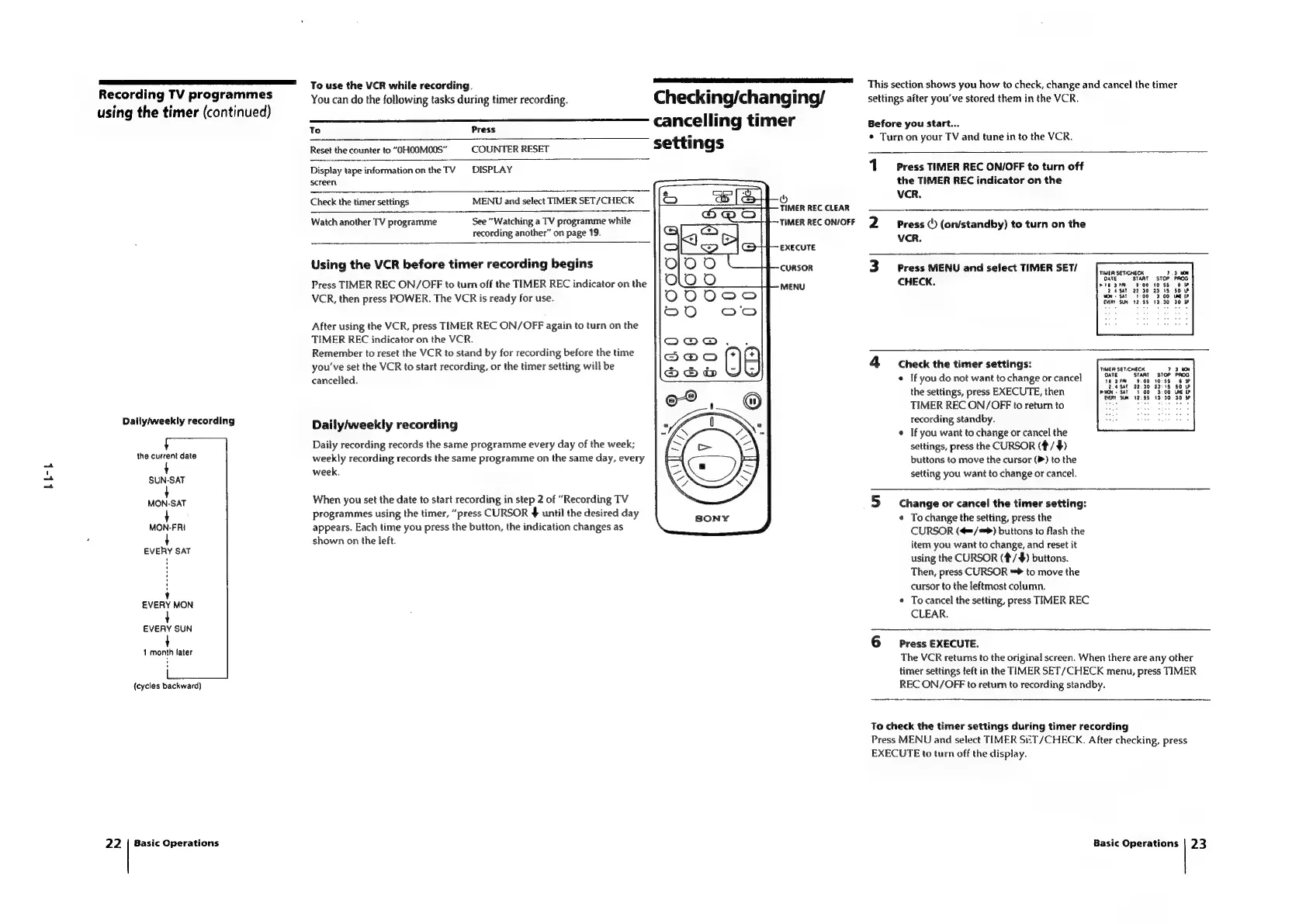
Daily/weekly
recording
Daily
recording
records
the
same
programme
every
day
of
the
week;
weekly
recording
records
the
same
programme
on
the
same
day,
every
week.
When
you
set
the
date
to
start
recording
in
step
2
of
“Recording
TV
programmes
using
the
timer,
“press
CURSOR
$
until
the
desired
day
appears.
Each
time
you
press
the
button,
the
indication
changes
as
shown
on
the
left.
This
section
shows
you
how
to
check,
change
and
cancel
the
timer
settings
after
you've
stored
them
in
the
VCR.
Before
you
start...
*
Turn
on
your
TV
and
tune
in
to
the
VCR.
1
Press
TIMER
REC
ON/OFF
to
turn
off
the
TIMER
REC
indicator
on
the
vcr.
2
Press
©
(on/standby)
to
turn
on
the
vcr.
3
Press
MENU
and
select
TIMER
SET/
CHECK.
4
Check
the
timer
settings:
¢
If
you
do
not
want
to
change
or
cancel
$3.55
the
settings,
press
EXECUTE,
then
wor
SAT
1003.00
Ve
TIMER
REC
ON/OFF
to
return
to
Rey
[ees
ake
He
3
recording
standby.
¢
If
you
want
to
change
or
cancel
the
settings,
press
the
CURSOR
(#/$)
buttons
to
move
the
cursor
()
to
the
setting
you
want
to
change
or
cancel.
TIMER
SET-CHECK
DATE
5
Change
or
cancel
the
timer
setting:
¢
Tochange
the
setting,
press
the
CURSOR
(¢=/*>)
buttons
to
flash
the
item
you
want
to
change,
and
reset
it
using
the
CURSOR
(#/
4)
buttons.
Then,
press
CURSOR
**
to
move
the
cursor
to
the
leftmost
column.
To
cancel
the
setting,
press
TIMER
REC
CLEAR.
6
Press
EXECUTE.
The
VCR
returns
to
the
original
screen.
When
there
are
any
other
timer
settings
left
in
the
TIMER
SET/CHECK
menu,
press
TIMER
REC
ON/OFF
to
retum
to
recording
standby.
To
check
the
timer
settings
during
timer
recording
Press
MENU
and
select
TIMER
Si:
T/CHECK.
After
checking,
press
EXECUTE
to
turn
off
the
display.
Basic
Operations
|
23

Table of Contents

Related product manuals