EasyManua.ls Logo

Sony SLV-286EE - Recording TV Programmes Using the Timer

Sony SLV-286EE
112 pages
Print Icon
To Next Page IconTo Next Page
To Previous Page IconTo Previous Page
Loading...
OL-L
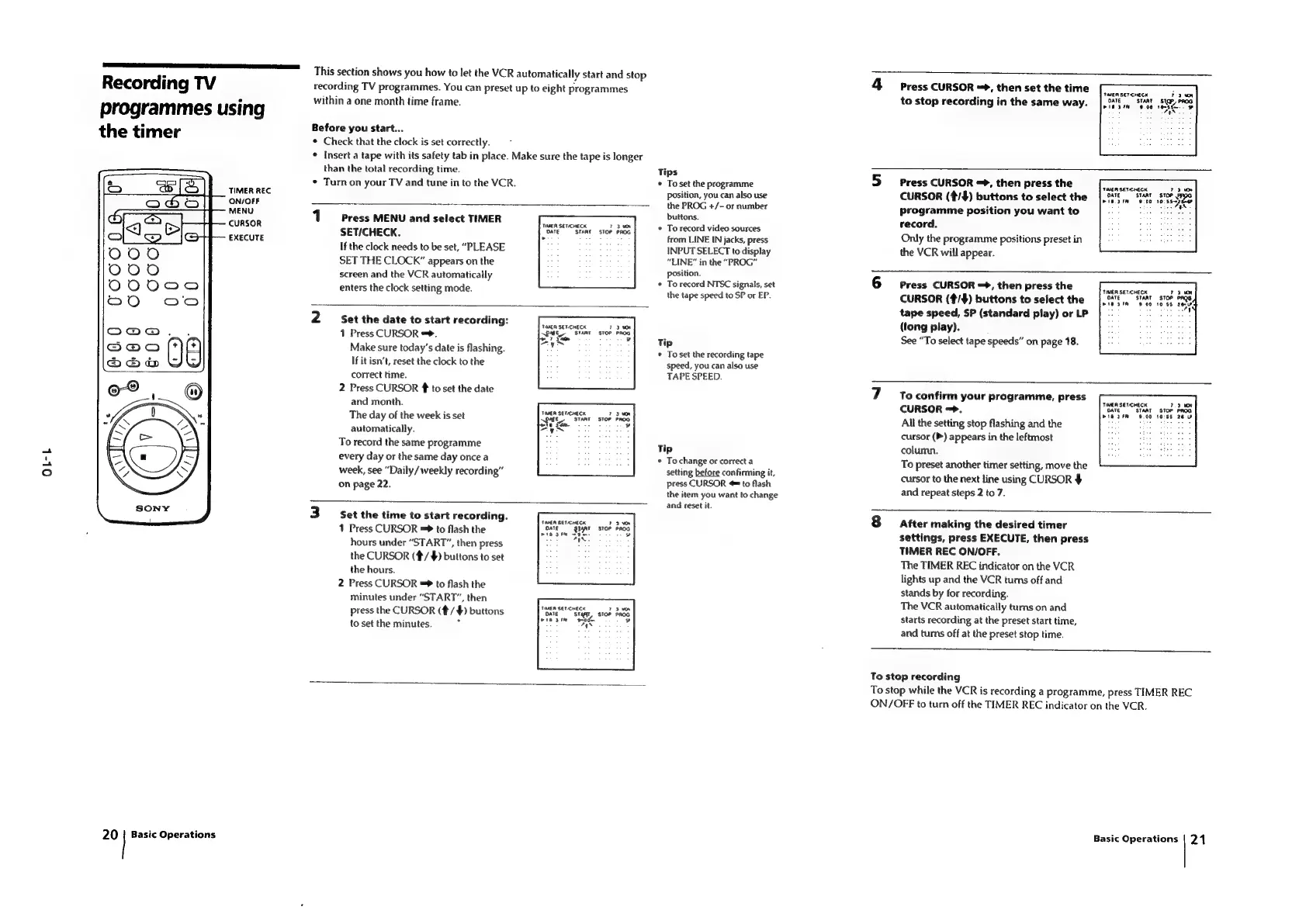
Recording
TV
programmes
using
the
timer
TIMER
REC
ON/OFF
MENU
CURSOR
This
section
shows
you
how
to
let
the
VCR
automatically
start
and
stop
recording
TV
programmes.
You
can
preset
up
to
eight
programmes
within
a
one
month
time
frame.
Before
you
start...
¢
Check
that
the
clock
is
set
correctly.
*
Insert
a
tape
with
its
safety
tab
in
place.
Make
sure
the
tape
is
longer
than
the
total
recording
time.
*
Turn
on
your
TV
and
tune
in
to
the
VCR.
1
Press
MENU
and
select
TIMER
SET/CHECK.
enters
the
clock
setting
mode.
TIMER
SETCHECK
ari
START
2
Set
the
date
to
start
recording:
1
Press
CURSOR
=.
Make
sure
today’s
date
is
flashing.
If
it
isn’t,
reset
the
clock
to
the
TIMER
SET.CHECK
Tips
To
set
the
programme
position,
you
can
also
use
the
PROG
+/-
or
number
buttons.
To
record
video
sources
To
record
NTSC
signals,
set
the
tape
speed
to
SP
or
EP.
Tip
To
set
the
recording
tape
speed,
you
can
also
use
Press
CURSOR
=,
then
set
the
time
to
stop
recording
in
the
same
way.
TIMER
SETCHECK
ATE
STAR
mle
sre
Press
CURSOR
=,
then
press
the
CURSOR
(¢/$#)
buttons
to
select
the
programme
position
you
want
to
record.
TIMER
SETICHECK
DATE
EXECUTE
>
from
LINE
IN
jacks,
press
Only
the
programme
positions
preset
in
If
the
clock
needs
to
be
set,
“PLEASE
INPUT
SELECT
to
display
the
VCR
will
appear.
SET
THE
CLOCK”
appears
on
the
“LINE”
in
the
“PROG”
screen
and
the
VCR
automatically
Position.
Press
CURSOR
=>,
then
press
the
CURSOR
(¢/#)
buttons
to
select
the
tape
speed,
SP
(standard
play)
or
LP
(tong
play).
See
“To
select
tape
speeds”
on
page
18.
TIMER
SET-CHECK
OATE
START
pies
9
00
correct
time.
TAPE
SPEED.
2
Press
CURSOR
to
set
the
date
To
confirm
your
programme,
press
and
month.
CURSOR
=>.
TIMER
SETCHECK
The
day
of
the
week
is
set
vOME
stan
All
the
setting
stop
flashing
and
the
mete
tae
automatically.
cursor
(P)
appears
in
the
leftmost
To
record
the
same
programme
Tip
column:
every
day
or
the
same
day
once
a
week,
see
“Daily
/weekly
recording”
on
page
22.
3
Set
the
time
to
start
recording.
1
Press
CURSOR
=
to
flash
the
hours
under
“START”,
then
press
the
CURSOR
(#/
$)
buttons
to
set
the
hours.
Press
CURSOR
=*
to
flash
the
minutes
under
“START”,
then
press
the
CURSOR
(#/
$)
buttons
to
set
the
minutes.
¥
N
TIMER
SETCHECK
DATE
ar
mis
fe
soe.
aN.
tea
ser-cnecn
DAI
st
‘st
vie
sim
ate
:
ae
.
To
change
or
correct
a
setting
before
confirming
it,
press
CURSOR
=
to
flash
the
item
you
want
to
change
and
reset
it.
To
preset
another
timer
setting,
move
the
cursor
to
the
next
line
using
CURSOR
$
and
repeat
steps
2
to
7.
After
making
the
desired
timer
settings,
press
EXECUTE,
then
press
TIMER
REC
ON/OFF,
The
TIMER
REC
indicator
on
the
VCR
lights
up
and
the
VCR
turns
off
and
stands
by
for
recording.
The
VCR
automatically
tums
on
and
starts
recording
at
the
preset
start
time,
and
turns
off
at
the
preset
stop
time.
To
stop
recording
To
stop
while
the
VCR
is
recording
a
programme,
press
TIMER
REC
ON/OFF
to
turn
off
the
TIMER
REC
indicator
on
the
VCR.
20
|
Basic
Operations
Basic
Operations
|
21

Table of Contents

Related product manuals