EasyManua.ls Logo

Sony SLV-286EE - Cassette Holder Assy, Frame (L) Cauling and Synchro Gear Assy; Lift Gear (L) Assy; Upper Plate, Rear Angle, Cassette Guide L

Sony SLV-286EE
112 pages
Print Icon
To Next Page IconTo Next Page
To Previous Page IconTo Previous Page
Loading...
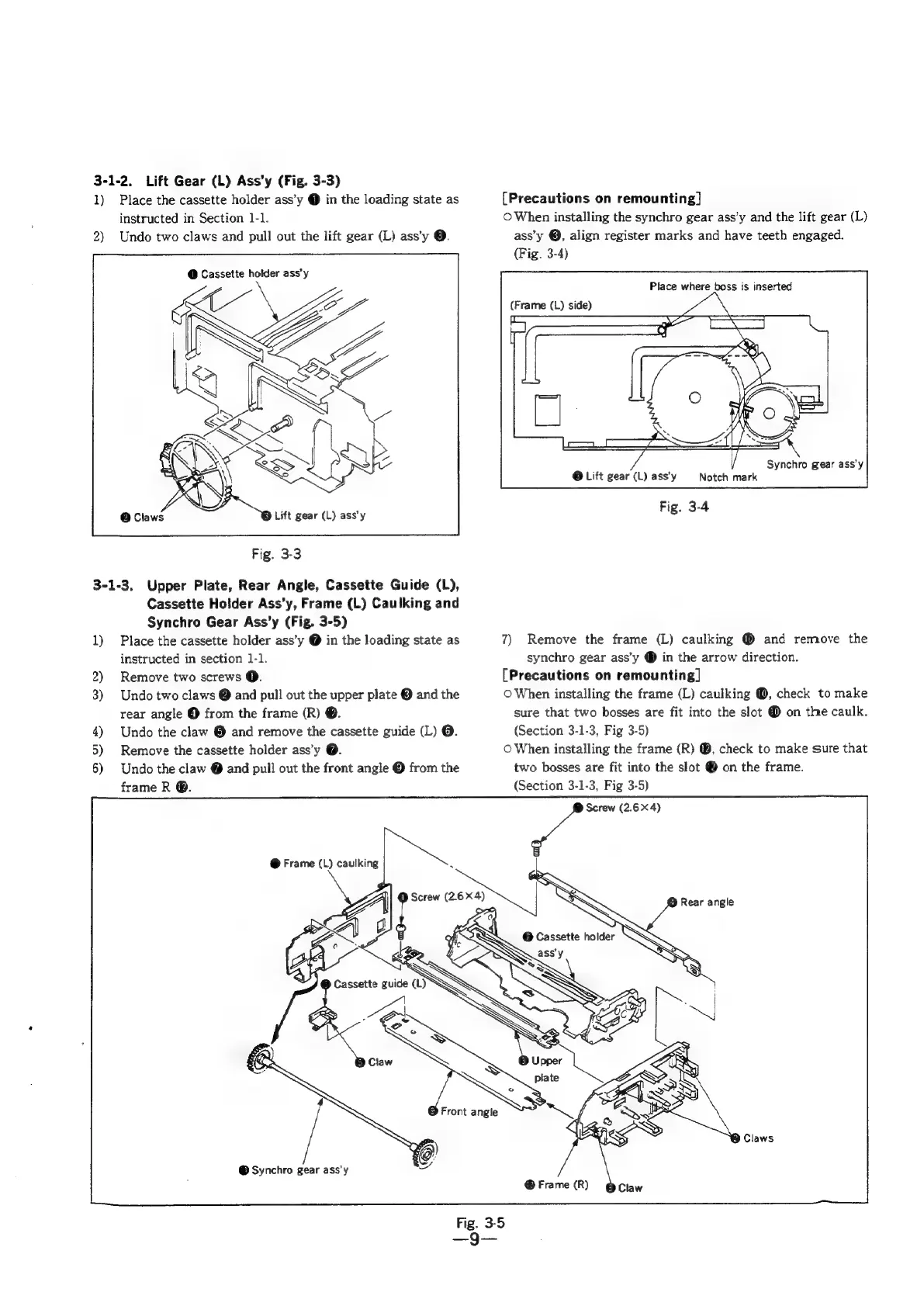
3-1-2.
Lift
Gear
(L)
Ass’y
(Fig.
3-3)
1)
Place
the
cassette
holder
ass’y
@
in
the
loading
state
as
instructed
in
Section
1-1.
2)
Undo
two
claws
and
pull
out
the
lift
gear
(L)
ass’y
@.
@
Cassette
holder
ass'y
Lift
gear
(L)
ass’y
Fig.
3-3
3-1-3.
Upper
Plate,
Rear
Angle,
Cassette
Guide
(L),
Cassette
Holder
Ass’y,
Frame
(L)
Caulking
and
Synchro
Gear
Ass’y
(Fig.
3-5)
1)
Place
the
cassette
holder
ass’y
@
in
the
loading
state
as
instructed
in
section
1-1.
2)
Remove
two
screws
@.
3)
Undo
two
claws
@
and
pull
out
the
upper
plate
@
and
the
rear
angle
@
from
the
frame
(R)
@.
4)
Undo
the
claw
@
and
remove
the
cassette
guide
(L)
@.
5)
Remove
the
cassette
holder
ass’y
@.
6)
Undo
the
claw
@
and
pull
out
the
front
angle
©
from
the
frame
R
@.
@
Synchro
gear
ass'y
[Precautions
on
remounting]
©
When
installing
the
synchro
gear
ass’y
and
the
lift
gear
(L)
ass’y
@,
align
register
marks
and
have
teeth
engaged.
(Fig.
3-4)
Place
where
boss
is
inserted
Synchro
gear
ass'y
@
Lift
gear
(L)
ass’y
Notch
mark
7)
Remove
the
frame
(L)
caulking
@
and
remove
the
synchro
gear
ass’y
®
in
the
arrow
direction.
[Precautions
on
remounting]
O
When
installing
the
frame
(L)
caulking
@,
check
to
make
sure
that
two
bosses
are
fit
into
the
slot
@
on
the
caulk.
(Section
3-1-3,
Fig
3-5)
©
When
installing
the
frame
(R)
@,
check
to
make
sure
that
two
bosses
are
fit
into
the
slot
@
on
the
frame.
(Section
3-1-3,
Fig
3-5)
Screw
(2.64)

Table of Contents

Related product manuals