EasyManua.ls Logo

Sony SLV-286EE - Page 9

Sony SLV-286EE
112 pages
Print Icon
To Next Page IconTo Next Page
To Previous Page IconTo Previous Page
Loading...
vk
E
fe
0d
i
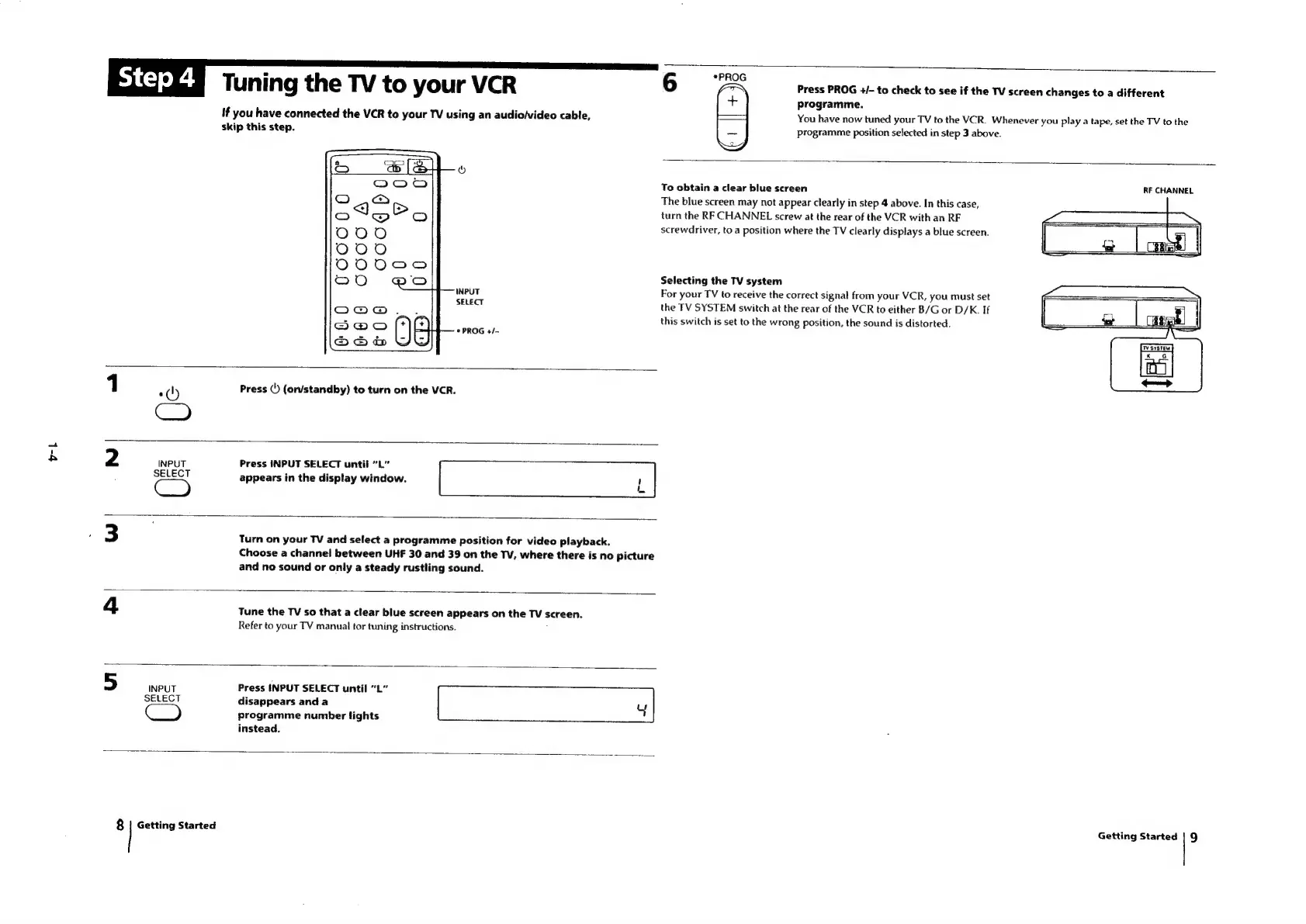
Tuni
ng
the
TV
to
your
VCR
6
wae
Press
PROG
+/-
to
check
to
see
if
the
TV
screen
changes
to
a
different
(+)
programme.
if
you
have
connected
the
VCR
to
your
TV
using
an
audio/video
cable,
-——4
You
have
now
tuned
your
TV
to
the
VCR.
Whenever
you
play
a
tape,
set
the
TV
to
the
skip
this
step.
=]
programme
position
selected
in
step
3
above.
To
obtain
a
clear
blue
screen
RF
CHANNEL
The
blue
screen
may
not
appear
clearly
in
step
4
above.
In
this
case,
turn
the
RF
CHANNEL
screw
at
the
rear
of
the
VCR
with
an
RF
screwdriver,
to
a
position
where
the
TV
clearly
displays
a
blue
screen.
Selecting
the
TV
system
INPUT
For
your
TV
to
receive
the
correct
signal
from
your
VCR,
you
must
set
SELECT
the
TV
SYSTEM
switch
at
the
rear
of
the
VCR
to
either
B/G
or
D/K.
If
this
switch
is
set
to
the
wrong
position,
the
sound
is
distorted.
©
PROG
+/-
1
Press
(')
(on/standby)
to
turn
on
the
VCR.
0)
CO
INPUT
Press
INPUT
SELECT
until
“L”
CG)
appears
in
the
display
window.
L
Turn
on
your
TV
and
select
a
programme
position
for
video
playback.
Choose
a
channel
between
UHF
30
and
39
on
the
TV,
where
there
is
no
picture
and
no
sound
or
only
a
steady
rustling
sound.
Tune
the
TV
so
that
a
clear
blue
screen
appears
on
the
TV
screen.
Refer
to
your
TV
manual
tor
tuning
instructions.
INPUT
Press
INPUT
SELECT
until
“L”
SELECT
disappears
and
a
u
|
Cc
)
programme
number
lights
instead.
8
Getting
Started
Getting
Started
9

Table of Contents

Related product manuals