EasyManua.ls Logo

Sony SLV-286EE - Page 10

Sony SLV-286EE
112 pages
Print Icon
To Next Page IconTo Next Page
To Previous Page IconTo Previous Page
Loading...
SL
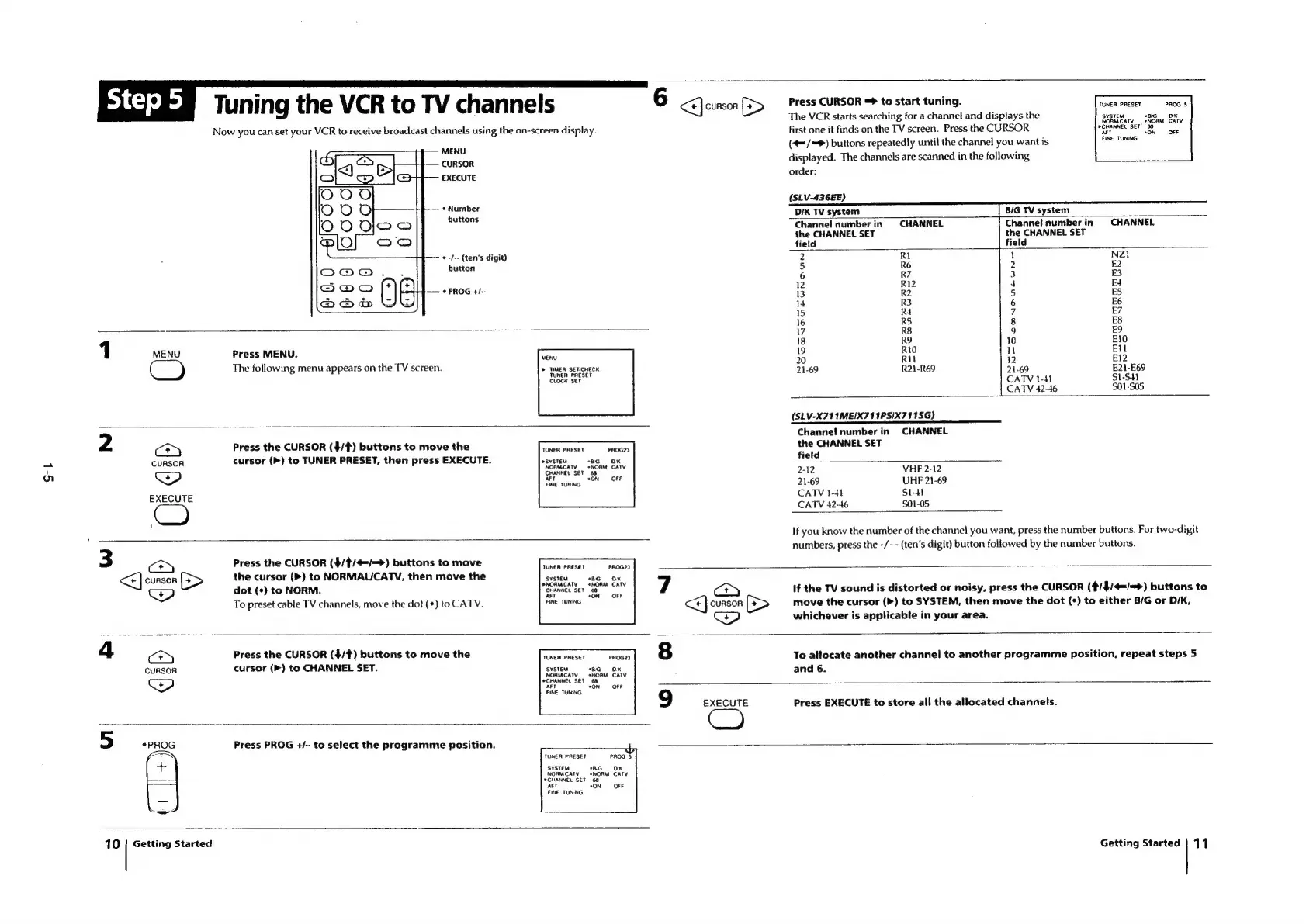
Tuning
the
VCR
to
TV
channels
Now
you
can
set
your
VCR
to
receive
broadcast
channels
using
the
on-screen
display.
MENU
CURSOR
EXECUTE
*
Number
buttons
button
PROG
+/-
«-/--
(ten’s
digit)
Press
MENU.
The
following
menu
appears
on
the
TV
screen.
Press
the
CURSOR
($/#)
buttons
to
move
the
cursor
(>)
to
TUNER
PRESET,
then
press
EXECUTE.
MENU
»
MER
SET-CHECK
TUNER
PRESET
CLOCK
SET
TUNER
PRESET
PROG23
PSYSTEM
“BG
OK
NORMCATV
«NORM
CATV
CHANNEL
SET
68
OFF
FINE
TUNING
Press
the
CURSOR
($/¢/4=/=>)
buttons
to
move
the
cursor
(>)
to
NORMAUCATYV,
then
move
the
<P)
dot
(+)
to
NORM.
To
preset
cable
TV
channels,
move
the
dot
(*)
to
CATV.
TUNER
PRESET
SYSTEM
NORM
CATY
CHANNEL
SET
ar
FINE
TUNING
6
<<]
CURSOR
(>
Press
CURSOR
=
to
start
tuning.
TUNER
FAESEY
The
VCR
starts
searching
for
a
channel
and
displays
the
srerem
first
one
it
finds
on
the
TV
screen.
Press
the
CURSOR
(4=/=>)
buttons
repeatedly
until
the
channel
you
want
is
displayed.
The
channels
are
scanned
in
the
following
order:
NORM
»CHANNEL
SET
AFT
*
FINE
TUNING
(SLV-436EE)
DiK
TV
system
B/G
TV
system
Channel
number
in
CHANNEL
Channet
number
in
CHANNEL
the
CHANNEL
SET
the
CHANNEL
SET
field field
2
R1
1
NZ1
5
R6
2
E2
6
R7
3
E3
12
R12
4
E4
13
R2
5
ES
14
R3
6
E6
15
R4
7
£7
16
R5 8
E8
17
R8
9
£9
18
RO
10
E10
19
R10
11
Ell
20
Rit
12
E12
21-69
R21-R69
21-69
E21-E69
CATV
1-41
SUL-SH
CATV
42-46
S01-S05
(SLV-X711MEIX711PSIX711SG)
Channel!
number
in
CHANNEL
the
CHANNEL
SET
field
2-12
VHF
2-12
21-69
UHF
21-69
CATV
1-41
S1-41
CATV
42-46
$01-05
If
you
know
the
number
of
the
channel
you
want,
press
the
number
buttons.
For
two-digit
numbers,
press
the
-/-
-
(ten‘s
digit)
button
followed
by
the
number
buttons.
If
the
TV
sound
is
distorted
or
noisy,
press
the
CURSOR
(t/$/4=/=>)
buttons
to
move
the
cursor
(>)
to
SYSTEM,
then
move
the
dot
(¢)
to
either
B/G
or
D/K,
whichever
is
applicable
in
your
area.
Press
the
CURSOR
($/#)
buttons
to
move
the
cuRSOR
cursor
(>)
to
CHANNEL
SET.
TUNER
PRESET
PROGZ3
SYSTEM
"8G
OK
ATV
NORM
CATV
68
NORMC:
CHANNEL
SET
Al
*ON
OFF
FINE
TUNING
Press
PROG
+/-
to
select
the
programme
position.
TUNER
PRESET
‘SYSTEM
FINE
TUNNG
10
Getting
Started
To
allocate
another
channel
to
another
programme
position,
repeat
steps
5
and
6.
9
EXECUTE
Press
EXECUTE
to
store
ali
the
allocated
channels.
Getting
Started
|
11

Table of Contents

Related product manuals