EasyManua.ls Logo

Sony SLV-286EE - Page 11

Sony SLV-286EE
112 pages
Print Icon
To Next Page IconTo Next Page
To Previous Page IconTo Previous Page
Loading...
o-4
Ste,
06
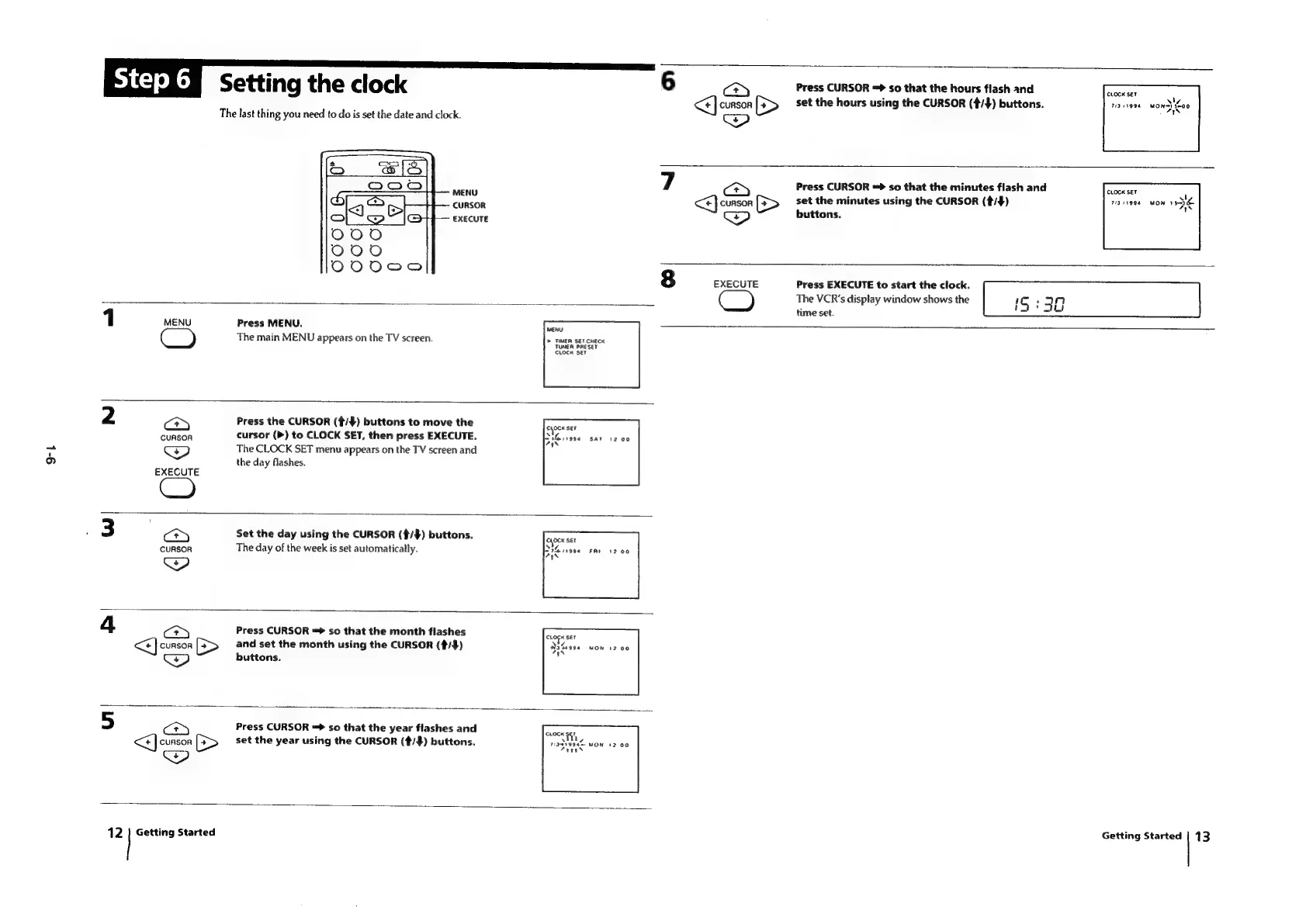
Setting
the
clock
6
a
Press
CURSOR
=>
so
that
the
hours
flash
and
clocx
set
<<]
CURSOR
[>
set
the
hours
using
the
CURSOR
(4/$)
buttons.
is
iiss
wow}
Loo
The
last
thing
you
need
to
do
is
set
the
date
and
clock.
MENG
7
Press
CURSOR
so
that
the
minutes
flash
and
cackser
COnson
<<)
CURSOR
>
set
the
minutes
using
the
CURSOR
(#/#)
ra
1994
buttons.
EXECUTE
8
EXECUTE
Press
EXECUTE
to
start
the
clock.
x
The
VCR's
display
window
shows
the
IS
:
32
time
set.
1
MENU
Press
MENU.
eal
The
main
MENU
appears
on
the
TV
screen.
>
TIMER
SEF.CHECK
cee
ee
2
a)
Press
the
CURSOR
(¢/$)
buttons
to
move
the
CURSOA
cursor
(P)
to
CLOCK
SET,
then
press
EXECUTE.
CP)
The
CLOCK
SET
menu
appears
on
the
TV
screen
and
the
day
flashes.
EXECUTE
Set
the
day
using
the
CURSOR
(¢/$)
buttons.
CURSOR
The
day
of
the
week
is
set
automatically.
Chock
Set
Th
ir996
AS
4
cy
Press
CURSOR
«>
so
that
the
month
flashes
<]
CURSOR
[=>
and
set
the
month
using
the
CURSOR
(4/#)
buttons.
Press
CURSOR
=>
so
that
the
year
flashes
and
p
CLOCK
SET
cursor
[=>
set
the
year
using
the
CURSOR
(#/#)
buttons.
rapa
Mon
12
|
Getting
Started
Getting
Started
|
13

Table of Contents

Related product manuals