5 Using the unit
206718 rev 9
SOREDEX 39
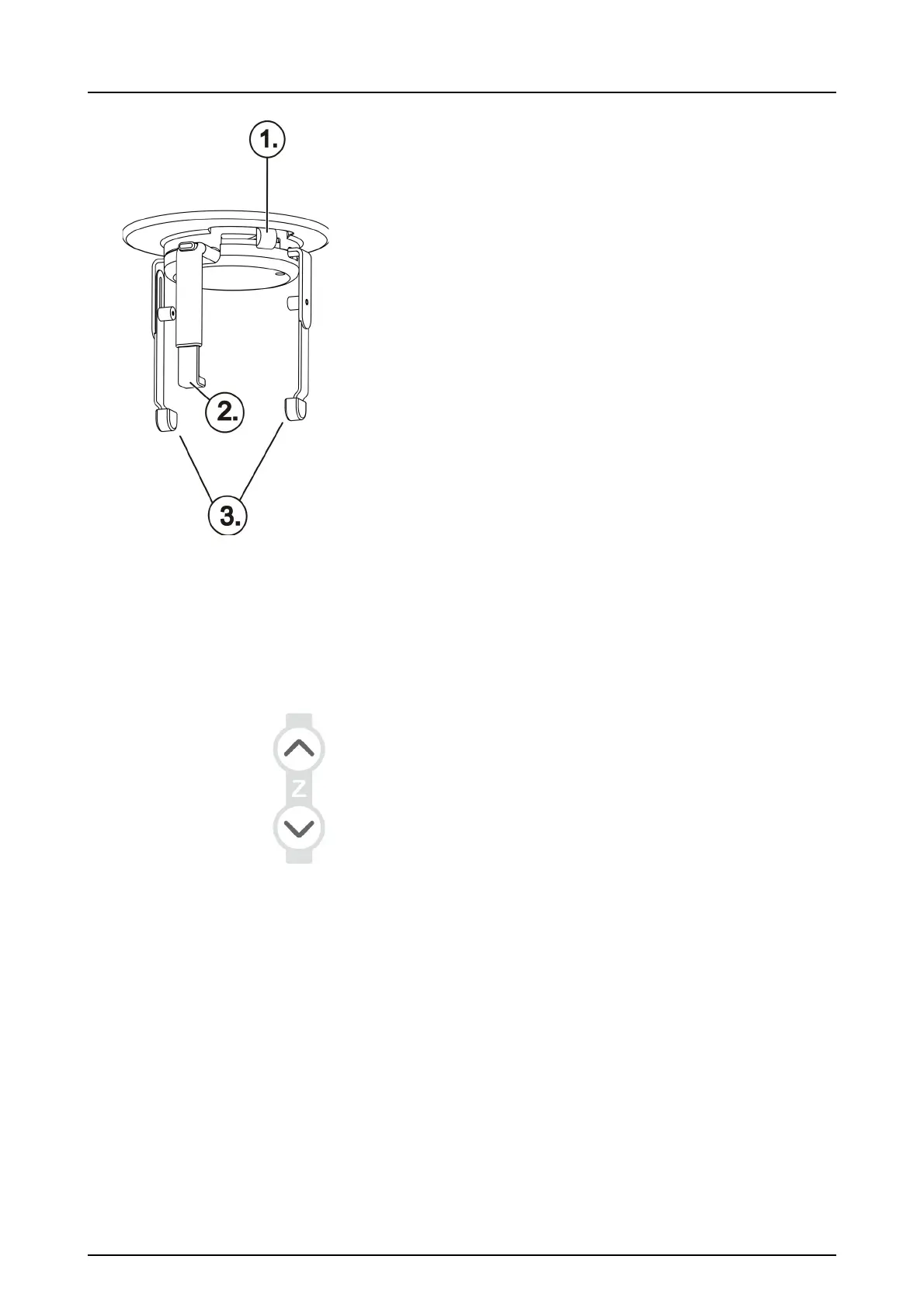
7. Open the temple supports.
1 Temple support knob
2 Forehead support
3 Temple supports
8. Ask the patient to remove any spectacles, hearing aids,
removable dentures, jewellery and hair clips and pins.
Place a protective lead apron on the patient.
NOTICE! Local country regulations may set different
standard for lead apron usage needs.
5.3.3 Patient positioning
5.3.3.1 Panoramic exposure
1. Insert the bite block with the bite plane. Place the dispos-
able covers.
NOTICE! Use a new disposable cover for every patient.
2. Adjust the unit height.
3. Guide the patient to the unit and instruct to stand as
straight and tall as possible. Exposure can be taken also
in sitting position. Ask the patient to take grip on the han-
dles and bite on the bite block. Use the lipholder or the
chin cup for an edentulous patient.
WARNING! Avoid risk of teeth fracture during the
positioning and imaging. If patient teeth are more fragile
than with normal healthy patient, eg. with osteoporotic
structure, or teeth are missing, be careful with bite block
and lift up and down movement. If there is any risk of
patient biting too high pressure causing fracture of teeth,
use lip holder or the chin cup and cotton roll between the
teeth for the patient positioning.



 To Next Page