1-3Lasair® Pro Aerosol Particle Counter Operations Manual
Chapter 1 : Quick Guide
Assembly
1. Remove the protective cap from the particle counter’s sample inlet.
2. Press tubing or ISP over the sample inlet base.
3. If using tubing, insert the free end of the tubing into one end of an adapter
(supplied with each ISP).
4. Place the sample probe on the other end of the adapter. The adapter’s O-ring will
hold the sample probe securely to the adapter.
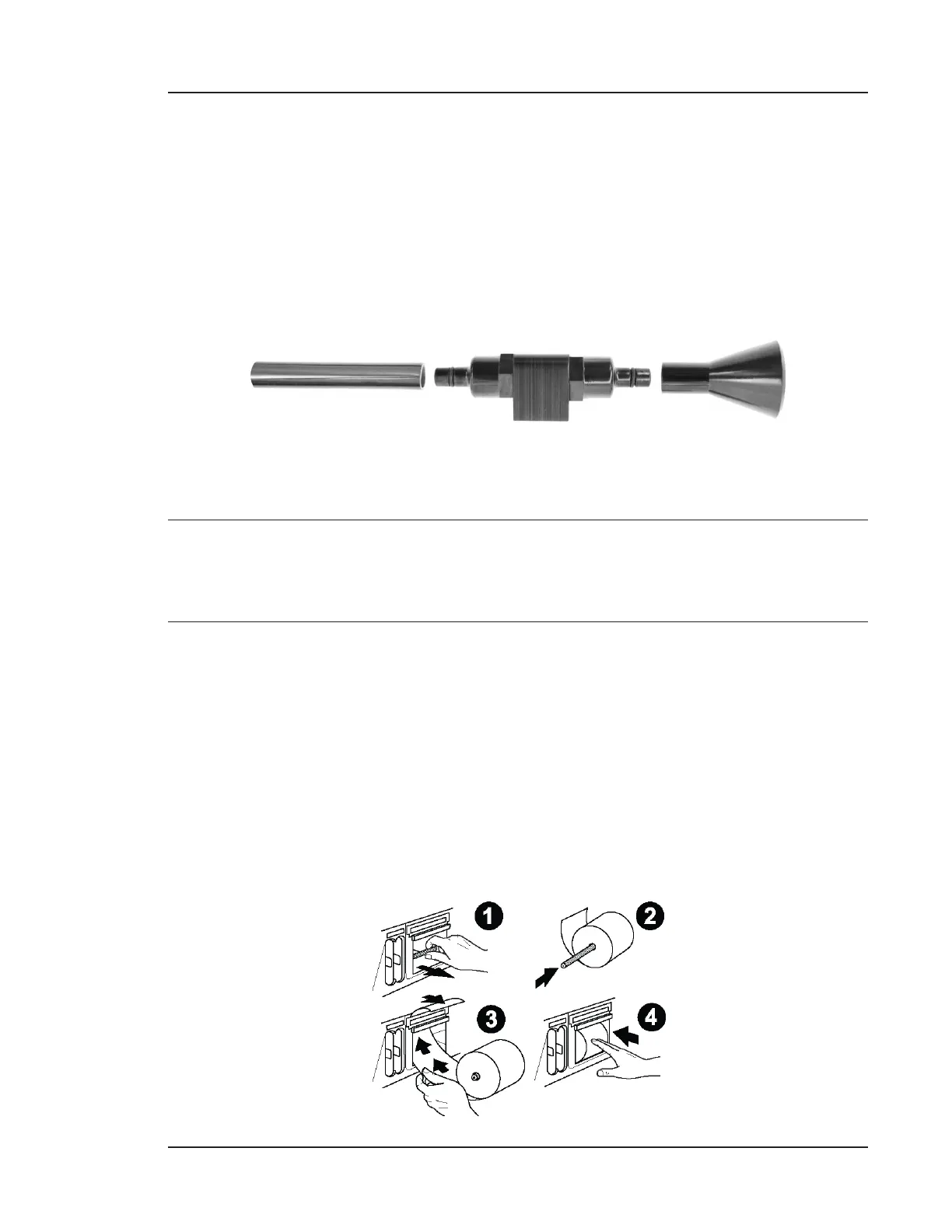
TUBING ADAPTER SAMPLE PROBE
5. Mount the adapter using the two 1/4-inch screw holes as necessary.
NOTE: If sampling particles greater than 1 m, use the minimum length required to
reach the sampling area. In pharmaceutical applications, tubing length should
be a maximum of 2 m.
Printer Roll Installation
Pull the right case cover out with the finger notch, as shown on page 1-2.
1. Turn on the Lasair Pro and remove the printer roll holder.
2. Insert the printer roll holder into the printer roll’s center.
3. Thread the paper into the top of the interior cavity as shown until the automatic
feed is engaged. The cutter will automatically snip a small portion of the roll.
4. Roll the paper so that it fits snug inside the interior cavity. Close the case.



 To Next Page