Chapter 12 : System Configuration
12-14 Lasair® Pro Aerosol Particle Counter Operations Manual
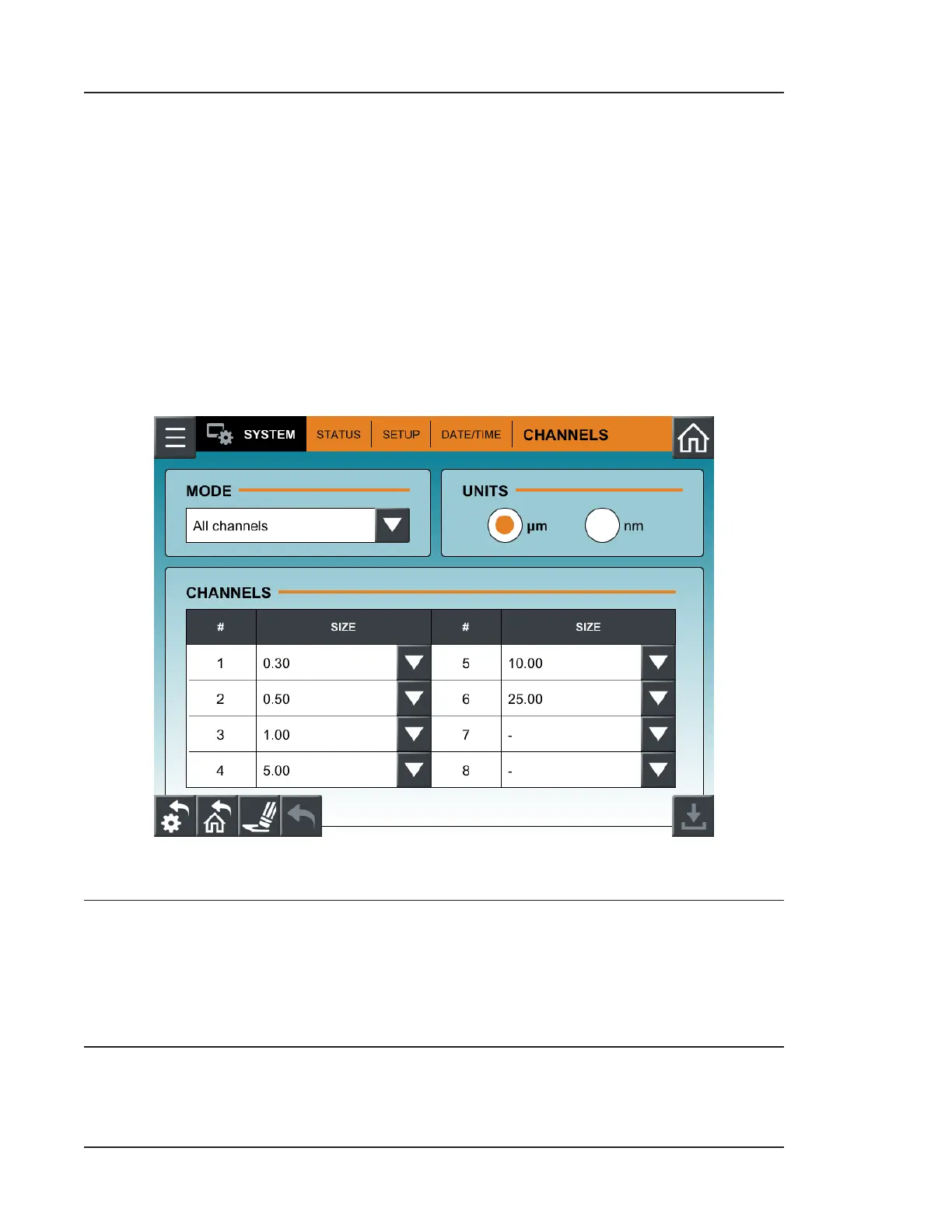
CHANNELS Tab
The CHANNELS tab allows the user to switch between All channels mode and
Pharmaceuticals mode.
• All channels mode: Enables all eight particle size channels for use with sampling.
• Pharmaceuticals mode: Enables only the 0.5 and 5.0 particle size channels.
Channel sizes can only be set in All channels mode. The size range is 0.30 to 25.00 with a
resolution of 0.01 for sizes less than 0.50, 0.05 for sizes between 0.50 and 1.00, 0.5 for sizes
between 1.00 and 3.00, and 1 for sizes between 3.00 and 25.00. Channel size units can be
changed between micrometers (m) and nanometers (nm).
Figure 12-9. CHANNELS tab, SYSTEM
NOTE: All sampling data is deleted when the mode is switched. If you wish to save
your sampling data, ensure it is manually exported via USB before changing
modes, and then re-imported aer the mode change is made. In addition, be
aware that all alarm settings will be incorrect, and channel sizes for statistics
recipes will be incorrect.


 To Next Page