Chapter 3 : Your System
3-4 Lasair® Pro Aerosol Particle Counter Operations Manual
HOME Screen
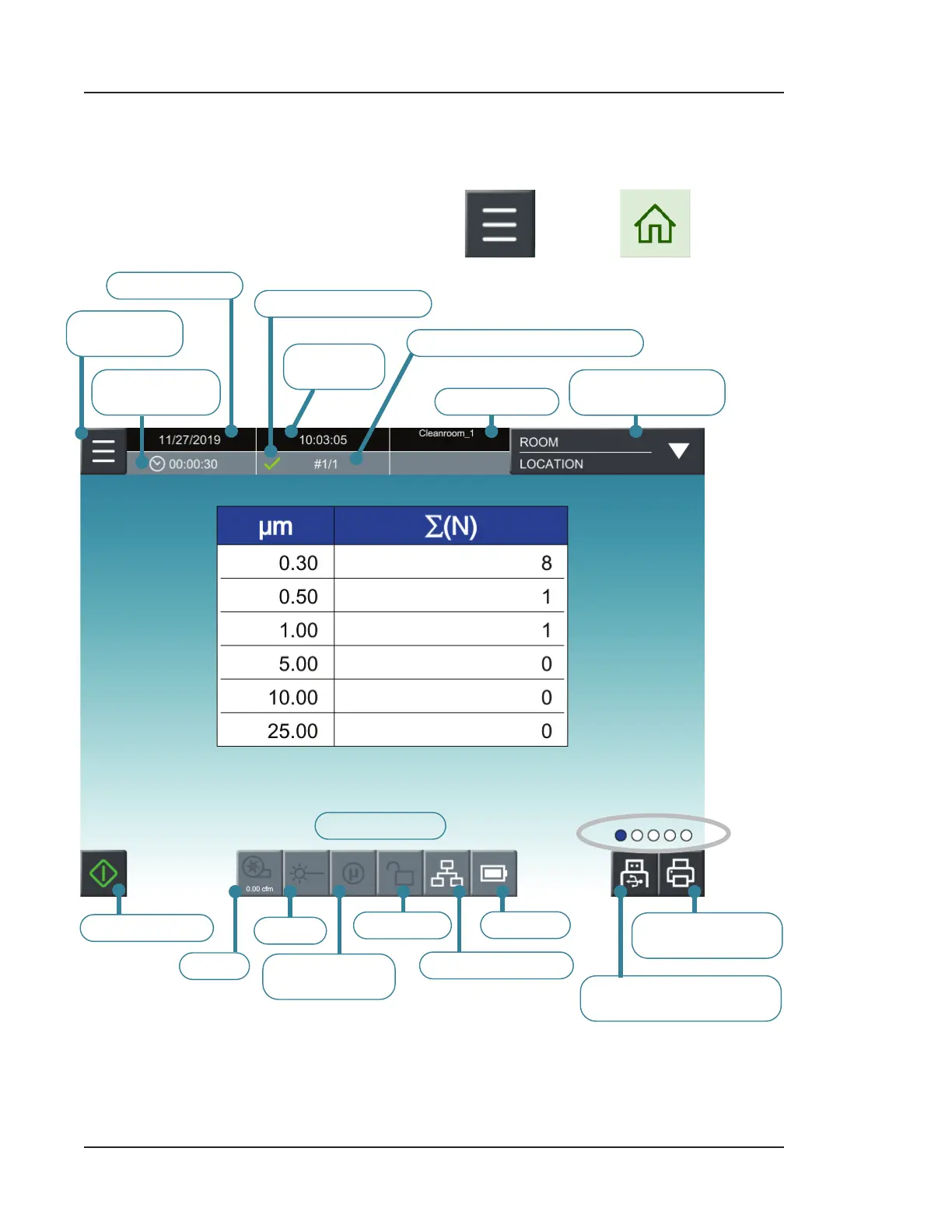
When you first turn on the Lasair Pro particle counter, the HOME screen displays. You can
also navigate to this screen any time by pressing and then (HOME).
CURRENT DATE
SAMPLE
TIME/VOLUME
CURRENT
TIME
RECIPE NAME
SUCCESS INDICATOR
ROOM/LOCATION
SELECTION
OPENS
NAVIGATION CURRENT SAMPLE #/TOTAL #
SAMPLE START
PUMP
STATUS ICONS
LASER
COINCIDENCE
LOSS
COMMUNICATION
BATTERY
SECURITY
SAVE CURRENT
SAMPLING DATA TO USB
PRINT CURRENT
SAMPLING DATA
Figure 3-2. Default sampling display (Cumulative Normalized Counts)



 To Next Page