4-11Lasair® Pro Aerosol Particle Counter Operations Manual
Chapter 4 : Connections
Analog Output
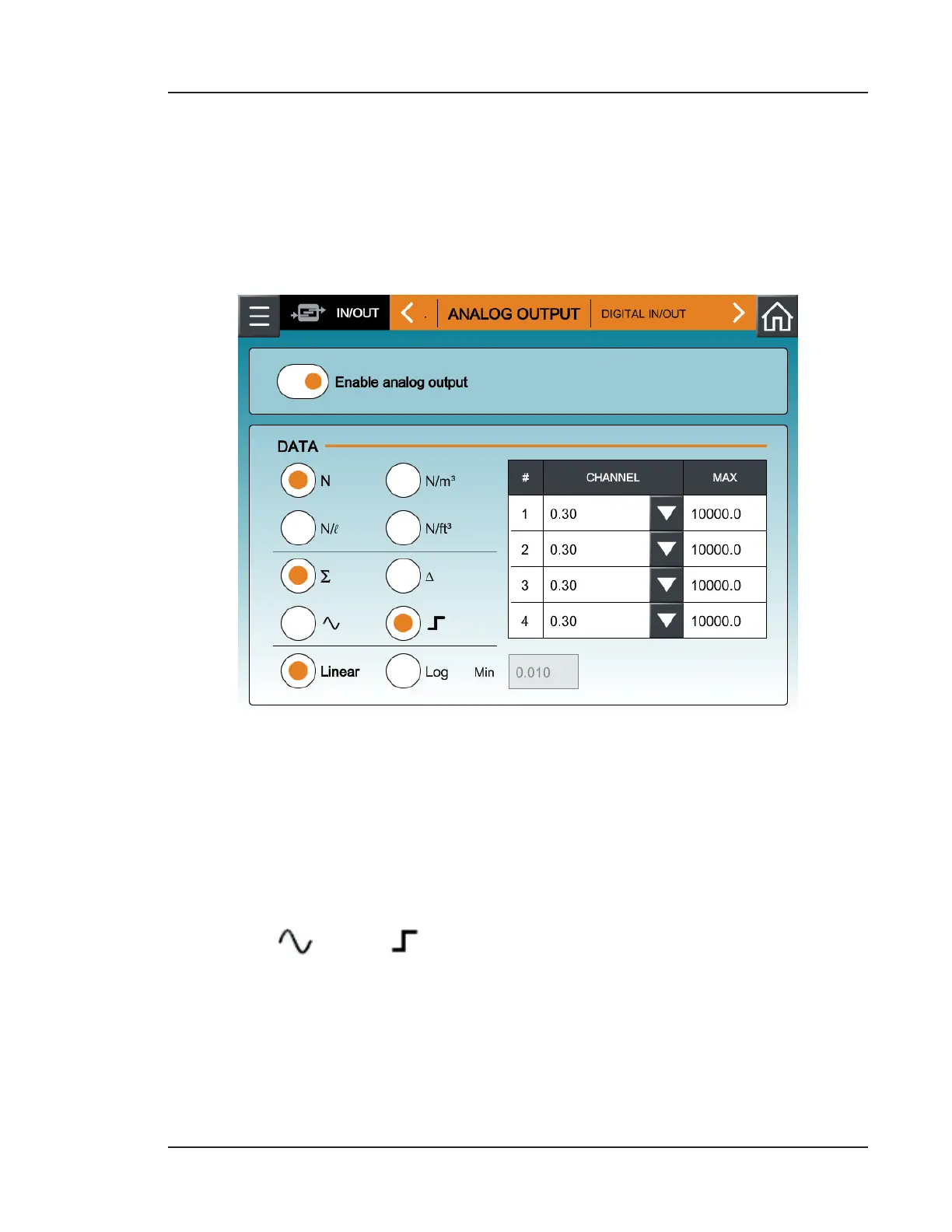
The Lasair Pro counter can be enabled to generate a multichannel analog output for
reading particle data on a separate device, such as a Programmable Logic Controller (PLC)
or Proportional-Integral-Derivative (PID) controller. Analog outputs are generated using
particle size channel limits. These limits are set in the ANALOG OUTPUT tab of the IN/OUT
screen.
Figure 4-6. ANALOG OUTPUT tab, IN/OUT
Particle data can be configured with analog output in the following way:
• Enable analog output: Enable or disable analog output
• Raw (N) or Normalized (N/m
3
, N/
3
, N/l) data: Sets the units for the data.
• Cumulative (∑) or dierential () data: Sets the type of data to trigger the analog
output. Cumulative refers to the sum of all particle counts of one size and larger in
a sample. Dierential refers to particle counts of a certain size in a sample.
• Wave ( ) or Step ( ): Sets how the output will be updated. The Wave option
sets the output to update once per second throughout the sample. The Step option
sets the output to update at the end of the sample.
• Linear or Log: Sets the data to appear in a linear or logarithmic graphic display.
See Lasair Pro Analog 4-20 mA Output Log Mode on page 4-12



 To Next Page