S
S
T
T
E
E
P
P
6
6
:
:
Channel Control of your DAW
In this step we will turn our attention to control of the DAW track.
®
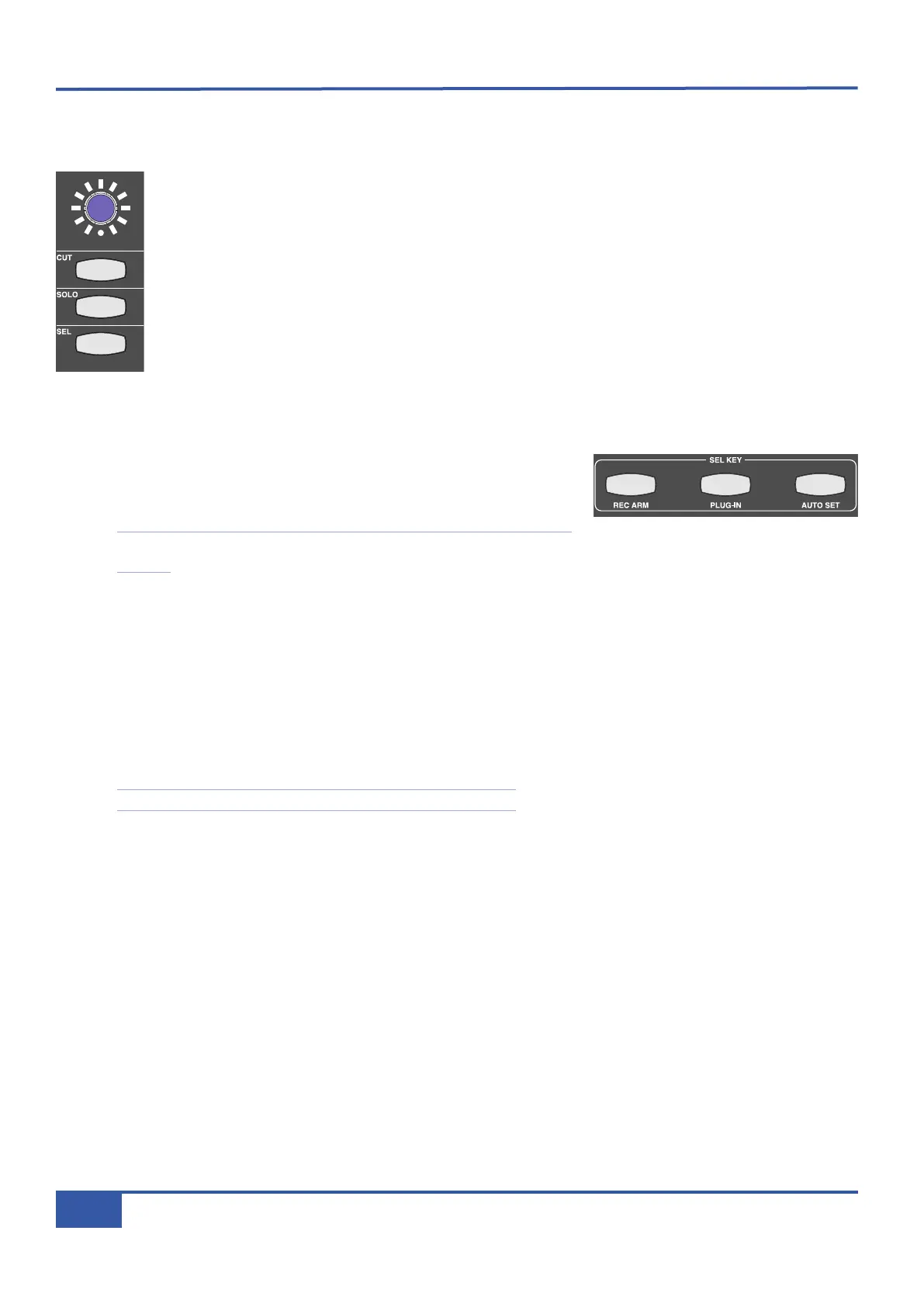
Still on the Matrix console, press the CUT button in the channel controlling the Test track, located above
the channel fader. You will notice that the Test track will cut in the DAW. On Matrix, the channel CUT
button will light. Press the CUT button again to deactivate it.
® Press the SOLO button in the channel controlling the Test track, located below the CUT button. You will
notice that the Test track will solo in the DAW. On Matrix, the channel SOLO button will light and the
CUT buttons in all the other channels will flash.
Notice that the SOLO LED below the monitoring section is flashing, indicating that there is a solo button
selected in the DAW.
® Press the SOLO button again to deactivate it.
® Move the fader at the bottom of the Matrix channel. You will notice that the DAW’s Test track fader is moving.
® Find the SEL KEY area of the centre section, located below the DAW LAYER
SELECT buttons. These buttons define the function of the lower SEL key
which is concerned with DAW control.
Note that the SEL KEY modes have nothing to do with the upper, analogue
SEL key.
® Ensure that all the SEL KEY buttons are unlit, indicating that the lower SEL keys are in default mode. If any buttons are lit,
press them to return to default mode.
In default mode, the lower SEL keys function as DAW track selectors:
® Press the SEL key in the channel controlling the Test track. You will notice that you have selected the Test track in the
DAW.
® Press the left hand SEL KEY button marked REC ARM and press the SEL key in the channel controlling the Test track
again. You will notice that this time you have record-armed the Test track in the DAW. Leave the track record-readied.
See Chapter 5 for details of other in-channel DAW control functions.
iJack iJack
CUT
DIM
i
n
22
62 811
0
0
1
1
2
2
3
3
4
4
5
5
6
6
10
20
30
40
50
5
0
5
10
10
20
30
40
50
5
0
5
10
10
20
30
40
50
5
0
5
10
10
20
30
40
50
5
0
5
10
10
20
30
40
50
5
0
5
10
10
20
30
40
50
5
0
5
10
10
20
30
40
50
5
0
5
10
10
20
30
40
50
5
0
5
10
10
20
30
40
50
5
0
5
10
10
20
30
40
50
5
0
5
10
10
20
30
40
50
5
0
5
10
10
20
30
40
50
5
0
5
10
10
20
30
40
50
5
0
5
10
10
20
30
40
50
5
0
5
10
10
20
30
40
50
5
0
5
10
10
20
30
40
50
5
0
5
10
9 10 11 12 13 14 15 161234 567 8
1234
5678
23456781 10 11 12 13 14 15 169 MASTER/FOCUS
REC
MON SOLO
MIX
LEFT
RIGHT
REC
MON SOLO
M
IX
SolidStateLogic Matrix
STEF19/05/08
in 2 2
62 811
C
UT
D
IM
A
RTIST
20
30
40
50
60
15
10
5
0
10
20
30
40
50
5
0
5
10
ARTIST
t2::TProjec itle
Me etrs
Mon
Auto T
R IP MiscBass
t
2: : tprojec i ttl e
metersmonautotripmisc
i
Jack iJack
CUT
DIM
i
n
22
62 811
0
0
1
1
2
2
3
3
4
4
5
5
6
6
10
20
30
40
50
5
0
5
10
10
20
30
40
50
5
0
5
10
10
20
30
40
50
5
0
5
10
10
20
30
40
50
5
0
5
10
10
20
30
40
50
5
0
5
10
10
20
30
40
50
5
0
5
10
10
20
30
40
50
5
0
5
10
10
20
30
40
50
5
0
5
10
10
20
30
40
50
5
0
5
10
10
20
30
40
50
5
0
5
10
10
20
30
40
50
5
0
5
10
10
20
30
40
50
5
0
5
10
10
20
30
40
50
5
0
5
10
10
20
30
40
50
5
0
5
10
10
20
30
40
50
5
0
5
10
10
20
30
40
50
5
0
5
10
9
10 11 12 13 14 15 16
1
2345678
1234
5678
23456781 10 11 12 13 14 15 169 MASTER/FOCUS
REC
MON SOLO
MIX
LEFT
RIGHT
REC
MON SOLO
MIX
SolidStateLogic Matrix
STEF19/05/08
in 2 2
62 811
CUTDIM
A
RTIST
20
30
40
50
60
15
10
5
0
10
20
30
40
50
5
0
5
10
ARTIST
t2::TProjec itle
Me etrs
Mon
Auto T
R IP MiscBass
t
2: : tprojec i ttl e
metersmonautotripmisc
Chapter 2 - Getting Started
22
Matrix Owner’s Manual



 To Next Page