M
M
o
o
n
n
i
i
t
t
o
o
r
r
i
i
n
n
g
g
Control Room Monitors
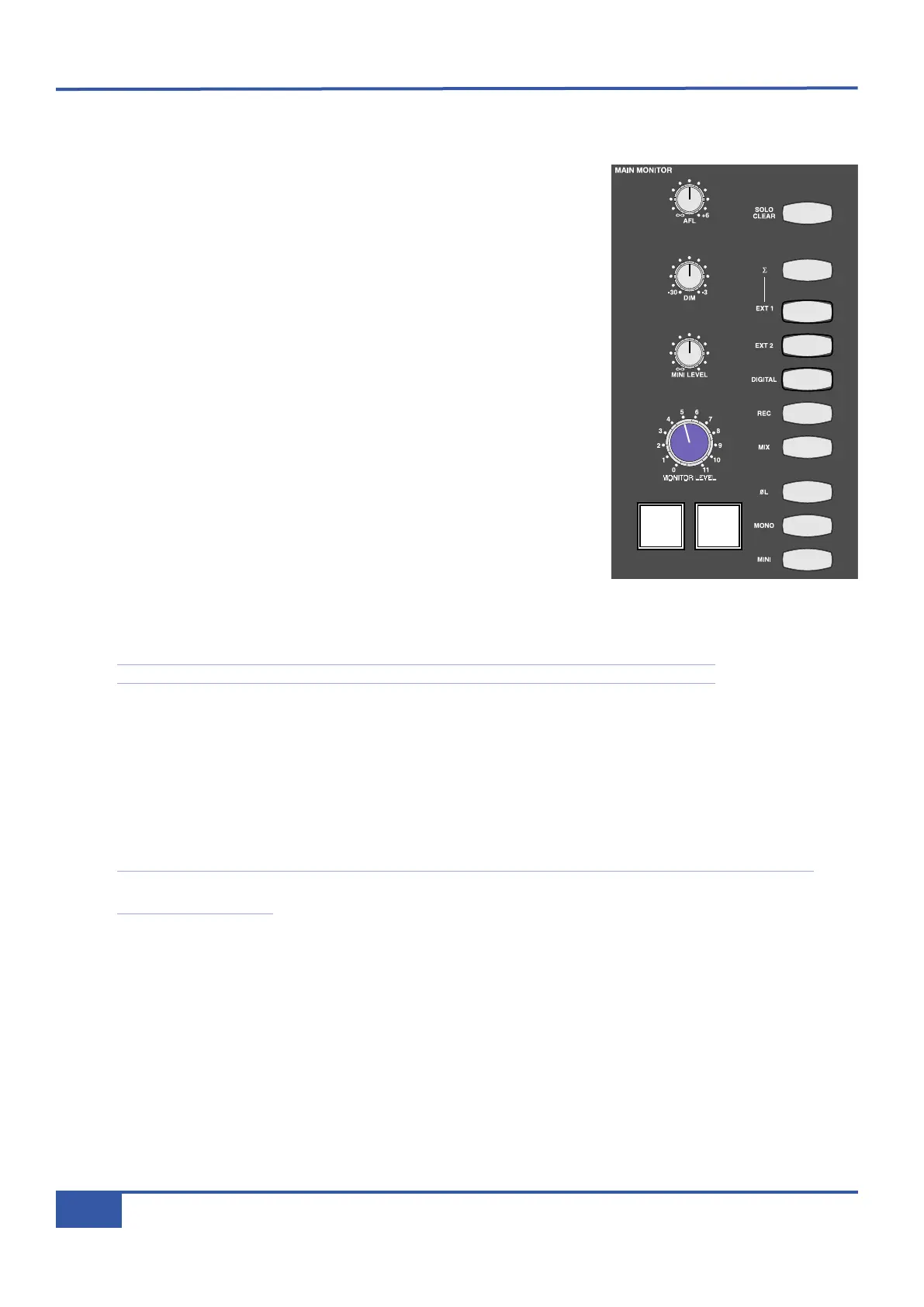
The MAIN MONITOR area of the Matrix centre section is located to the right of
the Master Channel. The blue pot towards the bottom left of the area is the volume
control for the main monitors, and beneath it are two buttons. The left button,
labelled DIM, immediately reduces the volume of the monitoring. The amount of
g
ain reduction introduced by the DIM button ranges from -3dB to -30dB and is
controlled by the DIM pot, which is the middle of the three grey pots above the
main volume control. The button to the right of the DIM button, labelled CUT,
mutes the monitoring. Both the DIM and CUT buttons light up to indicate that they
are active.
In the right half of the monitoring area are 10 buttons, which will be described in
ascending order:
Pressing MINI swaps the monitoring output from the main monitors to the near-field
monitors. The mini’s have an independent volume control which is the bottom of the
three grey pots, immediately above the main monitor volume control. To return to
hearing the main monitors, press the MINI button again. Pressing MONO sends a
left-right summed signal to both speakers. Pressing and holding øL inverts the phase
of the left-hand monitor signal. You can monitor the stereo difference (L-R) signal by
pressing øL when the MONO button has been selected.
The next five buttons above the øL button form the source selector for the monitor
bus. These include the MIX and REC busses along with three external inputs described below: DIGITAL, EXT2 and EXT1.
Each buttons lights when active.
Note that while the other buttons light yellow, the REC bus lights red in keeping with its colour coding.
Normally these buttons cancel each other (in other words, if you select one source, the previously selected source is automatically
deselected). However, the summing button (
ΣΣ
), located immediately above the five source selector buttons, removes the
intercancelling feature and instead sums all selected inputs, enabling multiple sources to be monitored simultaneously. Deselecting
the
ΣΣ
button cancels all monitoring sources and returns the monitoring to intercancelling mode.
The top button in the monitoring area, labelled SOLO CLEAR, clears any SOLO or AFL buttons that are active on the desk,
restoring the monitoring source selection in the buttons beneath it. The SOLO CLEAR button lights to indicate that there is a
channel or bus in solo or AFL mode somewhere on the desk, as does the SOLO light located above the VU meters.
Note that the small light marked SOLO beneath the MAIN MONITOR area displays the solo status of the DAW,
not the analogue channels.
External Monitoring Inputs
Matrix allows up to three external audio sources to feed the monitoring - two analogue and one digital. On the console, these
are labeled DIGITAL, EXT1 and EXT2. and their connections are described in Chapter 1. If an MP3 player or iPod is connected
to the iJack socket in the consoles right-hand trim, this signal will replace the EXT1 signal.
After Fade Listen (AFL)
The pot labelled AFL located at the top of the monitoring area sets the main monitoring volume for the stereo AFL function.
Pressing any AFL button on the centre section will replace the current feed to the monitors with the post-level signal (and in the
case of the Matrix channels, post level and pan) associated with that AFL button. Pressing multiple AFLs will sum the selected
signals together. AFLs can be cancelled by pressing the SOLO CLEAR button or by deselecting any active AFL buttons. Centre
section AFLs are unaffected by the solo monitoring soft key options detailed on Page 42.
iJack iJack
C
UT
DIM
i
n
22
62 811
0
0
1
1
2
2
3
3
4
4
5
5
6
6
10
20
30
40
50
5
0
5
10
10
20
30
40
50
5
0
5
10
10
20
30
40
50
5
0
5
10
10
20
30
40
50
5
0
5
10
10
20
30
40
50
5
0
5
10
10
20
30
40
50
5
0
5
10
10
20
30
40
50
5
0
5
10
10
20
30
40
50
5
0
5
10
10
20
30
40
50
5
0
5
10
10
20
30
40
50
5
0
5
10
10
20
30
40
50
5
0
5
10
10
20
30
40
50
5
0
5
10
10
20
30
40
50
5
0
5
10
10
20
30
40
50
5
0
5
10
10
20
30
40
50
5
0
5
10
10
20
30
40
50
5
0
5
10
9 10 11 12 13 14 15 161234 567 8
1234
5678
23456781 10 11 12 13 14 15 169 MASTER/FOCUS
REC
MON SOLO
MIX
LEFT
RIGHT
REC
MON SOLO
MIX
SolidStateLogic Matrix
STEF19/05/08
in 2 2
62 811
CUTDIM
ARTIST
20
30
40
50
60
15
10
5
0
10
20
30
40
50
5
0
5
10
ARTIST
t2::TProjec itle
Me etrs
Mon
Auto T
R IP MiscBass
t
2: : tprojec i ttl e
metersmonautotripmisc
Chapter 3 - Analogue Signal Flow
38
Matrix Owner’s Manual



 To Next Page