S
S
o
o
f
f
t
t
K
K
e
e
y
y
s
s
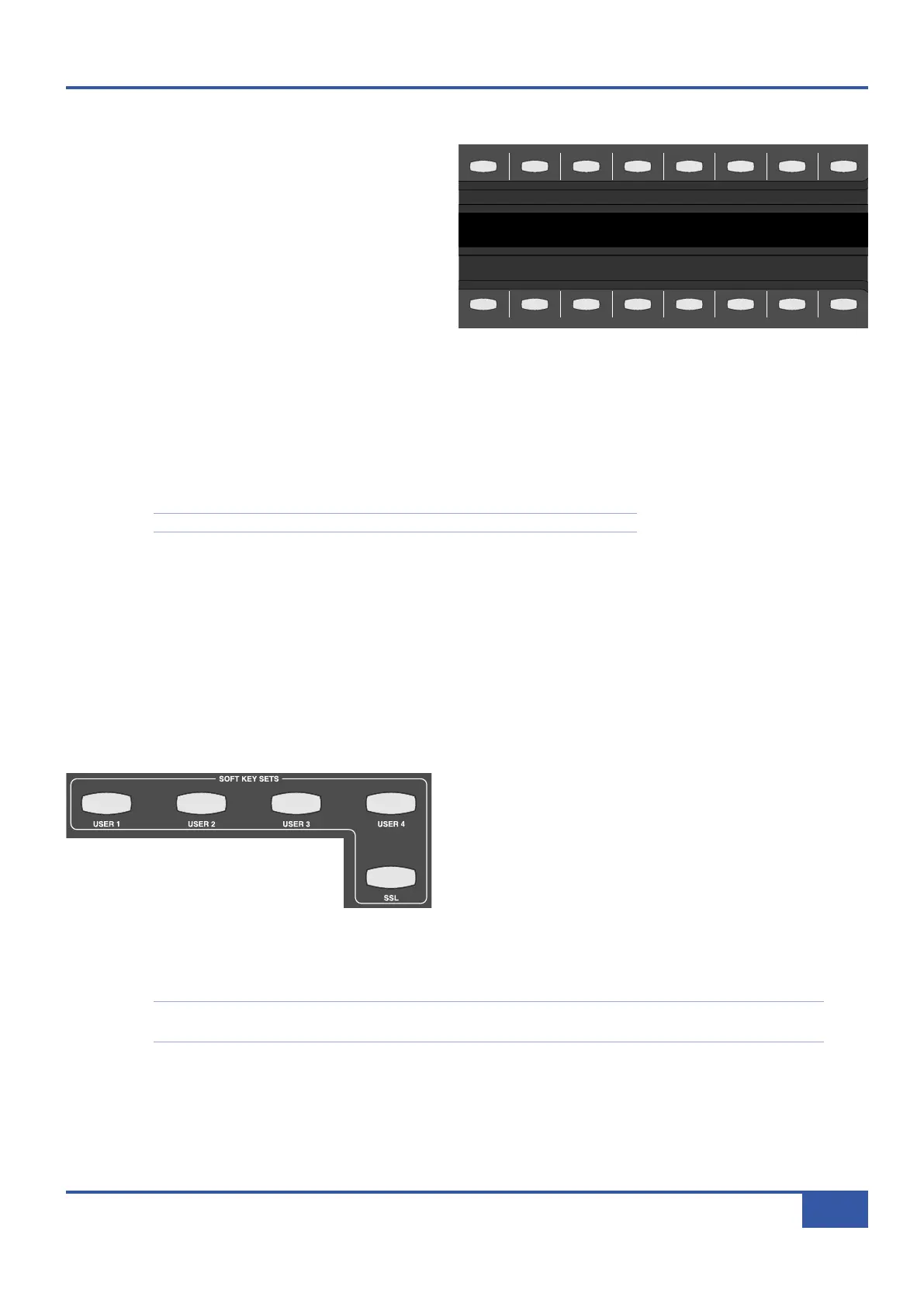
The soft key area of the desk is located below the counter
d
isplay in the centre section, and comprises 16 buttons
above and below the digital scribble strip which runs across
the whole desk:
T
here is a vast array of functions which can be assigned to
these buttons, and the scribble strip in between them
indicates what functions are currently assigned to them: the
upper row of the display refers to the row of buttons above
it, and the lower display to the row of buttons below it.
D
D
A
A
W
W
C
C
o
o
n
n
t
t
r
r
o
o
l
l
P
P
r
r
o
o
t
t
o
o
c
c
o
o
l
l
s
s
,
,
U
U
S
S
B
B
C
C
o
o
m
m
m
m
a
a
n
n
d
d
s
s
a
a
n
n
d
d
M
M
e
e
n
n
u
u
s
s
There are two types of message which these soft keys can be programmed to send: commands within the HUI and MCU protocols
described above, and any QWERTY commands which you might send from your computer’s normal keyboard, such as DAW quick
keys. These keyboard commands are not sent via the Ethernet MIDI ports, but via the USB cable connecting Matrix to the
computer.
MIDI CC layers
can only contain USB soft keys or Matrix commands.
Please refer to Chapter 1 for instructions for setting up MIDI and USB connections.
In addition to MIDI and USB commands, the top row of soft keys can be used as menu selectors for the bottom row, enabling
each button in the top row to access up to eight
separate
commands assigned to the buttons on the bottom row.
S
S
o
o
f
f
t
t
K
K
e
e
y
y
S
S
e
e
t
t
s
s
Each DAW layer has five soft key sets, providing plenty of space to tailor the control of each DAW package independently. The
sets are called ‘Default’ and ‘User 1’ to ‘User 4’. The supplied default Profiles come pre-programmed with a number of typical
functions appropriate to the DAW which that layer controls, allowing you to get started with Matrix before you have programmed
all your soft keys. The combination of sets and menus allows a maximum of 360 functions to be assigned to the soft keys of all
five sets.
The soft key set which is currently active in the soft keys is selected
using the buttons in the SOFT KEY SETS area of the centre
section, located below and to the right of the soft keys themselves.
In addition to the five programmable sets, there is also a further
system set labelled SSL which is used for accessing global settings
and options for the Matrix console.
Pressing one of these buttons simply activates that set of soft keys,
and pressing another button will replace the old selection with the new. The default set is active when none of the buttons are
lit, and can be reactivated when not active by pressing whichever soft key set button is lit.
Note that the SSL soft key button overrides the USER soft keys. Selecting user-defined soft keys while the SSL set is
active will not activate that soft key set until the SSL button is deselected. The SSL soft keys are described on Page 41.
iJack iJack
C
UT
DIM
i
n
22
62 811
0
0
1
1
2
2
3
3
4
4
5
5
6
6
10
20
30
40
50
5
0
5
10
10
20
30
40
50
5
0
5
10
10
20
30
40
50
5
0
5
10
10
20
30
40
50
5
0
5
10
10
20
30
40
50
5
0
5
10
10
20
30
40
50
5
0
5
10
10
20
30
40
50
5
0
5
10
10
20
30
40
50
5
0
5
10
10
20
30
40
50
5
0
5
10
10
20
30
40
50
5
0
5
10
10
20
30
40
50
5
0
5
10
10
20
30
40
50
5
0
5
10
10
20
30
40
50
5
0
5
10
10
20
30
40
50
5
0
5
10
10
20
30
40
50
5
0
5
10
10
20
30
40
50
5
0
5
10
9 10 11 12 13 14 15 161234 567 8
1234
5678
23456781 10 11 12 13 14 15 169 MASTER/FOCUS
REC
MON SOLO
MIX
LEFT
RIGHT
REC
MON SOLO
MIX
SolidStateLogic Matrix
STEF19/05/08
in 2 2
62 811
CUTDIM
A
RTIST
20
30
40
50
60
15
10
5
0
10
20
30
40
50
5
0
5
10
ARTIST
t2::TProjec itle
Me etrs
Mon
Auto T
R IP MiscBass
t
2: : tprojec i ttl e
m
etersmonautotripmisc
iJack iJack
CUT
D
IM
i
n
22
62 811
0
0
1
1
2
2
3
3
4
4
5
5
6
6
10
20
30
40
50
5
0
5
1
0
10
20
30
40
50
5
0
5
1
0
10
20
30
40
50
5
0
5
1
0
10
20
30
40
50
5
0
5
1
0
10
20
30
40
50
5
0
5
1
0
10
20
30
40
50
5
0
5
1
0
10
20
30
40
50
5
0
5
1
0
10
20
30
40
50
5
0
5
1
0
10
20
30
40
50
5
0
5
1
0
10
20
30
40
50
5
0
5
1
0
10
20
30
40
50
5
0
5
1
0
10
20
30
40
50
5
0
5
1
0
10
20
30
40
50
5
0
5
1
0
10
20
30
40
50
5
0
5
1
0
10
20
30
40
50
5
0
5
1
0
10
20
30
40
50
5
0
5
1
0
9
10 11 12 13 14 15 16
1
2345678
1
234
5
678
23456781 10 11 12 13 14 15 169 MASTER/FOCUS
REC
M
ON SOLO
MIX
LEFT
R
IGHT
REC
M
ON SOLO
MIX
S
olidStateLogic Matrix
STEF19/05/08
in 2 2
62 811
CUTDIM
ARTIST
20
30
40
50
60
15
10
5
0
10
20
30
40
50
5
0
5
1
0
ARTIST
t
2::TProjec itle
Me etrs
Mon
Auto T
R IP MiscBass
t2:: tprojec i ttl e
m
etersmonautotripmisc
Chapter 6 - DAW and CC Configuration
83
Matrix Owner’s Manual



 To Next Page