CChhaapptteerr 22 ––
Getting Started
The aim of this chapter is to familiarise you with the basics of operating your Matrix. We will restrict ourselves to simple
operations and leave more complex elements to the following chapters. You may find it helpful to complete the whole tutorial
before exploring the references to more detailed parts of the manual.
I
I
m
m
p
p
o
o
r
r
t
t
a
a
n
n
t
t
C
C
o
o
n
n
c
c
e
e
p
p
t
t
s
s
Before we get going, there are a couple of important operating principles which need to be explained:
T
T
h
h
e
e
M
M
a
a
s
s
t
t
e
e
r
r
C
C
h
h
a
a
n
n
n
n
e
e
l
l
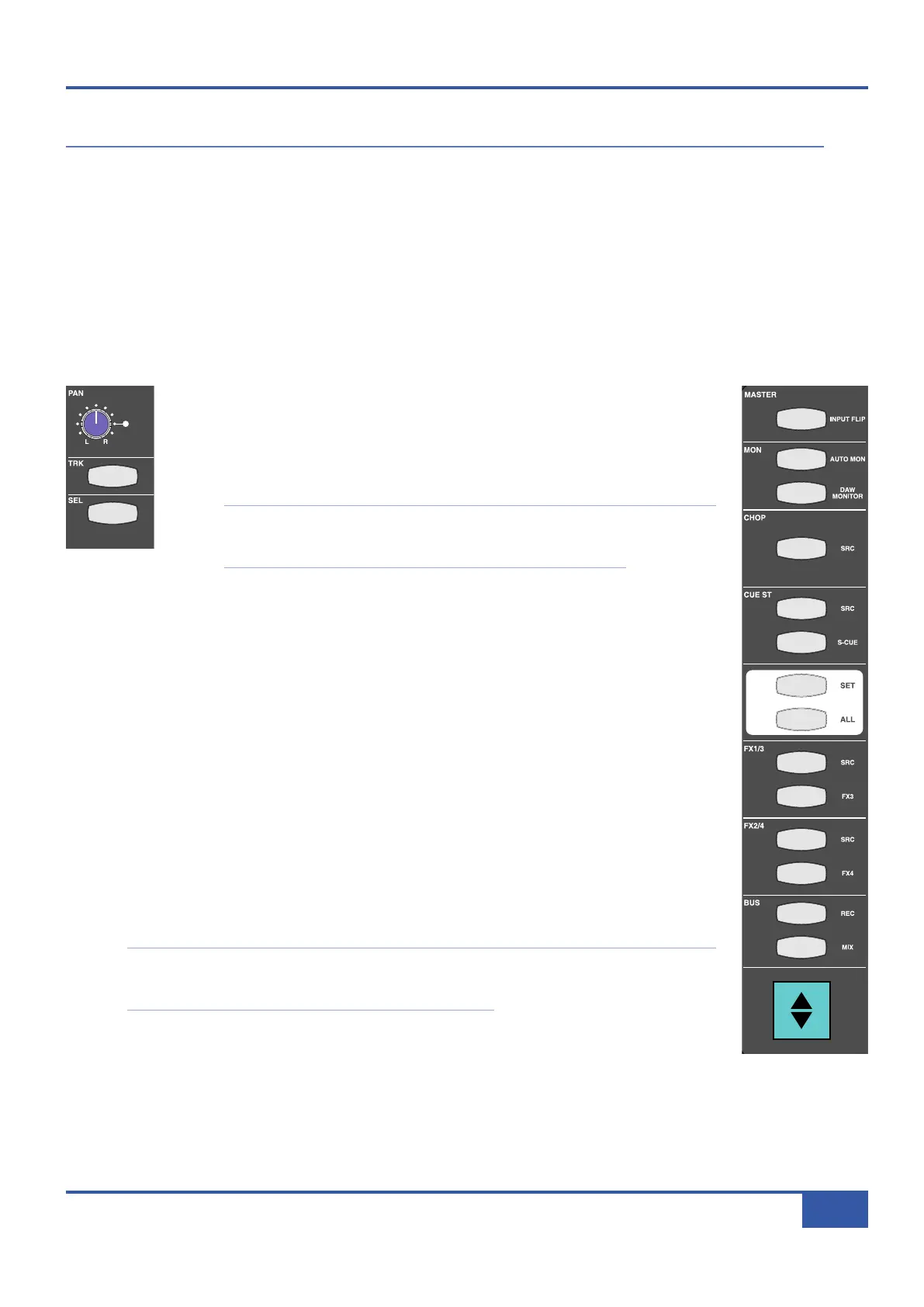
While many of the channel’s controls are located in the physical channel strip, a number
are instead found in the Master Channel (shown right) located in the top left-hand
corner of the desk’s centre section. The Master Channel gives you access to additional
channel strip controls for whichever channel strip is assigned to it using the upper SEL
button, located above the numeric display, in the middle of the channel (shown left).
Note: There is a second SEL button in the channel, located a little lower on the channel
strip, just above the fader. This button is associated with DAW control, not assigning
the Master Channel. The DAW SEL button is examined on Page 67.
Multiple channel strips can be assigned to the Master Channel. See Page 30 for details.
F
F
o
o
c
c
u
u
s
s
M
M
o
o
d
d
e
e
s
s
Matrix combines two distinct modes of operation in one control surface, providing control of both the
analogue signals and the DAW functions associated with the modern recording environment. In order
to accomplish this within a compact space, the console can operate in two ‘Focus’ modes, focusing on
either the analogue or DAW control functions. These modes are simply called Analogue Focus and DAW
Focus.
Focus modes primarily affect the channel faders and their CUT and SOLO buttons which control the
analogue signal when in Analogue Focus mode, but send control messages to the DAW when in DAW
Focus mode. Focus modes also affect the channel meters which normally meter the analogue signal in
Analogue Focus mode but replicate the DAW track metering in DAW Focus mode.
Matrix’s mode is selected and indicated by the large Focus button, located directly underneath the Master
Channel, on the left of the centre section (at the bottom of the graphic on the right). Pressing this button
swaps between Focus modes. It is lit to indicate Analogue Focus, and unlit to indicate DAW Focus.
Note: It is important to distinguish between DAW Focus mode (where the desk’s channels control the
tracks within the DAW) and DAW input selection within Analogue Focus mode (where the desk’s
channels control the analogue signal returning from the DAW).
i
Jack iJack
CUT
DIM
i
n
22
62 811
0
0
1
1
2
2
3
3
4
4
5
5
6
6
10
20
30
40
50
5
0
5
10
10
20
30
40
50
5
0
5
10
10
20
30
40
50
5
0
5
10
10
20
30
40
50
5
0
5
10
10
20
30
40
50
5
0
5
10
10
20
30
40
50
5
0
5
10
10
20
30
40
50
5
0
5
10
10
20
30
40
50
5
0
5
10
10
20
30
40
50
5
0
5
10
10
20
30
40
50
5
0
5
10
10
20
30
40
50
5
0
5
10
10
20
30
40
50
5
0
5
10
10
20
30
40
50
5
0
5
10
10
20
30
40
50
5
0
5
10
10
20
30
40
50
5
0
5
10
10
20
30
40
50
5
0
5
10
9 10 11 12 13 14 15 161234 567 8
1234
5
678
23456781 10 11 12 13 14 15 169 MASTER/FOCUS
REC
MON SOLO
MIX
L
EFT
RIGHT
R
EC
MON SOLO
MIX
SolidStateLogic Matrix
STEF19/05/08
in 2 2
62 811
CUTDIM
ARTIST
20
30
40
50
60
15
10
5
0
10
20
30
40
50
5
0
5
10
ARTIST
t2::TProjec itle
Me etrs
Mon
Auto T
R IP MiscBass
t2:: tprojec i ttl e
metersmonautotripmisc
iJack iJack
CUT
D
IM
i
n
22
62 811
0
0
1
1
2
2
3
3
4
4
5
5
6
6
10
20
30
40
50
5
0
5
10
10
20
30
40
50
5
0
5
10
10
20
30
40
50
5
0
5
10
10
20
30
40
50
5
0
5
10
10
20
30
40
50
5
0
5
10
10
20
30
40
50
5
0
5
10
10
20
30
40
50
5
0
5
10
10
20
30
40
50
5
0
5
10
10
20
30
40
50
5
0
5
10
10
20
30
40
50
5
0
5
10
10
20
30
40
50
5
0
5
10
10
20
30
40
50
5
0
5
10
10
20
30
40
50
5
0
5
10
10
20
30
40
50
5
0
5
10
10
20
30
40
50
5
0
5
10
10
20
30
40
50
5
0
5
10
9 10 11 12 13 14 15 161234 567 8
1234
5678
23456781 10 11 12 13 14 15 169 MASTER/FOCUS
REC
MON SOLO
MIX
LEFT
RIGHT
REC
MON SOLO
MIX
SolidStateLogic Matrix
STEF19/05/08
in 2 2
62 811
C
UT
D
IM
ARTIST
20
30
40
50
60
15
10
5
0
10
20
30
40
50
5
0
5
10
ARTIST
t2::TProjec itle
Me etrs
Mon
Auto T
R IP MiscBass
t2:: tprojec i ttl e
metersmonautotripmisc
Chapter 2 - Getting Started
15
Matrix Owner’s Manual



 To Next Page