A
A
u
u
x
x
i
i
l
l
i
i
a
a
r
r
y
y
S
S
e
e
n
n
d
d
s
s
Matrix has six aux sends: one stereo cue and four mono effects (FX) sends.
Stereo Cue Send
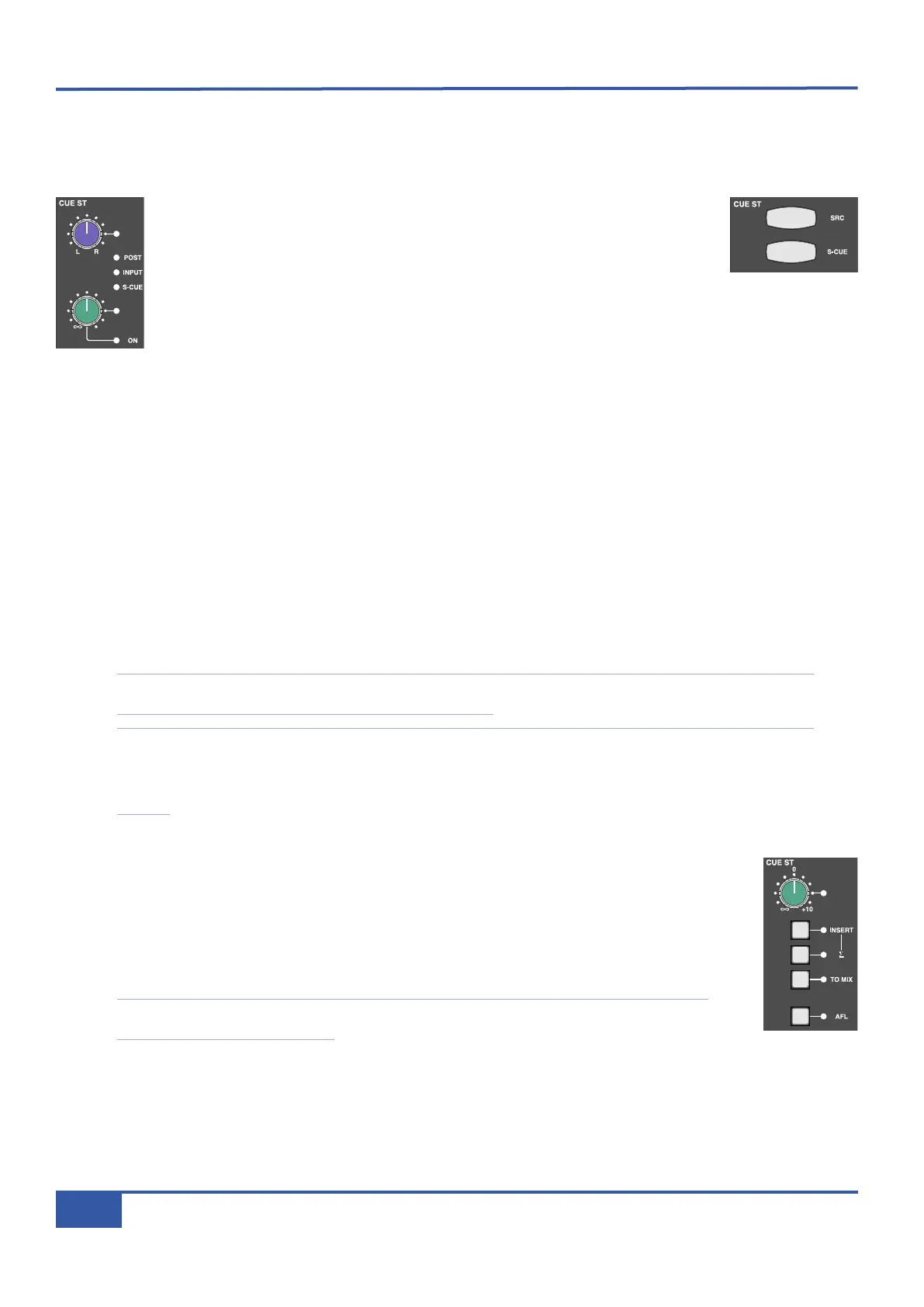
The send to the stereo cue bus has a gain trim and pan pot, both of which have Total
R
ecall LEDs. Pressing the gain pot switches the send on and off. The ON LED below the
pot will light to indicate that it is on. The pan pot is indented in the middle, where the
signal is feeding both the left and right busses equally.
T
he stereo cue bus can be fed from four places: line-in pre-input-selection, pre-fader (post-insert), post-fader
or via SuperCue. The first three of these are selected by the SRC button in the CUE ST section of the Master
Channel, with pre-fader being the default setting.
The source is indicated by the LEDs between the pan and gain pots, and by the colour of the SRC button:
S
S
i
i
g
g
n
n
a
a
l
l
S
S
o
o
u
u
r
r
c
c
e
e
L
L
E
E
D
D
i
i
n
n
d
d
i
i
c
c
a
a
t
t
i
i
o
o
n
n
S
S
R
R
C
C
b
b
u
u
t
t
t
t
o
o
n
n
c
c
o
o
l
l
o
o
u
u
r
r
Pre-fader, post-insert, (default setting) No LED Unlit
From the line-in, pre-gain INPUT is lit Red
Post-fader POST is lit Yellow
SuperCue monitoring (see below) S-CUE S-CUE is Green*
S
S
u
u
p
p
e
e
r
r
C
C
u
u
e
e
When CUE is selected as the source in the ARTIST MONITOR area of the centre section (see Page 39), SuperCue can be
used to control the artist’s headphone feed to provide full zero latency drop in and record monitoring for the artist. It works in
conjunction with the transport controls, summing the channel send and the DAW return when in Play, and automatically muting
the DAW return when in Record for a drop-in. The S-CUE button in the Master Channel overrides the source selection made
by the SRC button.
Note that for the SuperCue function to switch between corresponding DAW sends and returns, each DAW track output
must be sending to the Matrix channel which is feeding its input.
* Note that you can still cycle through the SRC options when in SuperCue. However, the source selection indicated by
the SRC button will not become active until the S-CUE button has been deselected. You will notice that if you cycle
through source options while in SuperCue mode, the SRC button colour changes but the LED indication in the channel
does not.
3
3
2
2
-
-
T
T
r
r
a
a
c
c
k
k
M
M
i
i
x
x
d
d
o
o
w
w
n
n
When Matrix is being used for mixdown, and the channel is therefore being fed from the DAW return the
main channel input (‘LINE IN’) can be used to create an extra input channel, allowing for 32-track
mixdowns on one Matrix. This is done by selecting INPUT as the source of the stereo cue, as described
above, and then pressing TO MIX within the CUE ST area of the desk’s centre section. FX sends can
then be fed from the CUE bus, enabling external processing to be assigned to the INPUT signal rather
than DAW return signal, as described below.
Note that when using the CUE ST bus this way, the DAW returns should be fed by those signals
requiring routing to the Insert Matrix.
iJack iJack
CUT
DIM
i
n
22
62 811
0
0
1
1
2
2
3
3
4
4
5
5
6
6
10
20
30
40
50
5
0
5
10
10
20
30
40
50
5
0
5
10
10
20
30
40
50
5
0
5
10
10
20
30
40
50
5
0
5
10
10
20
30
40
50
5
0
5
10
10
20
30
40
50
5
0
5
10
10
20
30
40
50
5
0
5
10
10
20
30
40
50
5
0
5
10
10
20
30
40
50
5
0
5
10
10
20
30
40
50
5
0
5
10
10
20
30
40
50
5
0
5
10
10
20
30
40
50
5
0
5
10
10
20
30
40
50
5
0
5
10
10
20
30
40
50
5
0
5
10
10
20
30
40
50
5
0
5
10
10
20
30
40
50
5
0
5
10
9 10 11 12 13 14 15 161234 567 8
1234
5678
23456781 10 11 12 13 14 15 169 MASTER/FOCUS
REC
MON SOLO
MIX
LEFT
RIGHT
REC
MON SOLO
MIX
SolidStateLogic Matrix
STEF19/05/08
in 2 2
62 811
CUTDIM
ARTIST
20
30
40
50
60
15
10
5
0
10
20
30
40
50
5
0
5
10
ARTIST
t2::TProjec itle
Me etrs
Mon
Auto T
R IP MiscBass
t2:: tprojec i ttl e
metersmonautotripmisc
iJack iJack
CUT
DIM
i
n
22
62 811
0
0
1
1
2
2
3
3
4
4
5
5
6
6
10
20
30
40
50
5
0
5
10
10
20
30
40
50
5
0
5
10
10
20
30
40
50
5
0
5
10
10
20
30
40
50
5
0
5
10
10
20
30
40
50
5
0
5
10
10
20
30
40
50
5
0
5
10
10
20
30
40
50
5
0
5
10
10
20
30
40
50
5
0
5
10
10
20
30
40
50
5
0
5
10
10
20
30
40
50
5
0
5
10
10
20
30
40
50
5
0
5
10
10
20
30
40
50
5
0
5
10
10
20
30
40
50
5
0
5
10
10
20
30
40
50
5
0
5
10
10
20
30
40
50
5
0
5
10
10
20
30
40
50
5
0
5
10
9 10 11 12 13 14 15 161234 567 8
1
234
5678
23456781 10 11 12 13 14 15 169 MASTER/FOCUS
REC
MON SOLO
MIX
LEFT
R
IGHT
REC
M
ON SOLO
MIX
SolidStateLogic Matrix
STEF19/05/08
in 2 2
62 811
CUTDIM
ARTIST
20
30
40
50
60
15
10
5
0
10
20
30
40
50
5
0
5
10
ARTIST
t2::TProjec itle
Me etrs
Mon
Auto T
R IP MiscBass
t2:: tprojec i ttl e
m
etersmonautotripmisc
iJack iJack
CUT
DIM
i
n
22
62 811
0
0
1
1
2
2
3
3
4
4
5
5
6
6
10
20
30
40
50
5
0
5
10
10
20
30
40
50
5
0
5
10
10
20
30
40
50
5
0
5
10
10
20
30
40
50
5
0
5
10
10
20
30
40
50
5
0
5
10
10
20
30
40
50
5
0
5
10
10
20
30
40
50
5
0
5
10
10
20
30
40
50
5
0
5
10
10
20
30
40
50
5
0
5
10
10
20
30
40
50
5
0
5
10
10
20
30
40
50
5
0
5
10
10
20
30
40
50
5
0
5
10
10
20
30
40
50
5
0
5
10
10
20
30
40
50
5
0
5
10
10
20
30
40
50
5
0
5
10
10
20
30
40
50
5
0
5
10
9
10 11 12 13 14 15 16
1
2345678
1234
5678
23456781 10 11 12 13 14 15 169 MASTER/FOCUS
REC
MON SOLO
MIX
LEFT
RIGHT
REC
MON SOLO
MIX
SolidStateLogic Matrix
STEF19/05/08
in 2 2
62 811
CUTDIM
ARTIST
20
30
40
50
60
15
10
5
0
10
20
30
40
50
5
0
5
10
ARTIST
t2::TProjec itle
Me etrs
Mon
Auto T
R IP MiscBass
t
2: : tprojec i ttl e
m
etersmonautotripmisc
Chapter 3 - Analogue Signal Flow
34
Matrix Owner’s Manual



 To Next Page