T
T
h
h
e
e
M
M
a
a
s
s
t
t
e
e
r
r
C
C
h
h
a
a
n
n
n
n
e
e
l
l
S
S
t
t
r
r
i
i
p
p
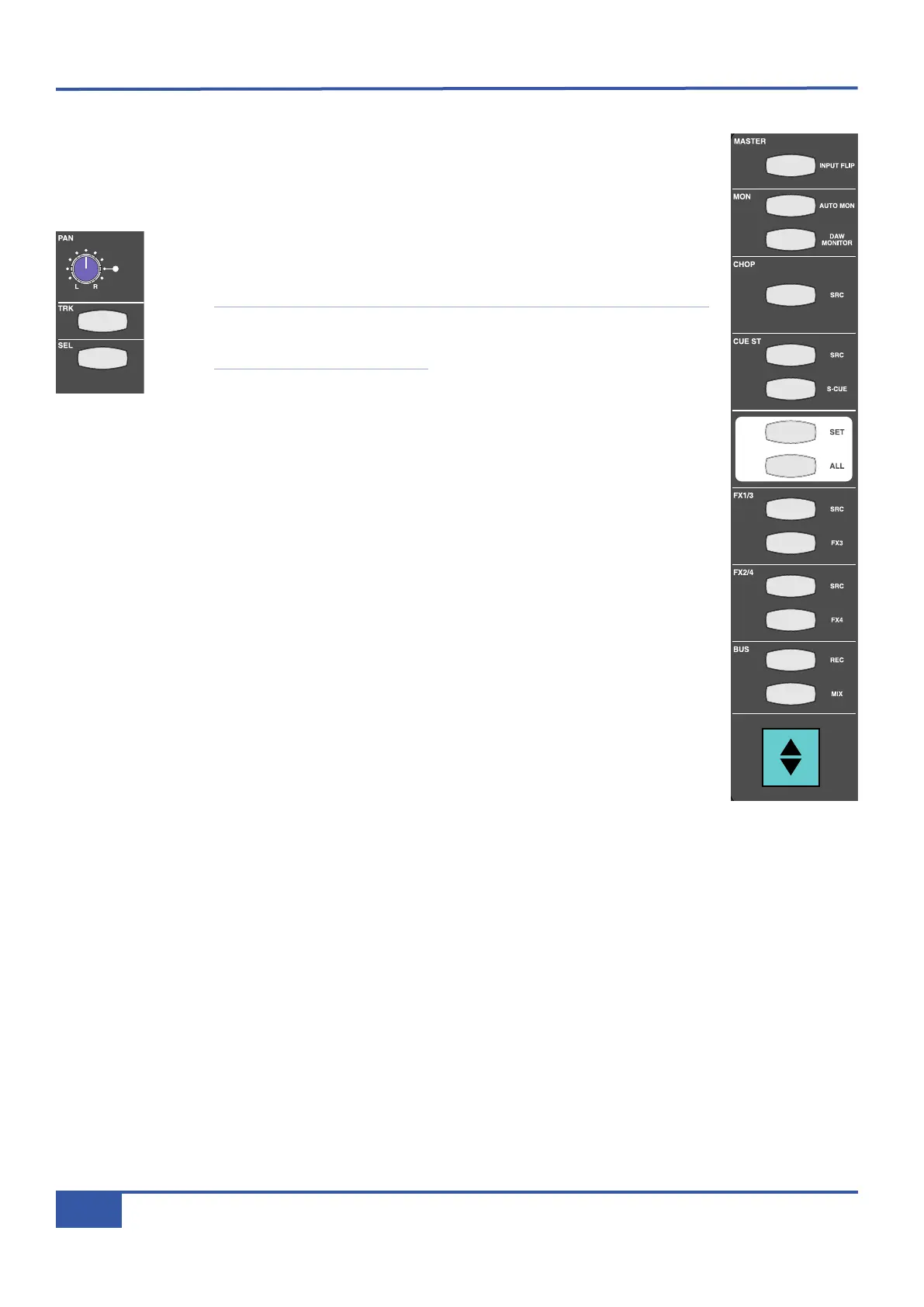
In addition to the controls within the physical channel strip, there is another section on Matrix which is
used to access channel strip functions. This is the Master Channel strip which appears in the top left-hand
corner of the desk’s centre section (shown right). While each line input has a dedicated channel strip, all
16 channels share the Master Channel, its controls accessing the channel strip to which it is assigned.
To assign the Master Channel to a particular channel strip, press the SEL button located
at the bottom end of the analogue section of the channel strip in question, just above
the numeric display.
Note that the DAW Control section of the fader strip also has a SEL button just above
the scribble strip which cannot be used for selection to the Master Channel. Use of this
SEL button is described on Page 67.
To assign the Master Channel to multiple channel strips, hold the left-most SEL button
of the main part of your intended selection and then press its right-most SEL button.
This assigns both selected channels plus all the channels in between. Pressing the ALL key will select all
16 channels, enabling you to perform global routing or source selection.
When multiple channels are assigned to the Master Channel, the LEDs on the Master Channel will assume
the status of the lowest selected channel. Any switching then performed will apply that setting in all
selected channels to correspond to the status to which the lowest channel has been switched. For
example, if Channels 1 to 5 are assigned to the Master Channel and Channel 1’s CUE ST source is set
to INPUT, switching the Master Channel CUE ST source from channel input to POST fader will set all
five channels’ CUE ST source to POST fader, regardless of what their status was before the switching.
If the SET button above the ALL button in the Master Channel is activated while an array of channels is
selected, any switching action on any of the physical channel strips (as opposed to the Master Channel)
such as muting a send, will be replicated across all selected channels, even if the channel strip used to
trigger the switch is not part of the selected array. Any switching then performed will unify that setting
on all selected channels to correspond to the status to which the operated channel has been switched.
The SET button will light up to indicate that it is active.
iJack iJack
C
UT
D
IM
i
n
22
62 811
0
0
1
1
2
2
3
3
4
4
5
5
6
6
10
20
30
40
50
5
0
5
10
10
20
30
40
50
5
0
5
10
10
20
30
40
50
5
0
5
10
10
20
30
40
50
5
0
5
10
10
20
30
40
50
5
0
5
10
10
20
30
40
50
5
0
5
10
10
20
30
40
50
5
0
5
10
10
20
30
40
50
5
0
5
10
10
20
30
40
50
5
0
5
10
10
20
30
40
50
5
0
5
10
10
20
30
40
50
5
0
5
10
10
20
30
40
50
5
0
5
10
10
20
30
40
50
5
0
5
10
10
20
30
40
50
5
0
5
10
10
20
30
40
50
5
0
5
10
10
20
30
40
50
5
0
5
10
9 10 11 12 13 14 15 161234 567 8
1234
5678
23456781 10 11 12 13 14 15 169 MASTER/FOCUS
REC
MON SOLO
MIX
LEFT
RIGHT
REC
MON SOLO
MIX
SolidStateLogic Matrix
STEF19/05/08
in 2 2
62 811
CUTDIM
A
RTIST
20
30
40
50
60
15
10
5
0
10
20
30
40
50
5
0
5
10
ARTIST
t2::TProjec itle
Me etrs
Mon
Auto T
R IP MiscBass
t
2: : tprojec i ttl e
metersmonautotripmisc
iJack iJack
CUT
DIM
i
n
22
62 811
0
0
1
1
2
2
3
3
4
4
5
5
6
6
10
20
30
40
50
5
0
5
10
10
20
30
40
50
5
0
5
10
10
20
30
40
50
5
0
5
10
10
20
30
40
50
5
0
5
10
10
20
30
40
50
5
0
5
10
10
20
30
40
50
5
0
5
10
10
20
30
40
50
5
0
5
10
10
20
30
40
50
5
0
5
10
10
20
30
40
50
5
0
5
10
10
20
30
40
50
5
0
5
10
10
20
30
40
50
5
0
5
10
10
20
30
40
50
5
0
5
10
10
20
30
40
50
5
0
5
10
10
20
30
40
50
5
0
5
10
10
20
30
40
50
5
0
5
10
10
20
30
40
50
5
0
5
10
9 10 11 12 13 14 15 161234 567 8
1234
5678
23456781 10 11 12 13 14 15 169 MASTER/FOCUS
REC
MON SOLO
MIX
LEFT
RIGHT
REC
MON SOLO
MIX
SolidStateLogic Matrix
STEF19/05/08
in 2 2
62 811
CUTDIM
ARTIST
20
30
40
50
60
15
10
5
0
10
20
30
40
50
5
0
5
10
ARTIST
t2::TProjec itle
Me etrs
Mon
Auto T
R IP MiscBass
t2:: tprojec i ttl e
metersmonautotripmisc
Chapter 3 - Analogue Signal Flow
30
Matrix Owner’s Manual



 To Next Page