S
S
T
T
E
E
P
P
1
1
1
1
:
:
Inserting Signal Processing into the
Channel
Most mixing desks have signal processing available in the channel. You will probably be aware by now that Matrix
doesn’t, as the outboard and DAW signal processing with which Matrix is designed to work would make in-
channel processing an unnecessary and costly expense. You can, however, insert your outboard signal processing
i
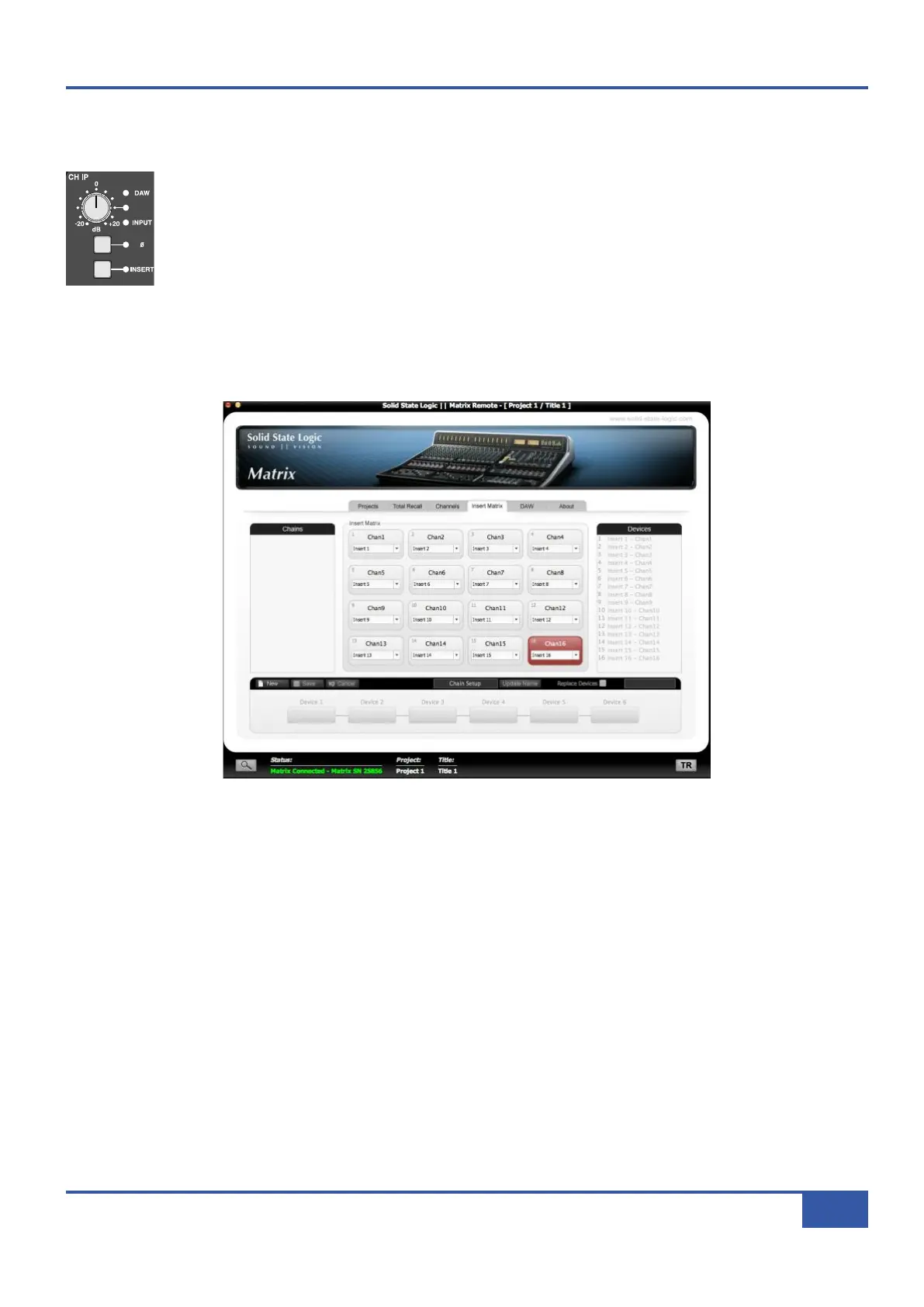
nto the channel using the Insert Matrix in the Matrix Remote:
® Press channel 16’s INSERT button, located between the CHIP and CHOP pots, shown left. Depending
on your setup, the monitoring may now fall silent.
On your computer, run the Matrix Remote and select the Insert Matrix tab which is the fourth tab from the left. The middle
of the Insert Matrix tab is made up of 16 buttons, referring to channels 1-16 on the desk. By default, Channel 16 has insert 16
assigned to it.
® Press the Channel 16 button and a drop-down menu will appear.
® Select Devices from the menu, and a second drop-down will appear.
® Select Device 1.
The processed signal should now appear on the monitors.
® Press INSERT in the Matrix channel again in order to remove the insert. The unprocessed signal should now return to the
monitors.
For more information regarding the Insert Matrix, including how to name Devices and chain them together, see Page 59.
Congratulations on completing the Tutorial. You should now be ready to explore some of the more advanced functions of Matrix.
The rest of this manual will fill in the detail wherever you need it.
iJack iJack
CUT
DIM
i
n
22
62 811
0
0
1
1
2
2
3
3
4
4
5
5
6
6
10
20
30
40
50
5
0
5
10
10
20
30
40
50
5
0
5
10
10
20
30
40
50
5
0
5
10
10
20
30
40
50
5
0
5
10
10
20
30
40
50
5
0
5
10
10
20
30
40
50
5
0
5
10
10
20
30
40
50
5
0
5
10
10
20
30
40
50
5
0
5
10
10
20
30
40
50
5
0
5
10
10
20
30
40
50
5
0
5
10
10
20
30
40
50
5
0
5
10
10
20
30
40
50
5
0
5
10
10
20
30
40
50
5
0
5
10
10
20
30
40
50
5
0
5
10
10
20
30
40
50
5
0
5
10
10
20
30
40
50
5
0
5
10
9 10 11 12 13 14 15 161234 567 8
1234
5
678
23456781 10 11 12 13 14 15 169 MASTER/FOCUS
REC
MON SOLO
MIX
L
EFT
RIGHT
REC
MON SOLO
MIX
SolidStateLogic Matrix
STEF19/05/08
in 2 2
62 811
CUTDIM
ARTIST
20
30
40
50
60
15
10
5
0
10
20
30
40
50
5
0
5
10
ARTIST
t2::TProjec itle
Me etrs
Mon
Auto T
R IP MiscBass
t2:: tprojec i ttl e
metersmonautotripmisc
Chapter 2 - Getting Started
27
Matrix Owner’s Manual



 To Next Page