S
S
T
T
E
E
P
P
4
4
:
:
Sending to the Auxiliary Sends
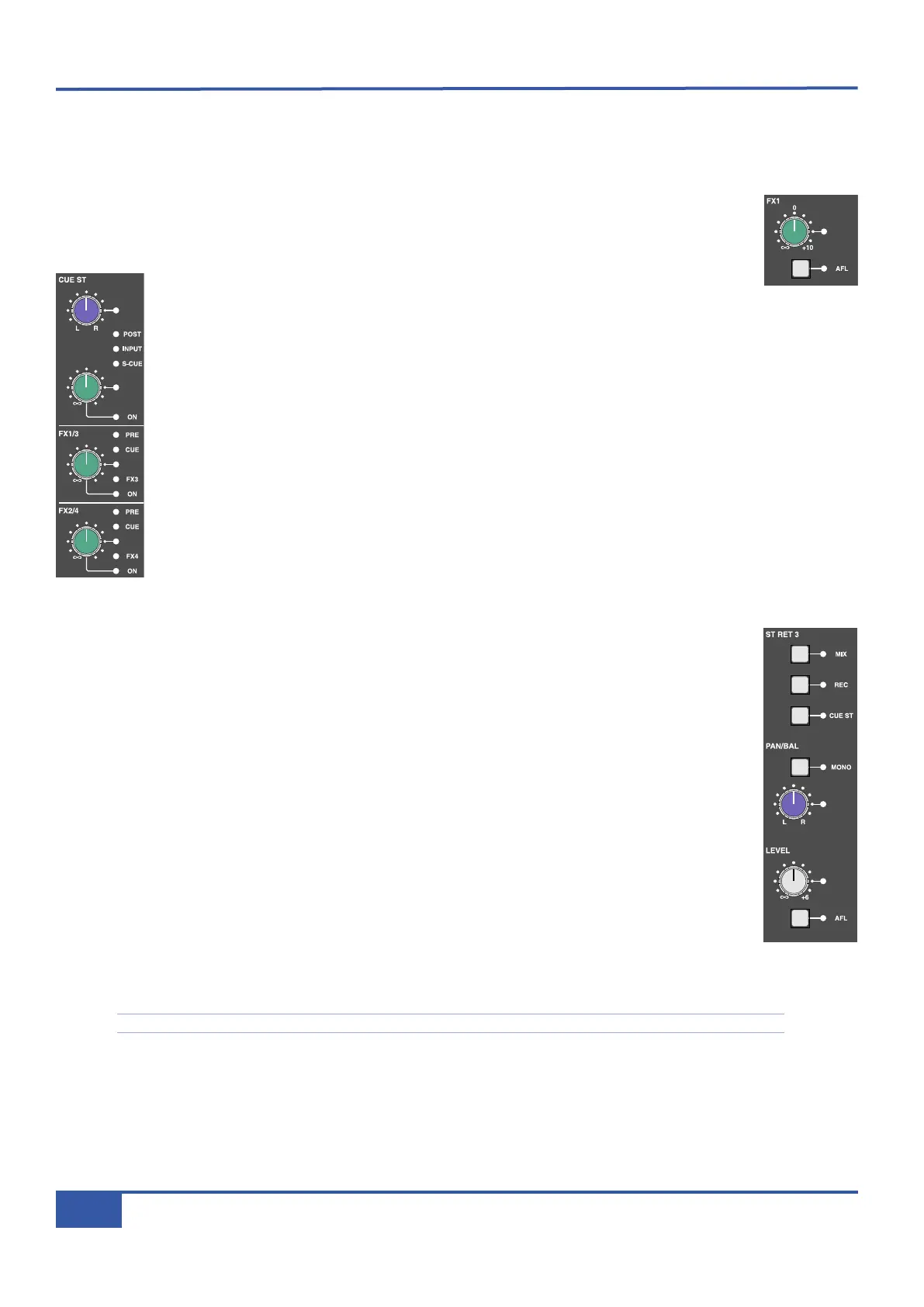
Matrix has six auxiliary sends, the first two forming the Stereo Cue (CUE ST) send (which you will probably use for monitoring
for musicians) and the remaining four labelled FX 1-4 (which you will probably use for feeding global effects such as reverb units).
® Check that the gain pots for the overall bus levels, located in the top right corner of the centre section (FX1
is shown right), are all set to 0dB, with the white line pointing towards the meters. This will allow you to
see what happens in the meters when you turn the pots in the channel.
The first two pots beneath the CHOP are the pan and gain trim for the CUE ST, which we
will cover in Step 8. The stereo cue functions similarly to the FX sends which we will
concentrate on here: The two pots below the stereo cue are the gain trim for the FX busses. FX1 and 3 share
a pot, as do FX 2 and 4.
® Press the upper gain pot, labelled FX1/3, to switch on FX1. The LED below it and to the right will light to
indicate that it is on.
® Use the pot to adjust the gain, using the FX1 meter to the right of the VU’s as a reference.
® In the Master Channel, press the button marked FX3. This swaps the FX1/3 gain pot from controlling the
FX1 send level to controlling the FX3 send level. The FX3 button will light to indicate that this swap has
been made, as will the FX3 LED to the right of the FX1/3 pot. Notice that the FX1 meter has gone blank
and the FX3 meter now reflects the CD player. The settings you created for the FX1 send transfer
automatically to the FX3 send.
FX busses 2 and 4 work in exactly the same way as FX busses 1 and 3, using the next gain pot down.
Once you have sent signal to the aux busses, you need to set the overall output level of the bus. Each aux bus
has its own control area, and you have already looked there to check that they are turned up sufficiently. For
this tutorial, we will use FX3, as well as ST RET 3 (Stereo Return 3, shown right).
® In the FX3 area in the very corner of the centre section, turn the gain pot to adjust the output signal level.
® Press the AFL button in the FX3 area to listen to the FX3 bus send. Press it again to return to normal
monitoring.
® In the ST RET 3 area, located below FX sends 1 and 2, press MIX to send the returning signal to the mix
bus. You should now hear the processing you created added to the clean CD signal in the monitoring.
® Press the AFL button below the ST RET 3 gain trim to listen to the signal on its own.
® Adjust the level of the return using the gain trim, and the left-right balance using the pot above the gain trim.
® Press the MONO button above the balance control. This reduces the stereo return to mono. The balance
pot will now be a pan pot. Press the MONO button again to restore the return to stereo again.
® Press the AFL button again to return to normal monitoring.
For more information on auxiliary sends, including altering the point in the channel which feeds them, see Page 35.
iJack iJack
CUT
DIM
i
n
22
62 811
0
0
1
1
2
2
3
3
4
4
5
5
6
6
10
20
30
40
50
5
0
5
10
10
20
30
40
50
5
0
5
10
10
20
30
40
50
5
0
5
10
10
20
30
40
50
5
0
5
10
10
20
30
40
50
5
0
5
10
10
20
30
40
50
5
0
5
10
10
20
30
40
50
5
0
5
10
10
20
30
40
50
5
0
5
10
10
20
30
40
50
5
0
5
10
10
20
30
40
50
5
0
5
10
10
20
30
40
50
5
0
5
10
10
20
30
40
50
5
0
5
10
10
20
30
40
50
5
0
5
10
10
20
30
40
50
5
0
5
10
10
20
30
40
50
5
0
5
10
10
20
30
40
50
5
0
5
10
9 10 11 12 13 14 15 161234 567 8
1234
5678
23456781 10 11 12 13 14 15 169 MASTER/FOCUS
REC
MON SOLO
MIX
LEFT
RIGHT
REC
MON SOLO
MIX
SolidStateLogic Matrix
STEF19/05/08
in 2 2
62 811
CUTDIM
ARTIST
20
30
40
50
60
15
10
5
0
10
20
30
40
50
5
0
5
10
ARTIST
t2::TProjec itle
Me etrs
Mon
Auto T
R IP MiscBass
t2:: tprojec i ttl e
metersmonautotripmisc
iJack iJack
CUT
D
IM
i
n
22
62 811
0
0
1
1
2
2
3
3
4
4
5
5
6
6
10
20
30
40
50
5
0
5
10
10
20
30
40
50
5
0
5
10
10
20
30
40
50
5
0
5
10
10
20
30
40
50
5
0
5
10
10
20
30
40
50
5
0
5
10
10
20
30
40
50
5
0
5
10
10
20
30
40
50
5
0
5
10
10
20
30
40
50
5
0
5
10
10
20
30
40
50
5
0
5
10
10
20
30
40
50
5
0
5
10
10
20
30
40
50
5
0
5
10
10
20
30
40
50
5
0
5
10
10
20
30
40
50
5
0
5
10
10
20
30
40
50
5
0
5
10
10
20
30
40
50
5
0
5
10
10
20
30
40
50
5
0
5
10
9 10 11 12 13 14 15 161234 567 8
1234
5678
23456781 10 11 12 13 14 15 169 MASTER/FOCUS
REC
MON SOLO
MIX
LEFT
RIGHT
REC
MON SOLO
MIX
SolidStateLogic Matrix
STEF19/05/08
in 2 2
62 811
CUTDIM
ARTIST
20
30
40
50
60
15
10
5
0
10
20
30
40
50
5
0
5
10
ARTIST
t2::TProjec itle
Me etrs
Mon
Auto T
R IP MiscBass
t2:: tprojec i ttl e
metersmonautotripmisc
iJack iJack
CUT
DIM
i
n
22
62 811
0
0
1
1
2
2
3
3
4
4
5
5
6
6
10
20
30
40
50
5
0
5
10
10
20
30
40
50
5
0
5
10
10
20
30
40
50
5
0
5
10
10
20
30
40
50
5
0
5
10
10
20
30
40
50
5
0
5
10
10
20
30
40
50
5
0
5
10
10
20
30
40
50
5
0
5
10
10
20
30
40
50
5
0
5
10
10
20
30
40
50
5
0
5
10
10
20
30
40
50
5
0
5
10
10
20
30
40
50
5
0
5
10
10
20
30
40
50
5
0
5
10
10
20
30
40
50
5
0
5
10
10
20
30
40
50
5
0
5
10
10
20
30
40
50
5
0
5
10
10
20
30
40
50
5
0
5
10
9 10 11 12 13 14 15 161234 567 8
1234
5678
23456781 10 11 12 13 14 15 169 MASTER/FOCUS
REC
MON SOLO
MIX
LEFT
RIGHT
REC
MON SOLO
M
IX
SolidStateLogic Matrix
STEF19/05/08
in 2 2
62 811
CUTDIM
ARTIST
20
30
40
50
60
15
10
5
0
10
20
30
40
50
5
0
5
10
ARTIST
t2::TProjec itle
Me etrs
Mon
Auto T
R IP MiscBass
t2:: tprojec i ttl e
metersmonautotripmisc
Chapter 2 - Getting Started
20
Matrix Owner’s Manual



 To Next Page