S
S
S
S
L
L
S
S
o
o
f
f
t
t
K
K
e
e
y
y
s
s
Soft keys are buttons which can have different functions assigned to them, depending on which soft key set is active.
T
here are a number of Matrix settings which are accessed
via the SSL set of soft keys. The soft key area of the desk is
located below the counter display in the centre section, and
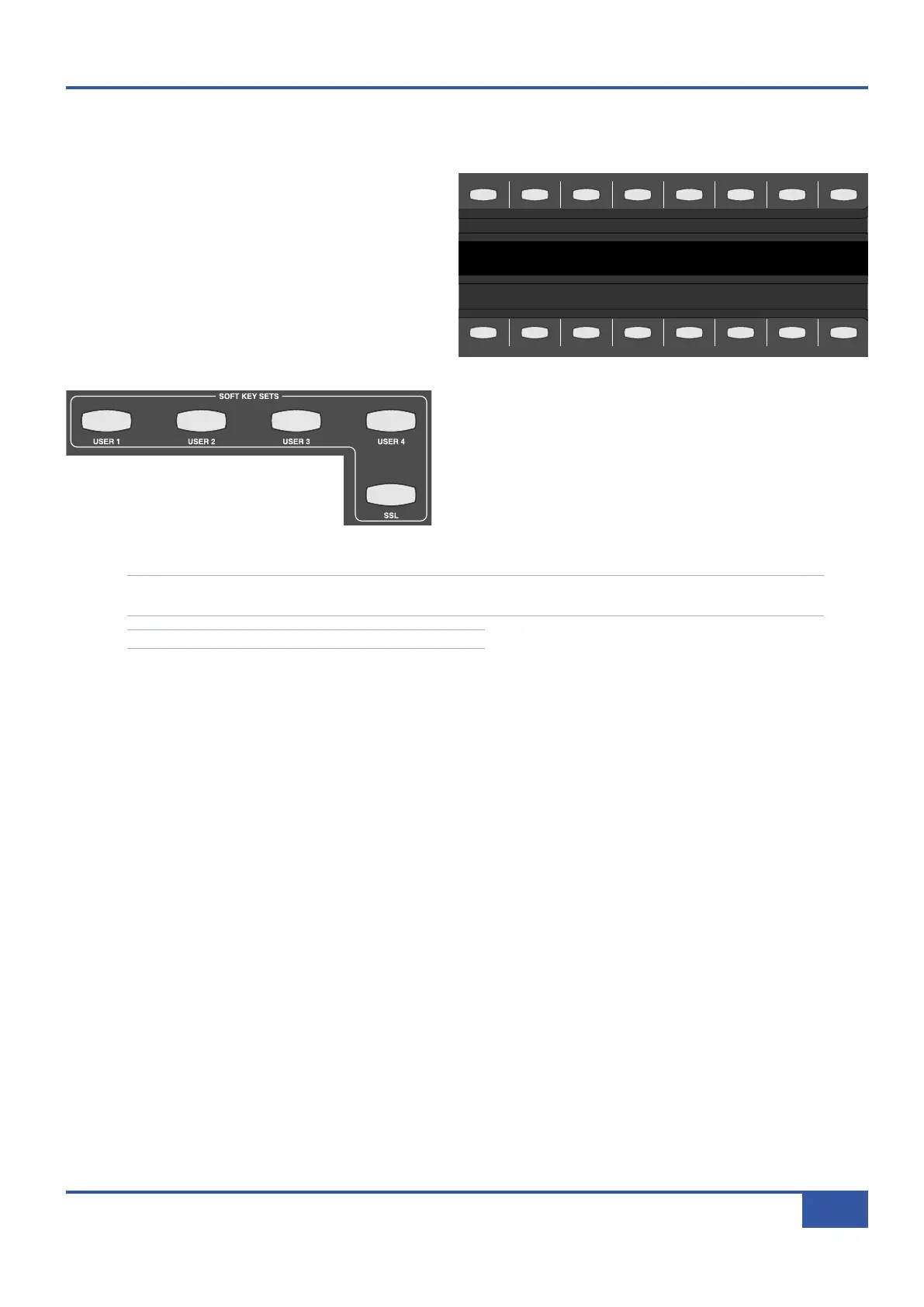
comprises 16 buttons above and below the digital scribble
strip which runs across the whole desk.
The scribble strip in between the button rows indicates
what functions are currently assigned to them: the upper
row of the display refers to the row of buttons above it, and
the lower display to the row of buttons below it.
There are six sets of soft keys, comprised of five user-definable sets
and the SSL set. The soft key set which is currently assigned to the
soft key area is selected using the SOFT KEY SETS buttons,
located on the right-hand side of the centre section, below the main
soft key area (shown left). The SSL set is selected by pressing the
SSL button, below the USER1-4 buttons. It will light to indicate
that it is selected. To exit the SSL soft keys and return to the
previously selected User set, press the SSL soft key button again.
Note that the SSL button overrides the USER buttons. However, the previously selected USER set indication is retained
along the top row of SOFT KEY SETS buttons as a reminder of which set will reactivate when the SSL set is deactivated.
For a description of the user-definable soft keys, see Page 83.
The SSL soft keys are arranged in menus, with the top row of soft keys acting as menu selectors and the bottom row accessing
functions within the currently selected menu. There are six menus of SSL soft keys, labelled
MMoonn
,
MMeetteerrss
,
AAuuttoo
,
TTRR
,
IIPP
and
MMiisscc
. The settings configured within these menus are detailed over the following pages.
When no soft key menus are active, the soft key display indicates the Current Project and Title (see Page 48).
i
Jack iJack
CUT
D
IM
i
n
22
62 811
0
0
1
1
2
2
3
3
4
4
5
5
6
6
10
20
30
40
50
5
0
5
10
10
20
30
40
50
5
0
5
10
10
20
30
40
50
5
0
5
10
10
20
30
40
50
5
0
5
10
10
20
30
40
50
5
0
5
10
10
20
30
40
50
5
0
5
10
10
20
30
40
50
5
0
5
10
10
20
30
40
50
5
0
5
10
10
20
30
40
50
5
0
5
10
10
20
30
40
50
5
0
5
10
10
20
30
40
50
5
0
5
10
10
20
30
40
50
5
0
5
10
10
20
30
40
50
5
0
5
10
10
20
30
40
50
5
0
5
10
10
20
30
40
50
5
0
5
10
10
20
30
40
50
5
0
5
10
9 10 11 12 13 14 15 161234 567 8
1234
5678
23456781 10 11 12 13 14 15 169 MASTER/FOCUS
REC
MON SOLO
MIX
LEFT
RIGHT
REC
MON SOLO
M
IX
SolidStateLogic Matrix
STEF19/05/08
in 2 2
62 811
C
UT
D
IM
ARTIST
20
30
40
50
60
15
10
5
0
10
20
30
40
50
5
0
5
10
ARTIST
t2::TProjec itle
Me etrs
Mon
Auto T
R IP MiscBass
t
2: : tprojec i ttl e
m
etersmonautotripmisc
iJack iJack
CUT
DIM
i
n
22
62 811
0
0
1
1
2
2
3
3
4
4
5
5
6
6
10
20
30
40
50
5
0
5
10
10
20
30
40
50
5
0
5
10
10
20
30
40
50
5
0
5
10
10
20
30
40
50
5
0
5
10
10
20
30
40
50
5
0
5
10
10
20
30
40
50
5
0
5
10
10
20
30
40
50
5
0
5
10
10
20
30
40
50
5
0
5
10
10
20
30
40
50
5
0
5
10
10
20
30
40
50
5
0
5
10
10
20
30
40
50
5
0
5
10
10
20
30
40
50
5
0
5
10
10
20
30
40
50
5
0
5
10
10
20
30
40
50
5
0
5
10
10
20
30
40
50
5
0
5
10
10
20
30
40
50
5
0
5
10
9 10 11 12 13 14 15 16123456 7 8
1234
5678
23456781 10 11 12 13 14 15 169 MASTER/FOCUS
R
EC
MON SOLO
MIX
LEFT
RIGHT
REC
MON SOLO
MIX
S
olidStateLogic Matrix
STEF19/05/08
in 2 2
62 811
CUTDIM
ARTIST
20
30
40
50
6
0
15
10
5
0
10
20
30
40
50
5
0
5
10
ARTIST
t2::TProjec itle
Me etrs
Mon
Auto T
R IP MiscBass
t
2: : tprojec i ttl e
metersmonautotripmisc
Chapter 3 - Analogue Signal Flow
41
Matrix Owner’s Manual



 To Next Page