S
S
T
T
E
E
P
P
8
8
:
:
Setting up Artist and Control Room
Headphones
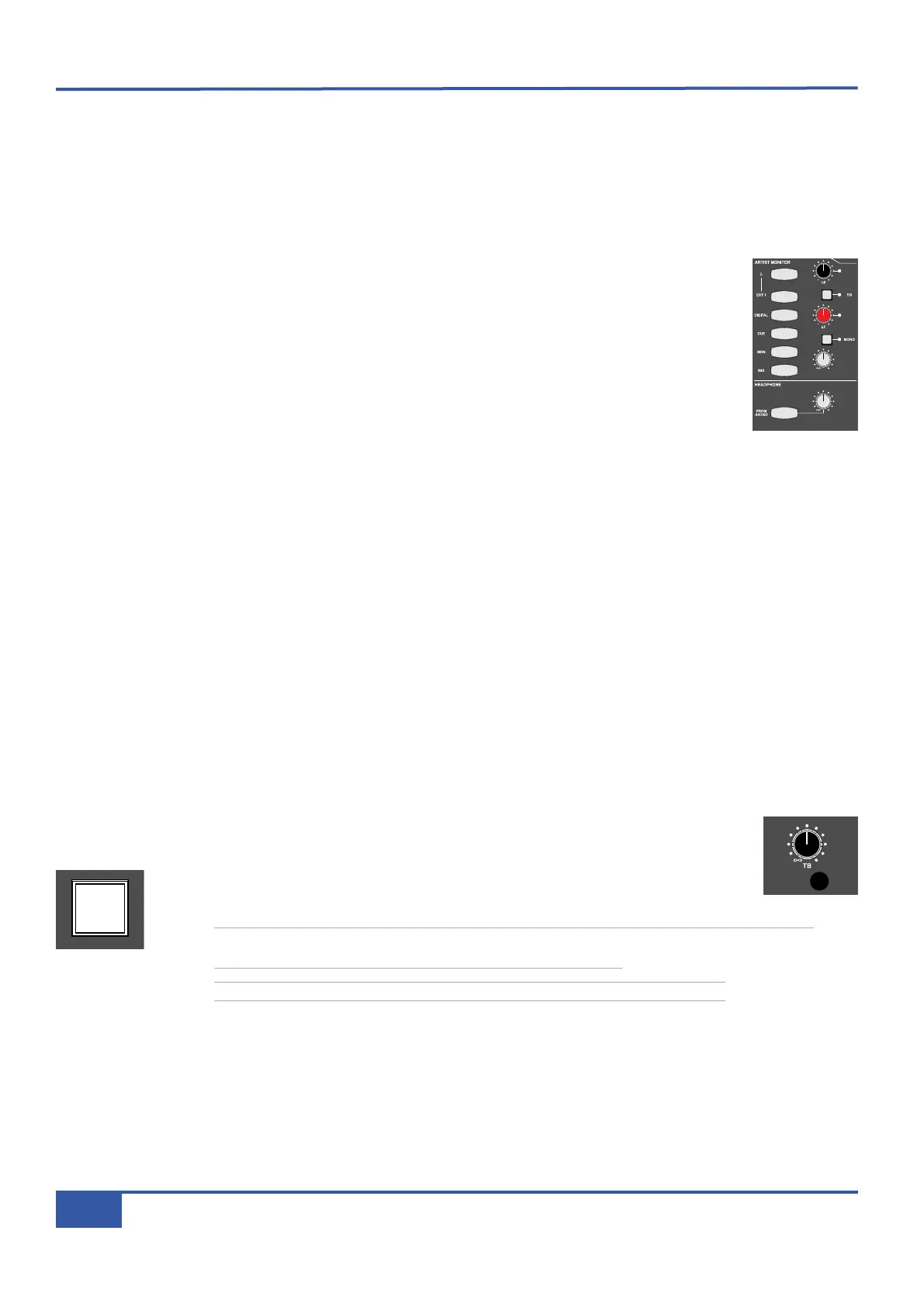
You can control the mix your musicians hear from the ARTIST MONITOR area, located to the right of the MAIN MONITOR
area, shown below.
You can listen to the artist’s mix using the desk’s own headphone output:
® Plug your headphones into the desk’s headphone socket, located in the trim on the right-hand side of
t
he desk.
® In the HEADPHONE area below the ARTIST MONITOR area, press the FROM ARTIST button.
This routes the artist’s mix, rather than the main monitor mix, to the desk’s headphones and it will light
to indicate that this routing has been selected.
® You can adjust the headphone level using the HEADPHONE pot next to the FROM ARTIST button.
We will use the stereo cue bus to create our artist’s headphone mix:
® In channel 16, press the CUE ST gain pot (the lower of the two CUE ST pots) to switch on the send. The LED below it and
to the right will light to indicate that it is on.
® Use the pot to adjust the gain, using the CUE ST meter to the right of the VU’s as a reference, and pan the signal using the
upper pot.
® In the ARTIST MONITOR area, press the CUE button (the fourth one down on the left-hand side). This selects the CUE
ST output as the send to the artist’s headphones. You will see the other source options available, shown above and below
the CUE button.
® Adjust the artist’s headphone level using the grey gain pot in the lower right-hand corner of the ARTIST MONITOR area.
® Press the button marked EQ, towards the top right, which inserts a 2-band EQ into the artist’s send.
® Adjust the EQ using the HF and LF pots, located above and below the EQ button.
® Press the MONO button to sum the send to mono. Press it again to restore the send to stereo.
You can talk to your musicians using the talkback mic. You can adjust the level of the talkback mic using the TB
pot, located above the MAIN MONITOR area (shown right). The talkback mic itself is just below the pot.
® Holding down the ARTIST button, located in the bottom right-hand corner of the centre
section, routes the talkback mic to the artist’s headphones.
Note that you will not hear the talkback mic on the desk headphone output, even though FROM
ARTIST is pressed, as the pick off point is pre level and TB injection.
Note that the main monitoring automatically dims when the talkback button is selected.
iJack iJack
CUT
D
IM
i
n
22
62 811
0
0
1
1
2
2
3
3
4
4
5
5
6
6
10
20
30
40
50
5
0
5
10
10
20
30
40
50
5
0
5
10
10
20
30
40
50
5
0
5
10
10
20
30
40
50
5
0
5
10
10
20
30
40
50
5
0
5
10
10
20
30
40
50
5
0
5
10
10
20
30
40
50
5
0
5
10
10
20
30
40
50
5
0
5
10
10
20
30
40
50
5
0
5
10
10
20
30
40
50
5
0
5
10
10
20
30
40
50
5
0
5
10
10
20
30
40
50
5
0
5
10
10
20
30
40
50
5
0
5
10
10
20
30
40
50
5
0
5
10
10
20
30
40
50
5
0
5
10
10
20
30
40
50
5
0
5
10
9 10 11 12 13 14 15 161234 567 8
1234
5678
23456781 10 11 12 13 14 15 169 MASTER/FOCUS
REC
MON SOLO
MIX
LEFT
RIGHT
REC
MON SOLO
MIX
SolidStateLogic Matrix
STEF19/05/08
in 2 2
62 811
C
UT
D
IM
ARTIST
20
30
40
50
60
15
10
5
0
10
20
30
40
50
5
0
5
10
ARTIST
t2::TProjec itle
Me etrs
Mon
Auto T
R IP MiscBass
t2:: tprojec i ttl e
m
etersmonautotripmisc
iJack iJack
CUT
DIM
i
n
22
62 811
0
0
1
1
2
2
3
3
4
4
5
5
6
6
10
20
30
40
50
5
0
5
10
10
20
30
40
50
5
0
5
10
10
20
30
40
50
5
0
5
10
10
20
30
40
50
5
0
5
10
10
20
30
40
50
5
0
5
10
10
20
30
40
50
5
0
5
10
10
20
30
40
50
5
0
5
10
10
20
30
40
50
5
0
5
10
10
20
30
40
50
5
0
5
10
10
20
30
40
50
5
0
5
10
10
20
30
40
50
5
0
5
10
10
20
30
40
50
5
0
5
10
10
20
30
40
50
5
0
5
10
10
20
30
40
50
5
0
5
10
10
20
30
40
50
5
0
5
10
10
20
30
40
50
5
0
5
10
9 10 11 12 13 14 15 161234 567 8
1234
5678
23456781 10 11 12 13 14 15 169 MASTER/FOCUS
REC
MON SOLO
MIX
LEFT
RIGHT
REC
MON SOLO
MIX
SolidStateLogic Matrix
STEF19/05/08
in 2 2
62 811
CUTDIM
ARTIST
20
30
40
50
60
15
10
5
0
10
20
30
40
50
5
0
5
10
A
RTIST
t2::TProjec itle
Me etrs
Mon
Auto T
R IP MiscBass
t2:: tprojec i ttl e
metersmonautotripmisc
iJack iJack
CUT
DIM
i
n
22
62 811
0
0
1
1
2
2
3
3
4
4
5
5
6
6
10
20
30
40
50
5
0
5
10
10
20
30
40
50
5
0
5
10
10
20
30
40
50
5
0
5
10
10
20
30
40
50
5
0
5
10
10
20
30
40
50
5
0
5
10
10
20
30
40
50
5
0
5
10
10
20
30
40
50
5
0
5
10
10
20
30
40
50
5
0
5
10
10
20
30
40
50
5
0
5
10
10
20
30
40
50
5
0
5
10
10
20
30
40
50
5
0
5
10
10
20
30
40
50
5
0
5
10
10
20
30
40
50
5
0
5
10
10
20
30
40
50
5
0
5
10
10
20
30
40
50
5
0
5
10
10
20
30
40
50
5
0
5
10
9 10 11 12 13 14 15 16123456 7 8
1234
5678
23456781 10 11 12 13 14 15 169 MASTER/FOCUS
REC
MON SOLO
MIX
LEFT
RIGHT
R
EC
MON SOLO
MIX
SolidStateLogic Matrix
STEF19/05/08
in 2 2
62 811
CUTDIM
ARTIST
20
30
40
50
60
15
10
5
0
10
20
30
40
50
5
0
5
10
ARTIST
t2::TProjec itle
Me etrs
Mon
Auto T
R IP MiscBass
t2:: tprojec i ttl e
metersmonautotripmisc
Chapter 2 - Getting Started
24
Matrix Owner’s Manual



 To Next Page