T
T
r
r
a
a
n
n
s
s
p
p
o
o
r
r
t
t
C
C
o
o
n
n
t
t
r
r
o
o
l
l
s
s
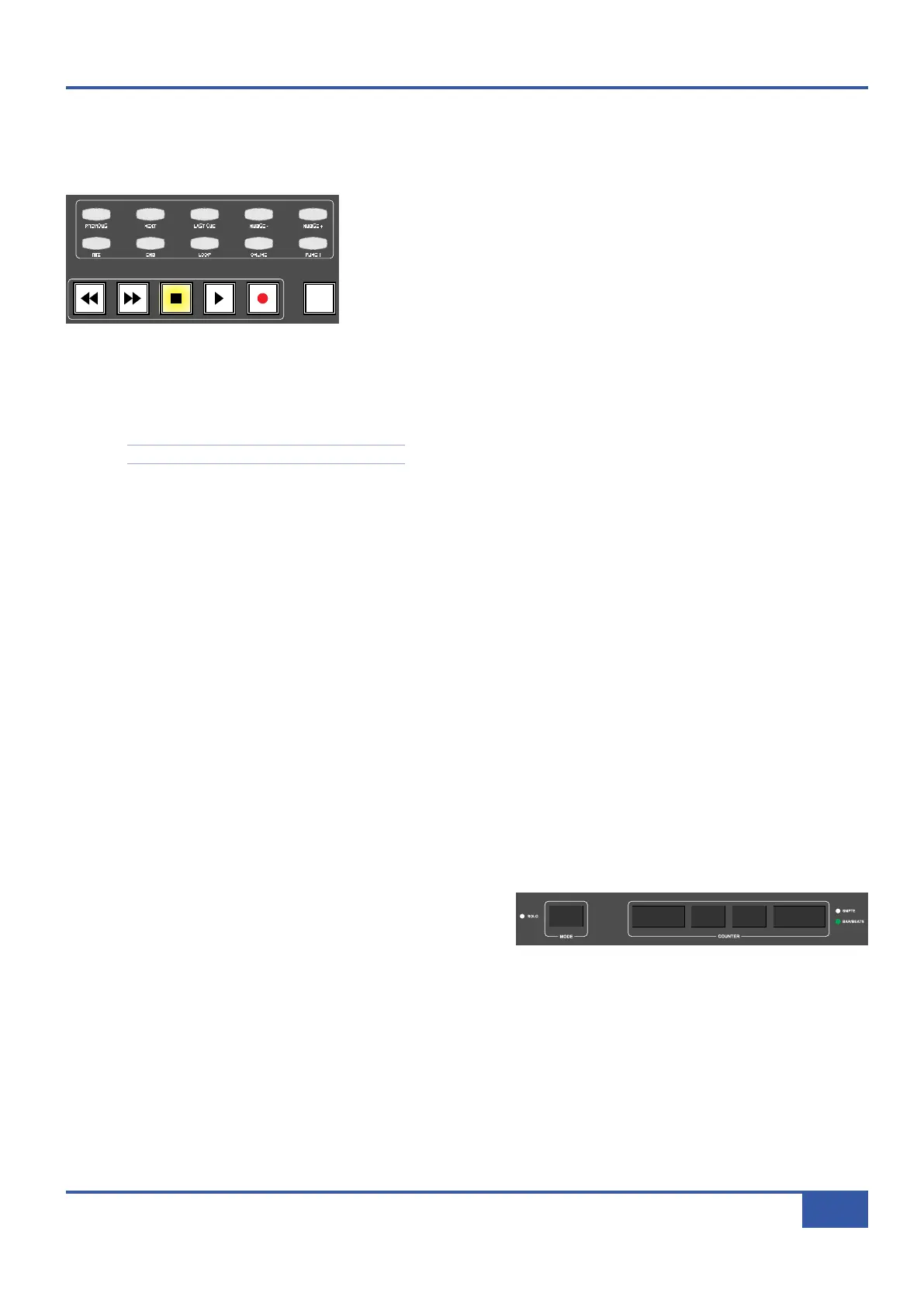
Your DAW’s transport can be controlled from the five dedicated transport buttons on Matrix control surface, located at the
bottom of the centre section:
The large buttons at the bottom of the transport area, with the exception of the
button marked ARTIST, operate the rewind, fast forward, stop, play and record,
functions in the same way as the DAW’s own on screen transport keys.
Above these large buttons are two rows of five smaller buttons which control
more advanced transport functions such as marker navigation and nudging. These
are labelled for use with the Pro Tools Profile, and are mapped to the nearest
equivalent function in the default Profiles for other DAWs, as detailed in the function map in Appendix A. The function assignments
of these buttons can be edited via the Transport/Utility page of the Soft Key Set area in the DAW tab, described on Page 89.
You will find definitions of these transport functions in your DAW’s
control surface documentation
, with the exception of
PREVIOUS, NEXT, and LAST CUE which function as follows:
Note that these functions are Pro Tools specific.
- PREVIOUS, located to the left of the top row, takes the cursor to the timeline marker numbered one lower than that
which was last selected using the PREVIOUS and NEXT buttons.
- NEXT, located to the right of PREVIOUS, takes the cursor to the timeline marker numbered one higher than that which
was last selected using the PREVIOUS and NEXT buttons.
- LAST CUE, the middle button in the top row, returns the cursor to the marker last selected using the NEXT button.
For example, if the marker previously selected using these buttons was Marker 4, PREVIOUS would move the cursor to Marker
3, NEXT to Marker 5, and LAST CUE back to Marker 4. On session startup, pressing any of these buttons will take the cursor
to Marker 1.
These additional transport functions appear in the HUI MIDI CMDS list in the DAW tab as Next Marker, Prev Marker,
and Last Marker respectively.
The internal Matrix marker counter can be reset using the Reset Marker soft key found in the HUI MIDI CMDS list in the
DAW tab (see Page 85).
S
S
e
e
s
s
s
s
i
i
o
o
n
n
C
C
o
o
u
u
n
n
t
t
e
e
r
r
The counter for the DAW timeline is shown in the numeric display above the digital scribble strip in the centre section.
The two digit mode display to the left is used only by MCU DAW’s
that support it. The larger counter to the right displays whichever
counter format is selected in the DAW, The format is indicated using
the LEDs to the right of the counter.
i
Jack iJack
CUT
DIM
i
n
2 2
62 811
0
0
1
1
2
2
3
3
4
4
5
5
6
6
10
20
30
40
50
5
0
5
10
10
20
30
40
50
5
0
5
10
10
20
30
40
50
5
0
5
10
10
20
30
40
50
5
0
5
10
10
20
30
40
50
5
0
5
10
10
20
30
40
50
5
0
5
10
10
20
30
40
50
5
0
5
10
10
20
30
40
50
5
0
5
10
10
20
30
40
50
5
0
5
10
10
20
30
40
50
5
0
5
10
10
20
30
40
50
5
0
5
10
10
20
30
40
50
5
0
5
10
10
20
30
40
50
5
0
5
10
10
20
30
40
50
5
0
5
10
10
20
30
40
50
5
0
5
10
10
20
30
40
50
5
0
5
10
9 10 11 12 13 14 15 1612345 6 78
1234
5
678
23456781 10 11 12 13 14 15 169 MASTER/FOCUS
REC
MON SOLO
MIX
LEFT
R
IGHT
REC
MON SOLO
MIX
SolidStateLogic Matrix
STEF19/05/08
in 2 2
62 811
CUTDIM
ARTIST
20
30
40
50
60
15
10
5
0
10
20
30
40
50
5
0
5
10
ARTIST
t2::TProjec itle
Me etrs
Mon
Auto T
R IP MiscBass
t2:: tprojec i tt l e
metersmonautotripmisc
iJack iJack
CUT
DIM
i
n
22
6
2811
0
0
1
1
2
2
3
3
4
4
5
5
6
6
10
2
0
3
0
40
50
5
0
5
10
10
2
0
3
0
40
50
5
0
5
10
10
2
0
3
0
40
50
5
0
5
10
10
2
0
3
0
40
50
5
0
5
10
10
2
0
3
0
40
50
5
0
5
10
10
2
0
3
0
40
50
5
0
5
10
10
2
0
3
0
40
50
5
0
5
10
10
2
0
3
0
40
50
5
0
5
10
10
2
0
3
0
40
50
5
0
5
10
10
2
0
3
0
40
50
5
0
5
10
10
2
0
3
0
40
50
5
0
5
10
10
2
0
3
0
40
50
5
0
5
10
10
2
0
3
0
40
50
5
0
5
10
10
2
0
3
0
40
50
5
0
5
10
10
2
0
3
0
40
50
5
0
5
10
10
2
0
3
0
40
50
5
0
5
10
9 10 11 12 13 14 15 1612345 6 78
1234
5678
23456781 10 11 12 13 14 15 169 MASTER/FOCUS
REC
MON SOLO
MIX
L
EFT
RIGHT
REC
MON SOLO
M
IX
SolidStateLogic Matrix
STEF19/05/08
i
n22
6
2811
CUTDIM
ARTIST
20
3
0
4
0
50
60
1
5
1
0
5
0
10
2
0
3
0
40
50
5
0
5
10
ARTIST
t2::TProjec itle
Me etrs
Mon
Auto T
R IP MiscBass
t2:: tprojec i tt l e
metersmonautotripmisc
Chapter 5 - DAW Control
69
Matrix Owner’s Manual



 To Next Page