Artist’s Monitoring
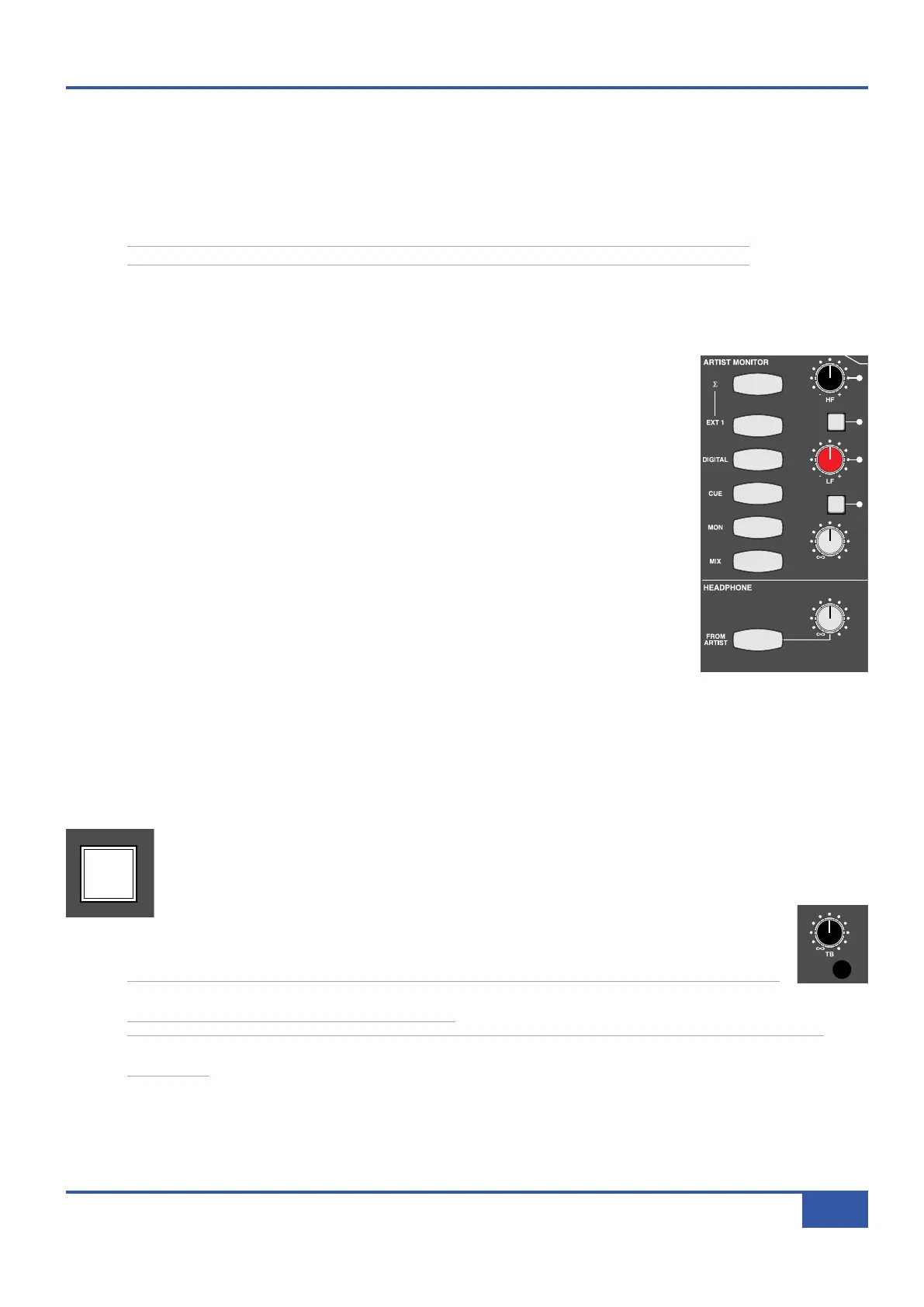
Matrix has an additional output for the artist’s headphones, which is controlled by the ARTIST MONITOR area of the centre
section, to the right of the MAIN MONITOR controls. The six buttons on the left hand side select the signal which is feeding
t
he artist’s monitoring. The sources available are (from bottom to top) the MIX bus, the control room monitor output (MON),
the CUE bus, the desk’s DIGITAL external monitor input (see Page 44), and the first of the two analogue external monitor inputs
(EXT1). Each button lights to indicate which is active.
Note that while the other buttons light yellow, the MON bus lights green in keeping with its colour coding.
Normally these buttons cancel each other. However, the summing button (
Σ
Σ
) located immediately above the five source selector
buttons, removes the intercancelling feature and instead sums all selected inputs, enabling multiple sources to be monitored
simultaneously. Deselecting the
ΣΣ
button cancels all monitoring sources and returns the artist’s monitor to intercancelling mode.
The ARTIST MONITOR has available a 2-band EQ with high-pass and low-pass shelving controls
and Total Recall LEDs. This is located in the top right of the ARTIST MONITOR area, and can
be switched into the circuit by pressing the EQ button located in between the HF and LF pots.
Both EQ pots are indented in the centre.
The pot in the bottom right is a gain control for the artist monitor output. The MONO button
above it reduces the feed to mono.
Engineer’s Headphones
There is an engineer’s headphone output located in the trim on the right hand side of Matrix, close
to the large navigation wheel. It is controlled by the area above the transport counter, consisting
of a HEADPHONE gain pot and a FROM ARTIST button which switches the headphone feed
from the control room monitor mix to the artist’s monitor mix (see above). The button lights to
indicate that the feed has been switched to the artist’s mix.
While the FROM ARTIST button is not selected, the headphone signal follows the source
selection in the MAIN MONITOR area, along with the øL and MONO buttons, but is not
affected by the DIM, CUT, MINI or level controls.
Conversely, when FROM ARTIST is selected, the engineer’s headphone signal follows the ARTIST MONITOR source
selection, EQ insert and MONO button, but is not affected by the level control.
T
T
a
a
l
l
k
k
b
b
a
a
c
c
k
k
The engineer can talk to the artist by pressing and holding the ARTIST button located to the left of the large
navigation wheel in the centre section. This sends the signal from the desk’s inbuilt talkback microphone to the
artist’s monitor feed.
The talkback microphone is located above the MAIN MONITOR area of the centre section
(shown right). Its level is set by the TB gain trim immediately above it. When it is pressed, the
DIM function is automatically activated in the main monitoring.
Note that the talkback function can also be assigned one of the two rear panel foot switch inputs via the DAW
tab in the Matrix Remote. See Page 90 for more details.
Note also that the talkback does not feed the engineer’s headphone signal, even when the FROM ARTIST button has
been selected.
iJack iJack
CUT
DIM
i
n
22
62 811
0
0
1
1
2
2
3
3
4
4
5
5
6
6
10
20
30
4
0
50
5
0
5
1
0
10
20
30
4
0
50
5
0
5
1
0
10
20
30
4
0
50
5
0
5
1
0
10
20
30
4
0
50
5
0
5
1
0
10
20
30
4
0
50
5
0
5
1
0
10
20
30
4
0
50
5
0
5
1
0
10
20
30
4
0
50
5
0
5
1
0
10
20
30
4
0
50
5
0
5
1
0
10
20
30
4
0
50
5
0
5
1
0
10
20
30
4
0
50
5
0
5
1
0
10
20
30
4
0
50
5
0
5
1
0
10
20
30
4
0
50
5
0
5
1
0
10
20
30
4
0
50
5
0
5
1
0
10
20
30
4
0
50
5
0
5
1
0
10
20
30
4
0
50
5
0
5
1
0
10
20
30
4
0
50
5
0
5
1
0
9 10 11 12 13 14 15 161234 567 8
1234
5678
23456781 10 11 12 13 14 15 169 MASTER/FOCUS
REC
MON SOLO
MIX
LEFT
RIGHT
REC
MON SOLO
MIX
SolidStateLogic Matrix
STEF19/05/08
in 2 2
62 811
CUTDIM
ARTIST
20
30
40
5
0
60
15
10
5
0
10
20
30
4
0
50
5
0
5
1
0
ARTIST
t2::TProjec itle
Me etrs
Mon
Auto T
R IP MiscBass
t2:: tprojec i ttl e
metersmonautotripmisc
iJack iJack
C
UT
DIM
i
n
22
62 811
0
0
1
1
2
2
3
3
4
4
5
5
6
6
10
20
30
40
50
5
0
5
10
10
20
30
40
50
5
0
5
10
10
20
30
40
50
5
0
5
10
10
20
30
40
50
5
0
5
10
10
20
30
40
50
5
0
5
10
10
20
30
40
50
5
0
5
10
10
20
30
40
50
5
0
5
10
10
20
30
40
50
5
0
5
10
10
20
30
40
50
5
0
5
10
10
20
30
40
50
5
0
5
10
10
20
30
40
50
5
0
5
10
10
20
30
40
50
5
0
5
10
10
20
30
40
50
5
0
5
10
10
20
30
40
50
5
0
5
10
10
20
30
40
50
5
0
5
10
10
20
30
40
50
5
0
5
10
9 10 11 12 13 14 15 161234 567 8
1234
5678
23456781 10 11 12 13 14 15 169 MASTER/FOCUS
REC
MON SOLO
MIX
LEFT
R
IGHT
REC
MON SOLO
MIX
SolidStateLogic Matrix
STEF19/05/08
in 2 2
62 811
CUTDIM
A
RTIST
20
30
40
50
60
15
10
5
0
10
20
30
40
50
5
0
5
10
ARTIST
t2::TProjec itle
Me etrs
Mon
Auto T
R IP MiscBass
t
2: : tprojec i ttl e
metersmonautotripmisc
iJack iJack
CUT
DIM
i
n
22
62 811
0
0
1
1
2
2
3
3
4
4
5
5
6
6
10
20
30
40
50
5
0
5
10
10
20
30
40
50
5
0
5
10
10
20
30
40
50
5
0
5
10
10
20
30
40
50
5
0
5
10
10
20
30
40
50
5
0
5
10
10
20
30
40
50
5
0
5
10
10
20
30
40
50
5
0
5
10
10
20
30
40
50
5
0
5
10
10
20
30
40
50
5
0
5
10
10
20
30
40
50
5
0
5
10
10
20
30
40
50
5
0
5
10
10
20
30
40
50
5
0
5
10
10
20
30
40
50
5
0
5
10
10
20
30
40
50
5
0
5
10
10
20
30
40
50
5
0
5
10
10
20
30
40
50
5
0
5
10
9 10 11 12 13 14 15 161234 567 8
1
234
5678
23456781 10 11 12 13 14 15 169 MASTER/FOCUS
REC
MON SOLO
MIX
LEFT
RIGHT
REC
M
ON SOLO
MIX
SolidStateLogic Matrix
STEF19/05/08
in 2 2
62 811
CUTDIM
ARTIST
20
30
40
50
60
15
10
5
0
10
20
30
40
50
5
0
5
10
ARTIST
t2::TProjec itle
Me etrs
Mon
Auto T
R IP MiscBass
t
2: : tprojec i ttl e
metersmonautotripmisc
Chapter 3 - Analogue Signal Flow
39
Matrix Owner’s Manual



 To Next Page