D
D
A
A
W
W
T
T
r
r
a
a
c
c
k
k
C
C
o
o
n
n
t
t
r
r
o
o
l
l
A number of the parameters within the tracks of your DAW can be controlled using the lower section of the
Matrix channel strip. The Matrix controls which can be used in this way include:
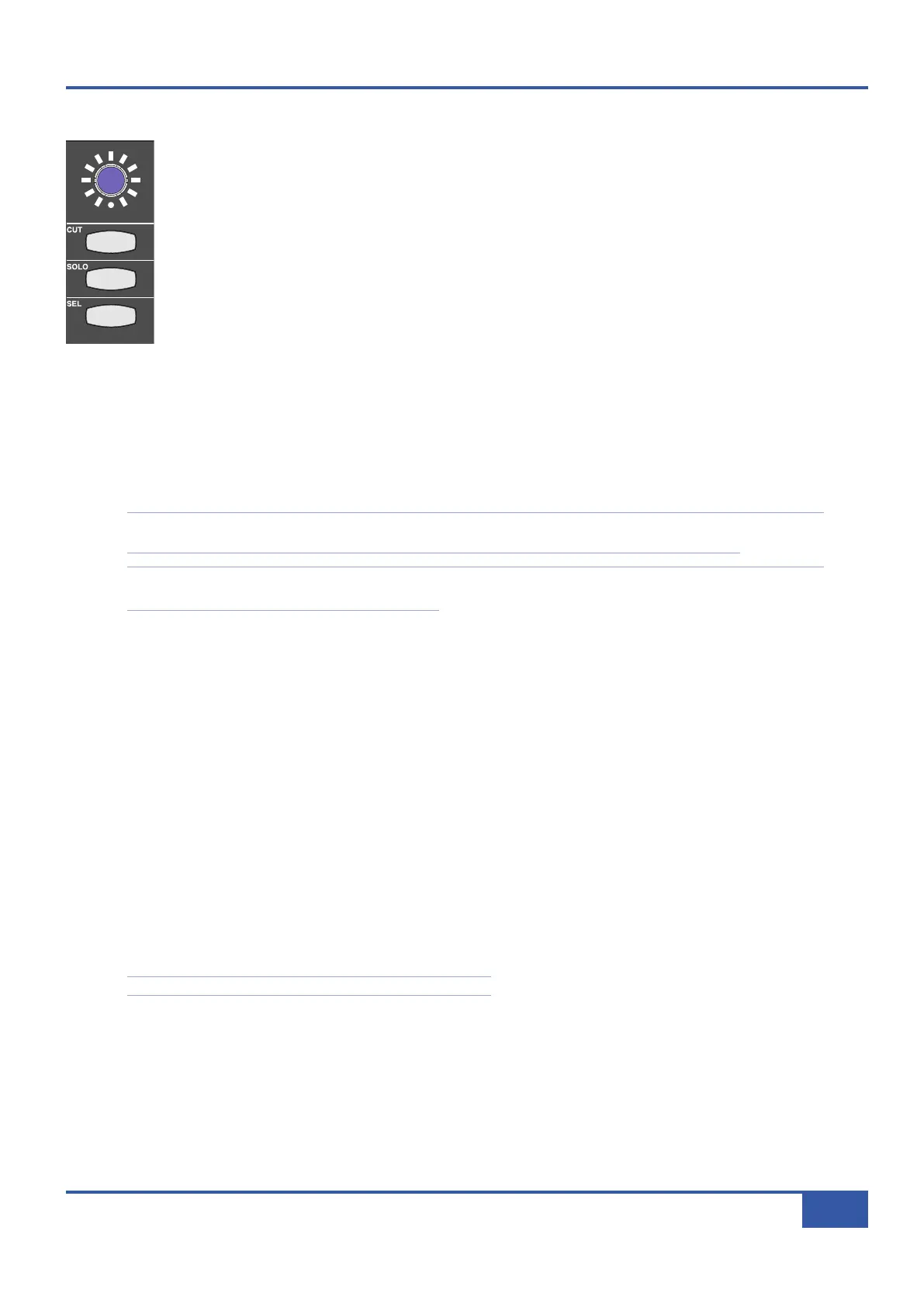
- The blue shaft encoder located below the digital scribble strip, called the V-Pot,
- The momentary switch in the centre of the blue pot, called the V-Sel,
- The CUT, SOLO and SEL buttons located beneath the blue pot,
- The channel fader.
The functions of the V-Pot, V-Sel button and SEL button are defined by the protocol-specific assignment soft keys.
Additional options and modes are available via V-POT MODE and SEL KEY buttons described on Pages 66
and 67.
When in DAW Focus mode, the channel CUT button mutes the DAW track which that channel is currently controlling, and the
channel SOLO button solos the DAW track which that channel is currently controlling. The CUT and SOLO buttons light when
pressed to show that they are active, just as in Analogue Focus mode. The presence of a solo button within the DAW tracks is
indicated by the CUT buttons on all unsoloed tracks flashing, and by the SOLO LED to the to the left of the 2-digit Mode
display also flashing.
Please note that there are two SEL buttons in the Matrix channel. The other SEL button is located further up the channel
strip, above the digital scribble strip, and is concerned with the desk’s analogue routing, not DAW control.
Note that in DAW mode, the channel SOLO mode is defined by the DAW, and that the analogue and DAW solo
functions have separate centre section solo indicators.
T
T
h
h
e
e
D
D
i
i
g
g
i
i
t
t
a
a
l
l
S
S
c
c
r
r
i
i
b
b
b
b
l
l
e
e
S
S
t
t
r
r
i
i
p
p
The digital scribble strip that runs across the centre of the desk consists of two display rows. By default, the top row contains
labels associated with the channel faders, and is therefore Focus mode dependent: In Analogue Focus mode it displays the channel
names defined in the Channels tab of the Matrix Remote (switching to a momentary display of the fader value in dB when a fader
is moved), whereas in DAW Focus mode the top row normally displays the DAW track names.
The bottom row of the scribble strip is associated with the V-Pot located beneath the scribble strip. When Matrix is assigned to
a layer controlling a DAW, the bottom row of the scribble strip displays either the name or the value of the parameter controlled
by the V-Pot. When controlling Pro Tools, the scribble strip only displays the name of the V-Pot. For DAWs controlled via the
MCU protocol, please refer to their control surface documentation for full details of their scribble strip displays and messages.
In order to cater for variations in the ways MCU DAWs return channel data, there is a Flip Scribble Strips box in the DAW
tab of the Remote, located to the right of the Edit Profiles button. This switches the two rows of the scribble strip, allowing
Nuendo labelling to follow the Logic format. Flip Scribble Strips is enabled for the Nuendo default Profile and disabled for the
Logic default Profile. For other MCU DAWs, the labelling format described in their control surface documentation will enable
you to ascertain whether or not to activate this function.
See Page 92 for a description of the scribble strip in CC layers.
iJack iJack
CUT
DIM
i
n
22
62 811
0
0
1
1
2
2
3
3
4
4
5
5
6
6
10
20
30
40
50
5
0
5
10
10
20
30
40
50
5
0
5
10
10
20
30
40
50
5
0
5
10
10
20
30
40
50
5
0
5
10
10
20
30
40
50
5
0
5
10
10
20
30
40
50
5
0
5
10
10
20
30
40
50
5
0
5
10
10
20
30
40
50
5
0
5
10
10
20
30
40
50
5
0
5
10
10
20
30
40
50
5
0
5
10
10
20
30
40
50
5
0
5
10
10
20
30
40
50
5
0
5
10
10
20
30
40
50
5
0
5
10
10
20
30
40
50
5
0
5
10
10
20
30
40
50
5
0
5
10
10
20
30
40
50
5
0
5
10
9 10 11 12 13 14 15 161234 567 8
1234
5678
2
3456781 10 11 12 13 14 15 169 MASTER/FOCUS
R
EC
MON SOLO
MIX
LEFT
RIGHT
REC
MON SOLO
MIX
SolidStateLogic Matrix
STEF19/05/08
in 2 2
62 811
CUTDIM
ARTIST
20
30
40
50
60
15
10
5
0
10
20
30
40
50
5
0
5
10
ARTIST
t2::TProjec itle
Me etrs
Mon
Auto T
R IP MiscBass
t2:: tprojec i ttl e
m
etersmonautotripmisc
Chapter 5 - DAW Control
65
Matrix Owner’s Manual



 To Next Page