STARLITE Mk5 User Manual Version 1.2
36
Setting the Drive Card DIP Switches
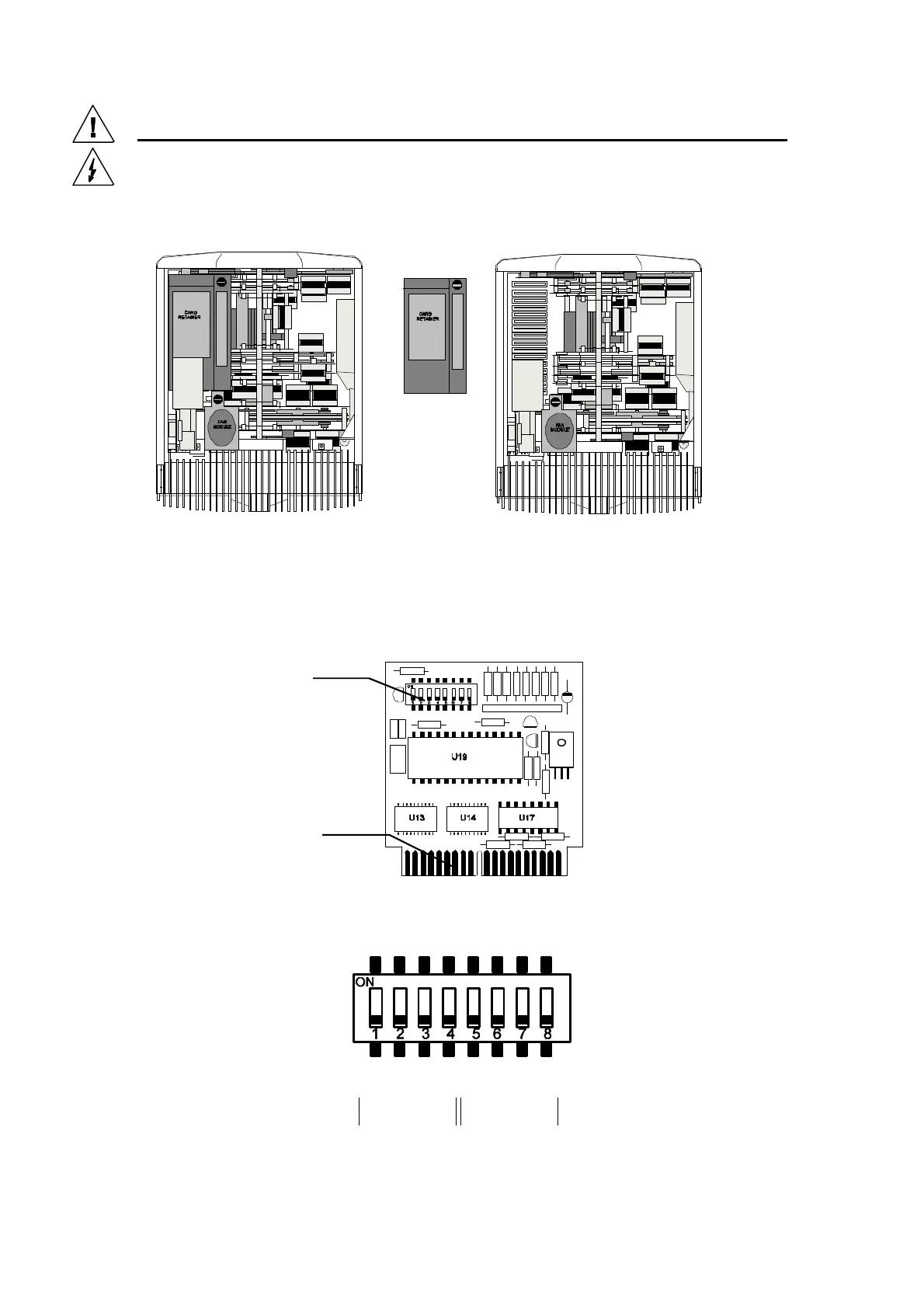
The decoder and drive cards can be accessed by first removing the unit head covers and the secondary
cooling fan module (or card retainer) which can be removed by unlatching the quarter turn fasteners.
Now unplug the fan module(or remove card retainer) and place aside. You now have access to the
decoder and drive cards. (See: “Fan” side of head)
Drive Card DIP Switches
All head function drive cards are identical and can be used to control any of the various head
functions. The 8-way DIP Binary personality switch is split into two halves. Switches 1 to 4 set the
Drive function and switches 5 to 8 set the internal DMX address for the head functions.
Note: These switches are factory set to the standard personality listed below.
STARLITE Mk 5 DRIVE CARD (Issue 3)
8 way DIP switch
8 Way Binary
Personality
Edge Connector
with locating slot
Drive
Functions
Internal DMX
Address


 To Next Page