4-8
150832-639 Operator Manual Operating Instructions
4.5.1 Backup (Override)
Control System Operation
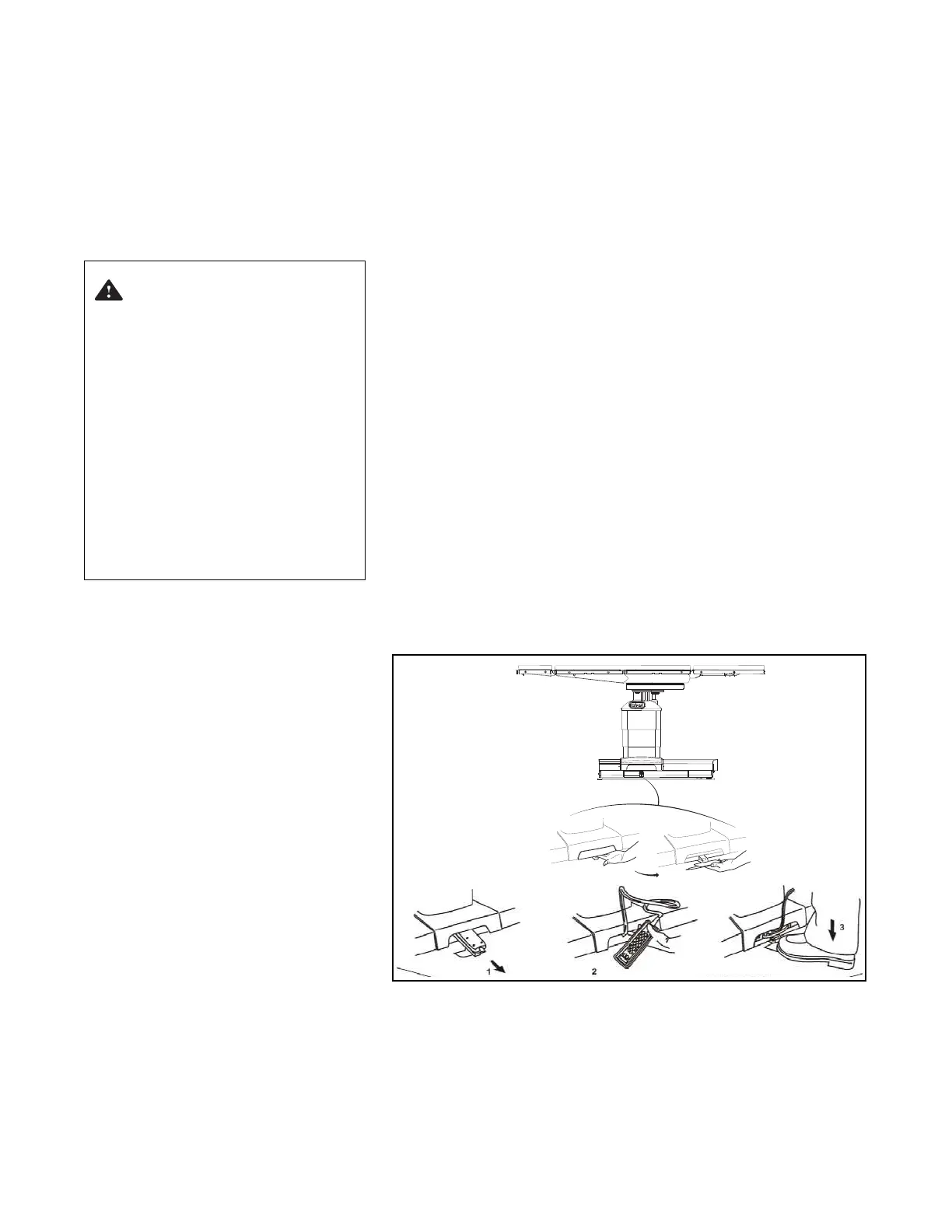
To operate system, proceed as follows (see Figure 4-5):
1. Flip pedal down.
2. Slide Backup Hand Control out from base.
3. To operate table functions, pump pedal while pressing desired
function button on Backup Hand Control (see Figure 4-6).
NOTE: When using the Backup (Override) Control System, note the
following:
1) For FLOOR UNLOCK and SLIDE (HEAD and FOOT)
functions, it is not necessary to pump pedal.
2) Pressing any button on the Backup Hand Control deactivates
Primary Hand Control.
3) When a SLIDE pushbutton is pressed, the green LED (see
Figure 4-6) next to the word CAUTION should light indicating
system is active.
4) When any tabletop function button (except SLIDE) is pressed,
green LED next to USE WITH FOOT PUMP should light.
5) The ALS System is NOT active during Backup (Override)
Control System operation.
6) When table is in the Backup UNLOCK configuration, tabletop
functioning IS active. LOCK table before moving tabletop.
7) Reverse Orientation is NOT available in Backup Control
operation. If patient was in reverse orientation when auxiliary
control was activated, change TREND to REV. TREND, LEFT
TILT to RIGHT TILT, etc.
Figure 4-5. Backup (Override) Control System
4.5.2 Backup Hand Control
Description
The Backup Hand Control pushbutton descriptions are as follows
(Figure 4-6):
NOTE: Simply release the Backup Hand Control pushbutton when
desired STERIS 4085 General Surgical Table Tabletop position has
WARNING – PERSONAL
INJURY AND/OR EQUIPMENT
DAMAGE HAZARD:
• ALS System is not active
during Backup Control.
Ensure proper tabletop
movements to prevent
patient/staff injury and/or
equipment damage.
• During Backup Control,
tabletop functions are
available even if table floor
locks are NOT engaged.
LOCK table before moving
tabletop or transferring
patient.
C-MAX 05
Ensurecapscover
socketswhennotinuse.
SERVE













 To Next Page