Stonex R25/R25LR Total Station - User Manual 111
1. Set-up the instrument on tripod or adjustment platform and leveling accurately.
2. Aim at the cross-hairs of collimator or the obvious target at a distance. Gets the face left angle reading Hl and
the face right angle reading Hr.
3. Calculating the horizontal collimation error C according to:
if C<8″, no adjustment will be necessary. If C>8″, proceed with the following adjustment.
II. Adjustment by program
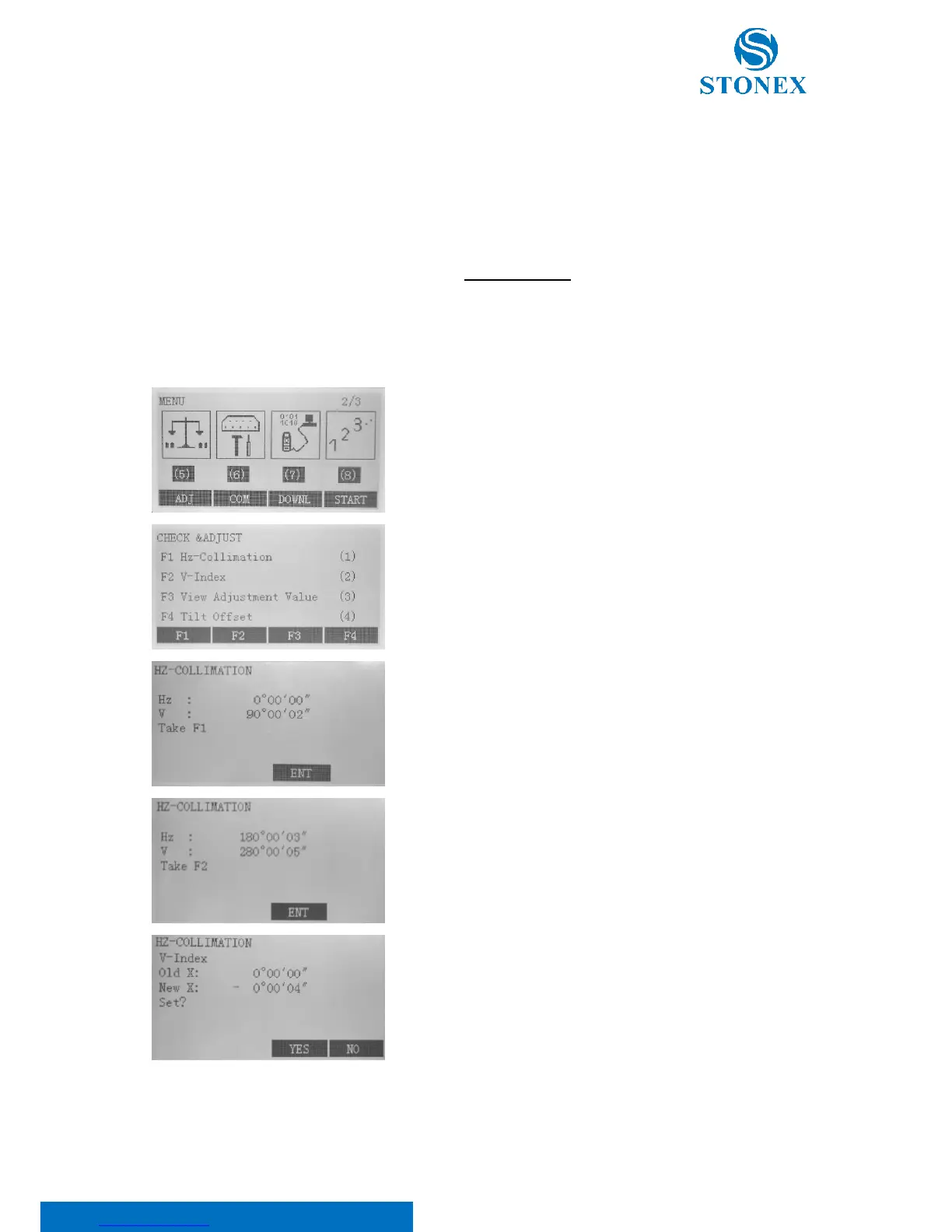
In the second page of the menu select F1[ADJ].
Then, F1 “Hz-Collimation” to access collimation error process.
Aim at the cross-hair of collimator at telescope left, and it’ll display
the horizontal and vertical angles.
Aim at the cross-hair of collimator at telescope right, and it’ll display
the horizontal and vertical angles
The software will calculate the new collimation error and vertical index
error automatically. press F3[YES] to renew the correction, or press F4:
[NO] to give up this adjustment,



 To Next Page