Stonex R25/R25LR Total Station - User Manual 110
When the offset value falls within the range ±20″, adjustment is not necessary. If one of the offset values (Xoffset,
Yoffset) exceeds ±20″, adjust the value as follows.
II. Adjustment by program
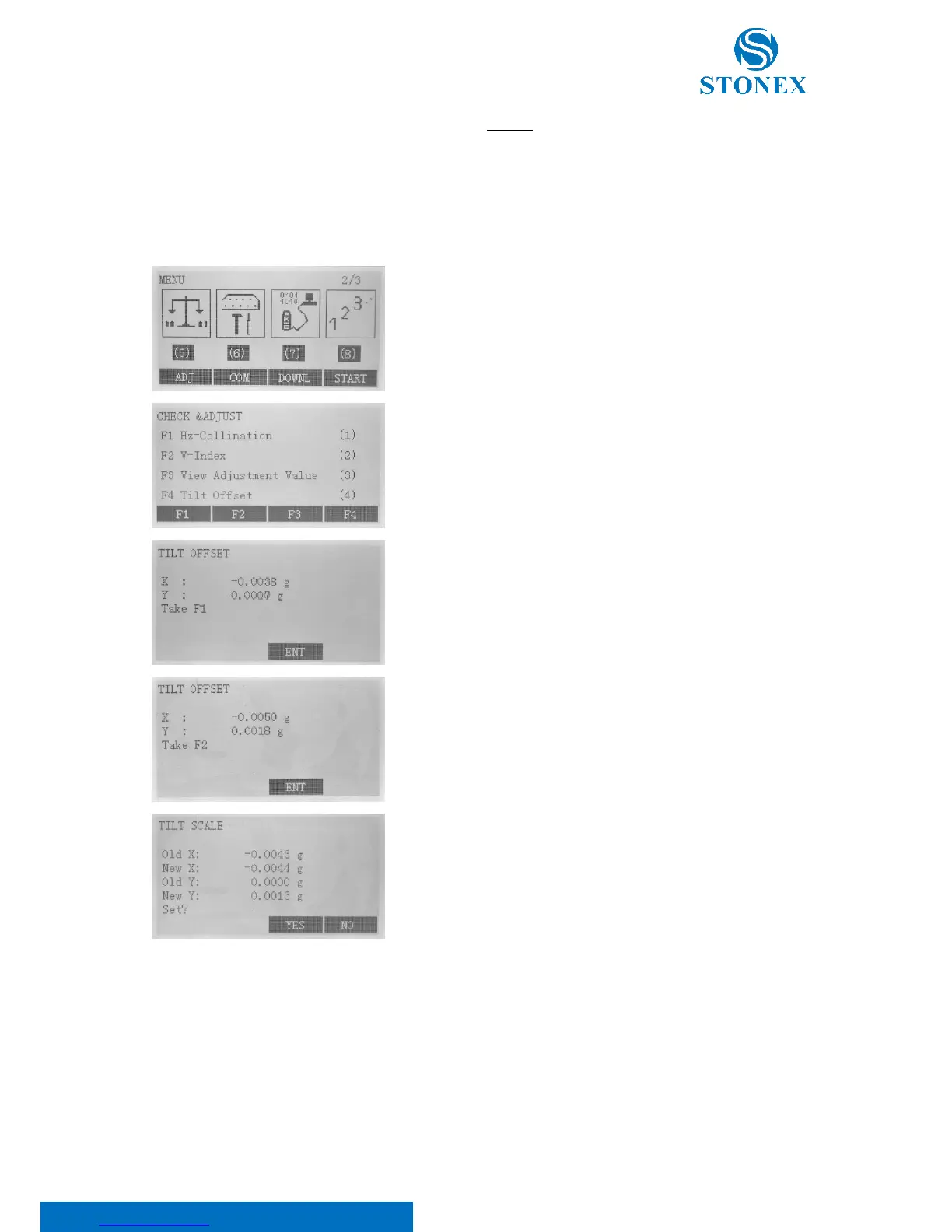
In the second page of the menu select F1[ADJ],
Then, F4 “Tilt Offset” to adjust the tilt.
Press F3[ENT] to set the horizontal angle to 0°.
“Take F2” is displayed. Rotate the top of instrument 180°/200gon. Wait
a few seconds for the display to stabilize, then press F3[ENT].
If both correction constant are in the range, press F3[YES] to renew
the correction angle, or press F4[NO] to give up this adjustment,
10.8. Horizontal collimation error C
If the telescope’s sight line isn’t perpendicular to the horizontal axis, the collimation error will appear. The
assembling, transportation and operation will cause this error.
I. Check



 To Next Page