Stonex R25/R25LR Total Station - User Manual 52
8.2. Stake out
This program calculates the required elements to stake out points from coordinates or manually entered angles,
horizontal distances and heights. Stake out differences can be displayed continuously.
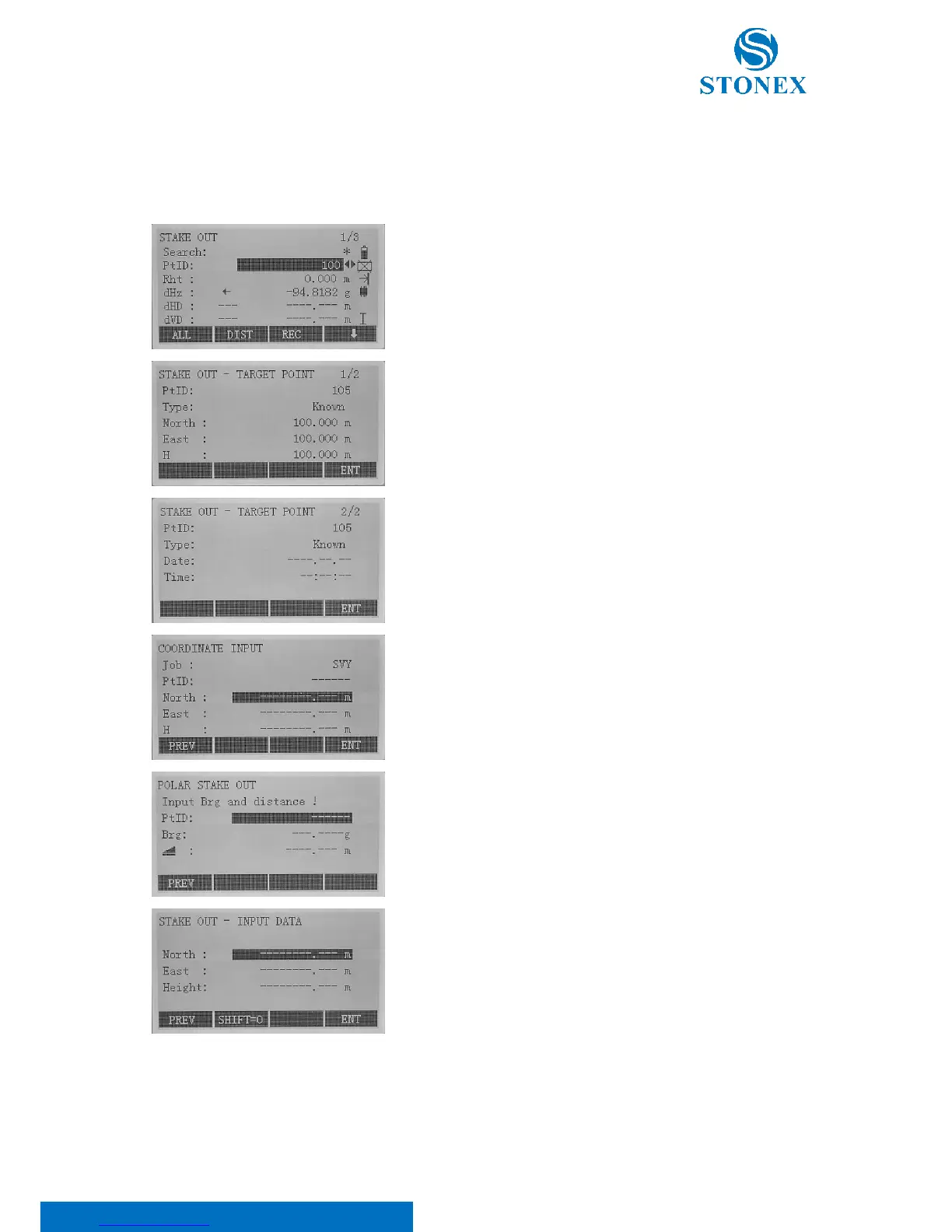
Select the point to stake out using the ◄/► keys in the PtID row or
editing the point name in the Search row. For the latter, write the
name and press [ENT] key to search the point.
Use the F4[ ↓ ] key to scroll the black bar at the bottom of the display.
Select the [VIEW] softkey to see the coordinates and info of the
selected point.
If you want to insert coordinates of a new point to stake out, select
the [ENH] softkey and edit name and coordinates.
Select [B&D] softkey to input the angle and the longitudinal distance
offsets.
Select [MANUAL] softkey to input the easting, northing and height
offsets. You can press F2[SHIFT=0] to set all the values to 0.
To start staking out, in order to have enough time to find the point, it useful to change the EDM setting, applying a
higher number of measurements. Press [EDM] softkey, then F2[TIMES] and set the number you prefer (refer to 5.3.
EDM settings for more details).



 To Next Page