• Network: Adds a tag if none is present. The value of the tag is the queue number times two (six
for queue 3, etc…)
• Core: All frames exiting this port will be tagged, in some cases double-tagged.
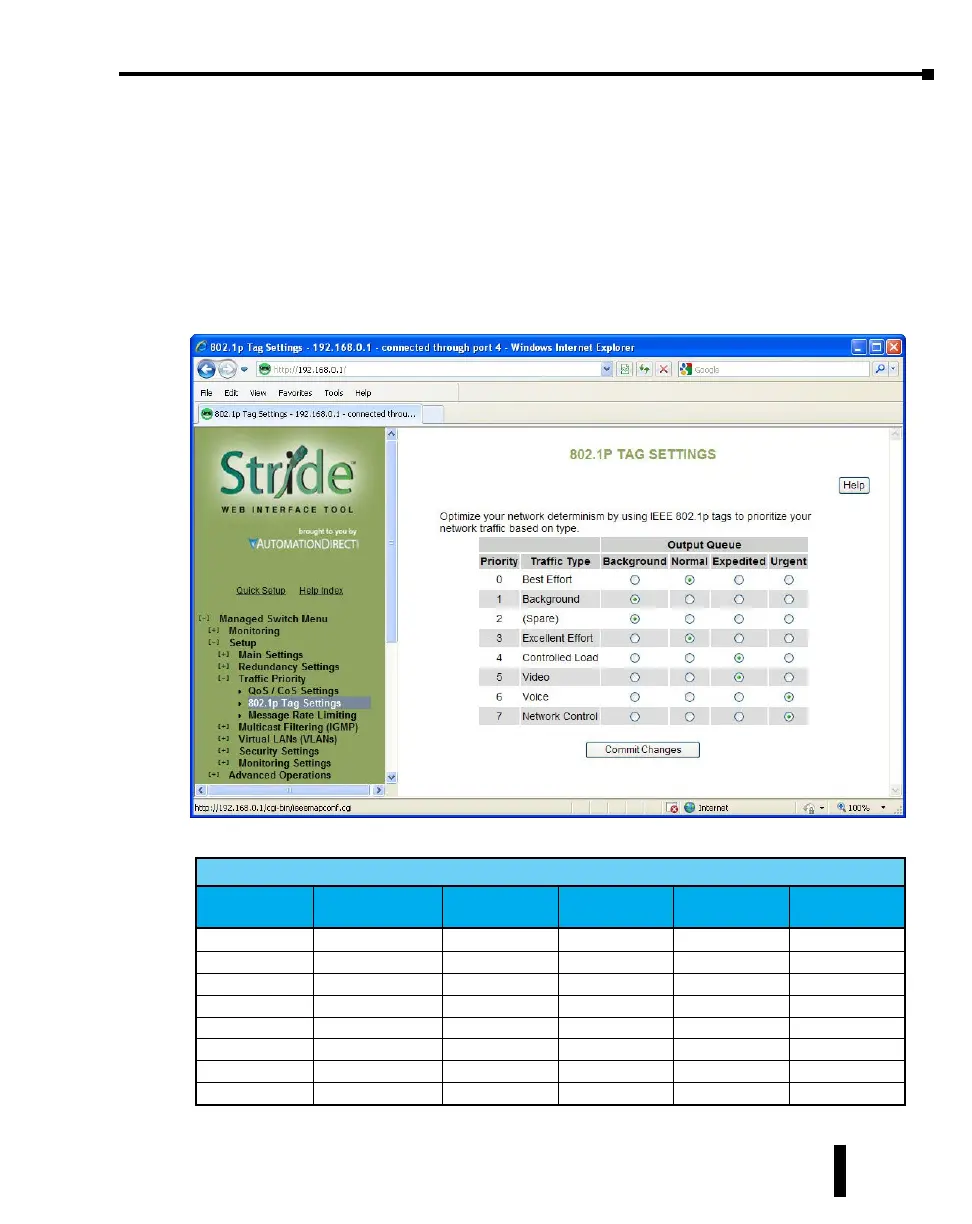
802.1p Tag Settings
The managedswitch has four Output Queues: Background, Normal, Expedited and Urgent
with Background being the lowest priority and Urgent being the highest priority. In the
IEEE 802.1p specification, there are eight different priorities that are carried in the tag.
Configure each of the 802.1p priorities for the output queue that is appropriate. More than
one 802.1p priority may be configured for a given output queue.
The table below indicates the defaults:
Managed Switch Output Queue
Priority
Traffic Type
(802.1p priority)
Background Normal Expedited Urgent
0
Best Effort
X
1
Background
X
2
(Spare)
X
3
Excellent Effort
X
4
Controlled Load
X
5
Video
X
6
Voice
X
7
Network Control
X
4-31
Chapter 4 - Managed Switch Software Setup
Stride Industrial Ethernet Switches User Manual 2nd Ed. Rev. A



 To Next Page