SNMP read/write name: This parameter sets the SNMPv2 community string and SNMPv3
user name that may be used by SNMP clients for read/write access to settings. Enter your
own value if you wish to secure read/write access. (Default is “private”).
SNMP read/write password: These parameters set the password for secure SNMPv3 access
by the read/write user. SNMP passwords must be at least 8 characters long. The default
read/write password is ‘privatepwd’ (w/out quotes).
Terminal and web: Password set here is used for Telnet and web access. To change the
administrative password, select this option. (Default password is ‘admin’).
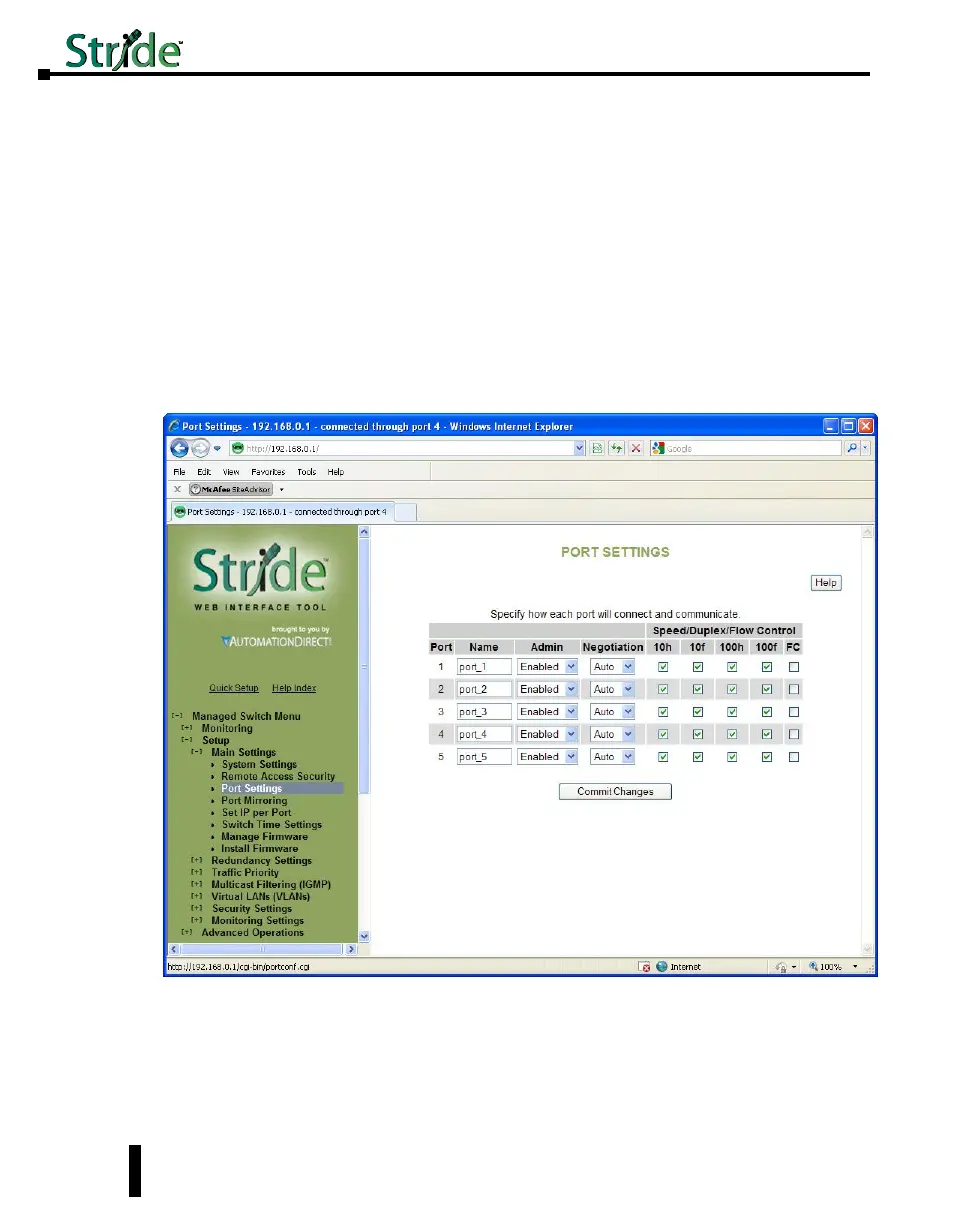
Port Settings
The switch comes with default port settings that allow you to connect to the Ethernet
Ports without any configuration. Should there be a need to change the name of the ports,
negotiation settings or flow control settings, you can do this in the Port Settings menu.
Port Name: Each port in the managed switch can be identified with a custom name. Specify
a name for each port here.
Admin: Ports can be enabled or disabled in the managed switch. For ports that are disabled,
they are virtually non-existent (not visible in terms of switch operation or spanning tree
algorithm). Choose to enable or disable a port by selecting Enabled or Disabled, respectively.
4-6
Chapter 4 - Managed Switch Software Setup
Stride Industrial Ethernet Switches User Manual 2nd Ed. Rev. A



 To Next Page