Installation, Plastic Case Switches
Overview
These industrial Ethernet switches and media converters can be snapped onto a standard 35
mm x 7.5 mm height DIN rail (Standard: CENELEC EN50022). The switches and media
converters can be mounted either vertically or horizontally. Refer to the mechanical drawings
that follow for proper mounting.
NOTE: Make sure to allow enough room to route your Ethernet copper or fiber optic cables.
DIN Rail Mounting
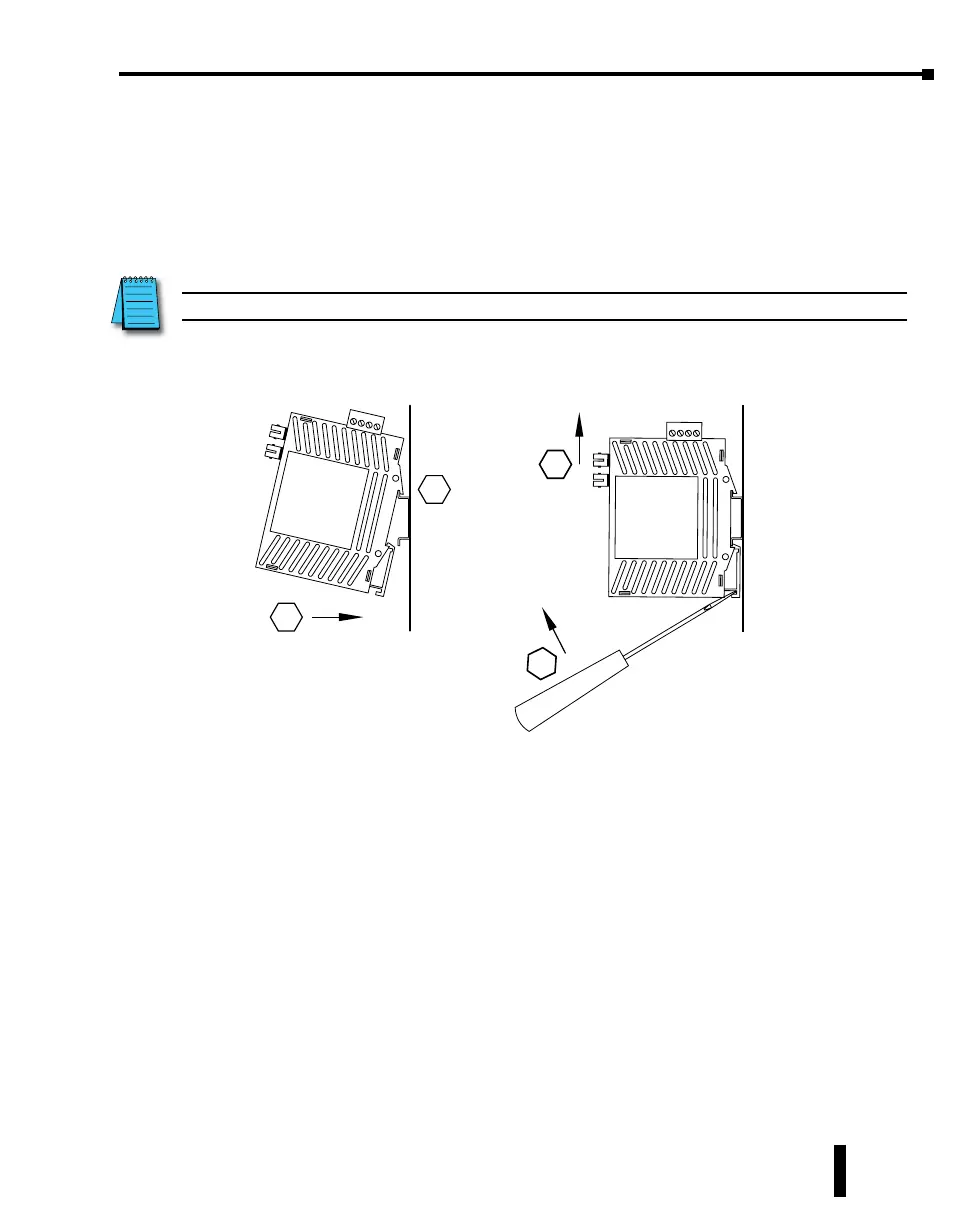
DIN rail mounting steps:
1. Hook top back of unit over the DIN rail.
2. Push bottom back onto the DIN rail until it snaps into place.
DIN rail removal steps:
A. Insert screwdriver into DIN clip and pry until it releases from the DIN rail.
B. Unhook top of unit from DIN rail.
Mounting Removal
1
2
A
B
Stride Industrial Ethernet Switches User Manual 2nd Ed. Rev. B
Chapter 1 - Hardware
1-11



 To Next Page