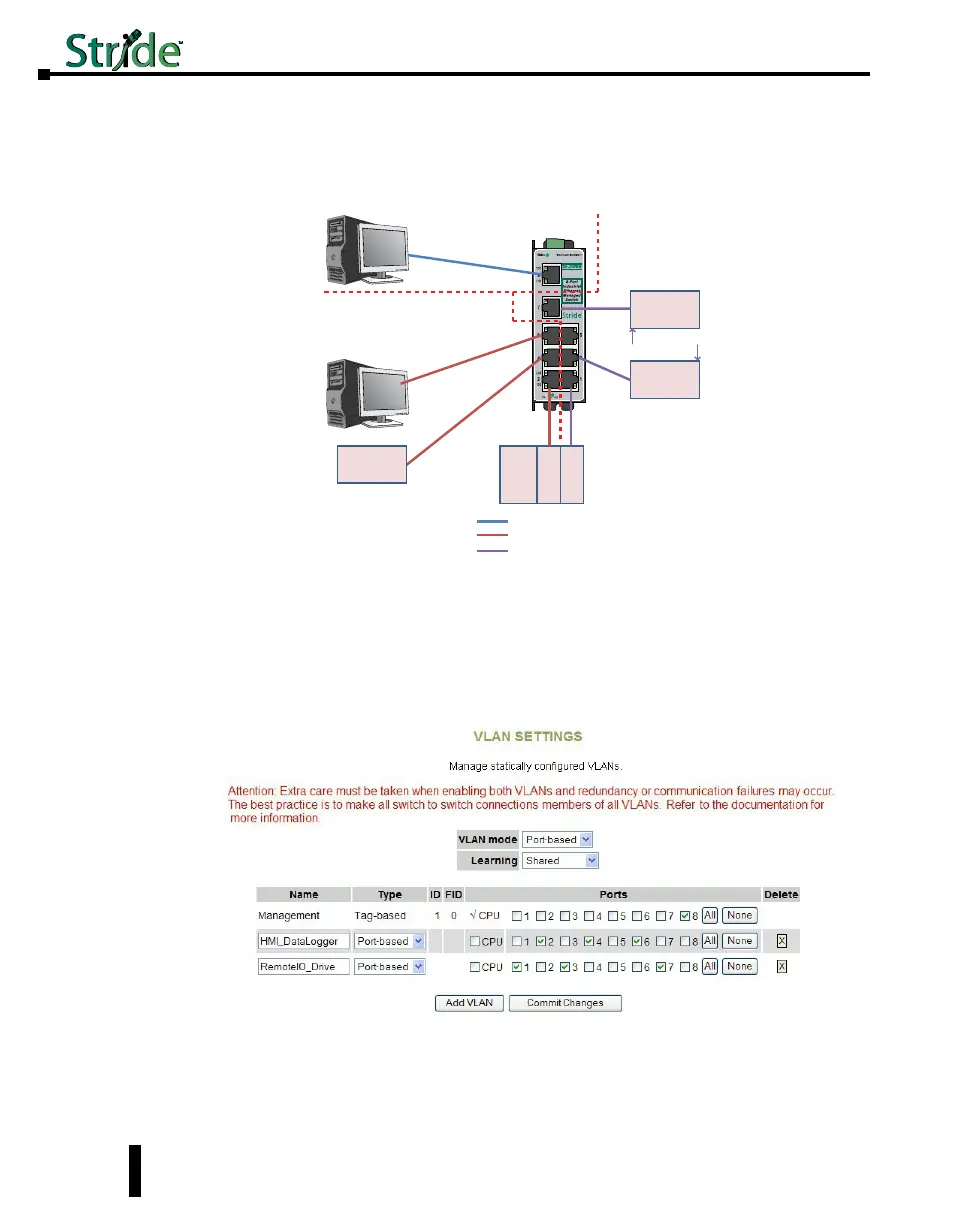
Problem #2: This scenario is very similar to the first. We have the same problem to solve
but the logistics are simpler, in that all of the devices are local and can be wired into the same
switch.
Remote
I / O
PLC/
PAC
Ether
Interface 1
Ether
Interface 2
Drive
VLAN 1 = Management VLAN
VLAN 2 = PLC (Ethernet Interface 1), Office PC, HMI
VLAN 3 = PLC (Ethernet Interface 2), Remote I/O, Drive
Configuration
/ Diagnostic
PC for VLAN
Management
Office PC
HMI
Heavy Multicast
and Broadcast
Traffic
VLAN 1
VLAN 2
VLAN 3
Solution: We will use a Stride managed switch, utilizing the Port-based VLAN feature. The
question could be posed, “Why not just use two unmanaged switches?” While this would
work, the customer wants to use as few components in the system as possible to minimize
points for possible equipment faults and he would like the enhanced diagnostic capabilities
that a managed switch provides.
Switch Setup:
When using port-based VLANs, VLAN tags don’t determine which VLAN a port is in so it is
not necessary to configure the ports.
4-50
Chapter 4 - Managed Switch Software Setup
Stride Industrial Ethernet Switches User Manual 2nd Ed. Rev. A


 To Next Page