53
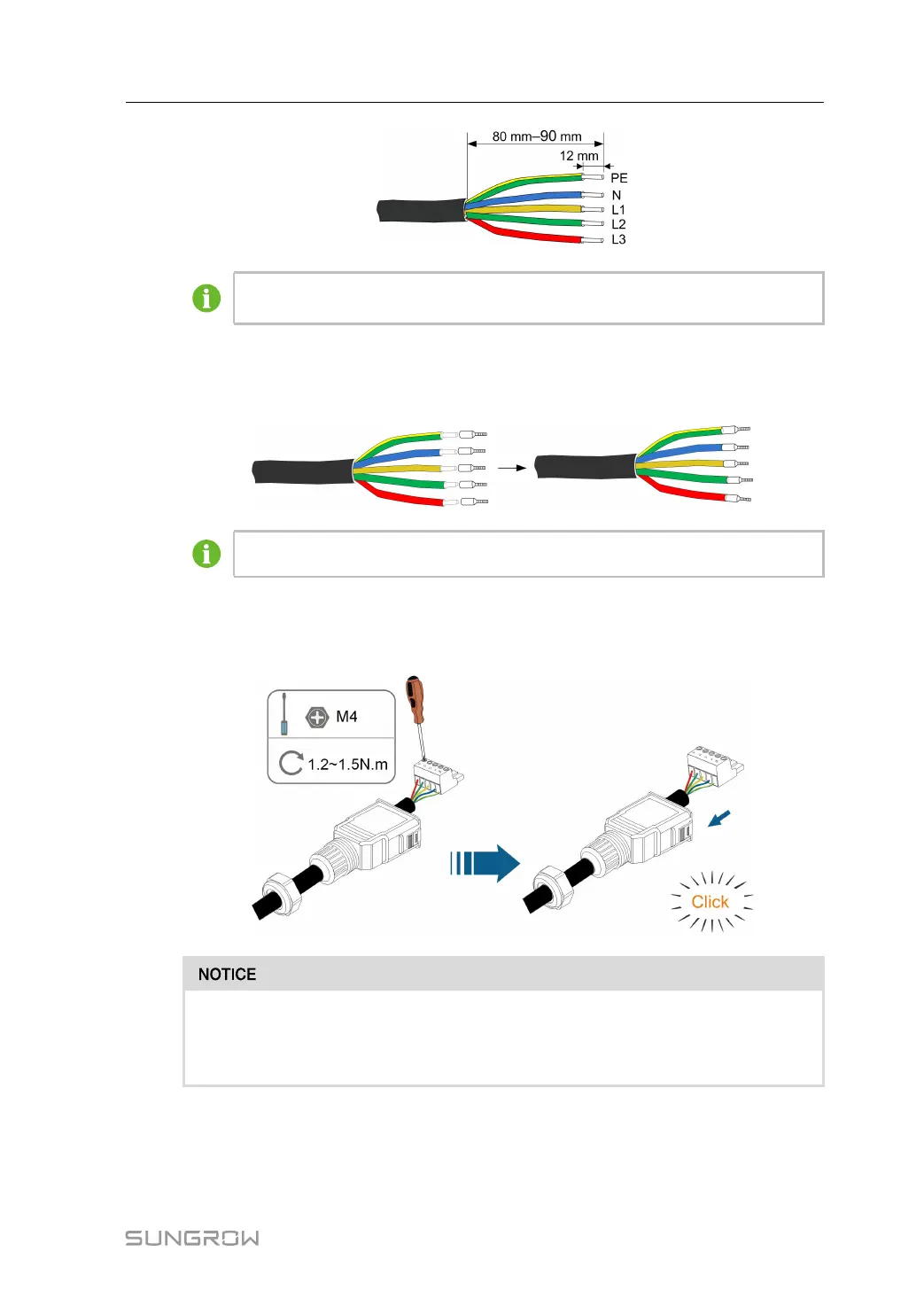
The color of the cable cores in the figure is for reference only, and cables or cable
cores selected must meet local standards.
step 6 (Optional) When using a multi-core multi-strand copper wire cable, connect the AC wire
head to the cord end terminal (hand-tight). In case of single-strand copper wire, skip this
step.
Select appropriate cord end terminal according to the cable cross-section area.
step 7 Fix all the wires to the terminal plug according to the assignment and tighten to a torque of
1.2 N•m–1.5 N•m with a screwdriver. Then push the terminal plug into the housing until there
is an audible click.
Observe the plug assignment. Do not connect any phase line to the "PE" terminal
or the PE wire to the "N" terminal. Otherwise, unrecoverable damage to the inverter
may follow.
step 8 Ensure that the wires are securely in place by slightly pulling them. Tighten the swivel nut to
the housing.
User Manual 6 Electrical Connection



 To Next Page