EasyManua.ls Logo

Sungrow SH3K6 - Page 57

Sungrow SH3K6
118 pages
Print Icon
To Next Page IconTo Next Page
To Previous Page IconTo Previous Page
Loading...
User Manual 6 Electrical Connection
49
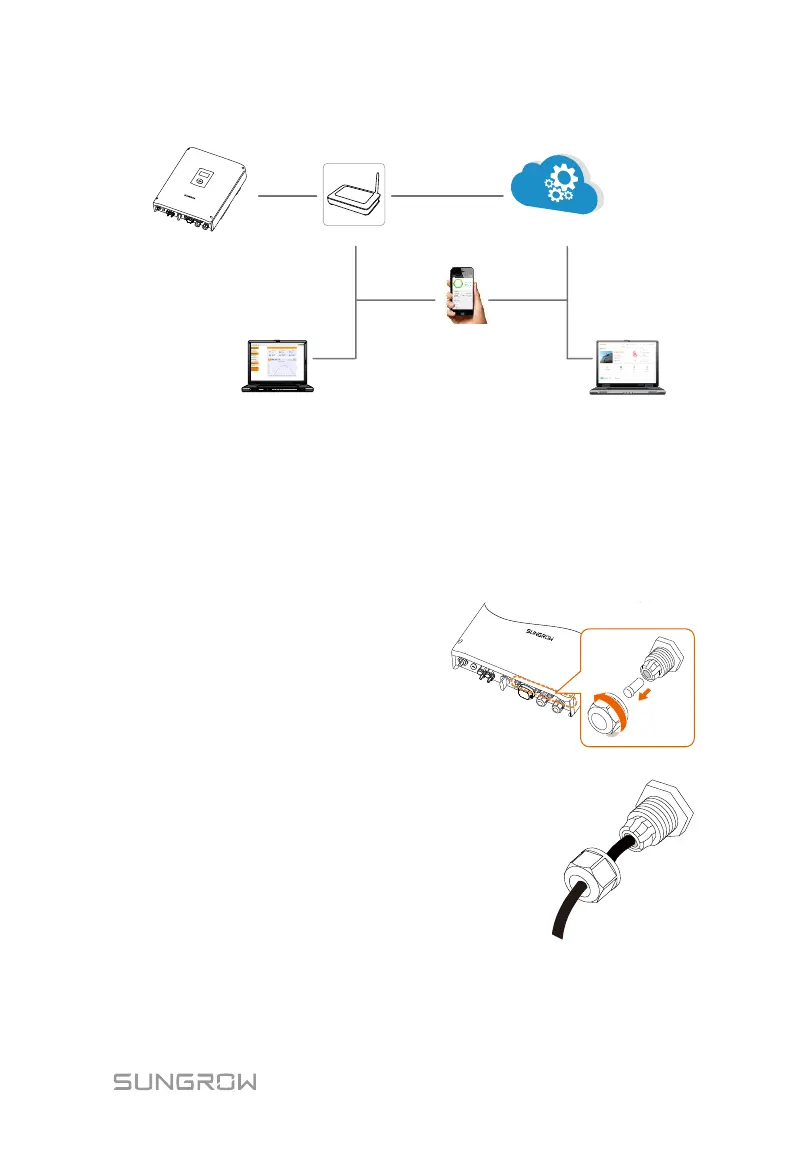
The following figure shows how the Ethernet connection may work with a router.
Router/SwitchInverter
Internet
iSolarCloud APP
Local access
Remote
iSolarCloud server
iSolarCloud Web
Browser
Fig. 6-5 Ethernet Connection with a Router
Cable Requirements
Use a TIA/EIA 568B standard network cable with a diameter of 3 mm5.3 mm.
Refer to the switch/routers manual for the definition of the communication port.
Procedure:
1. Unscrew the swivel nut
from any Com. port.
2. Lead the cable through
the cable gland and
remove the cable jacket
by 8 mm15 mm.
3. Use the Ethernet crimper to crimp the cable and connect the cable to
RJ45 plug according to TIA/EIA 568B, as shown below.

Table of Contents

Other manuals for Sungrow SH3K6

Related product manuals