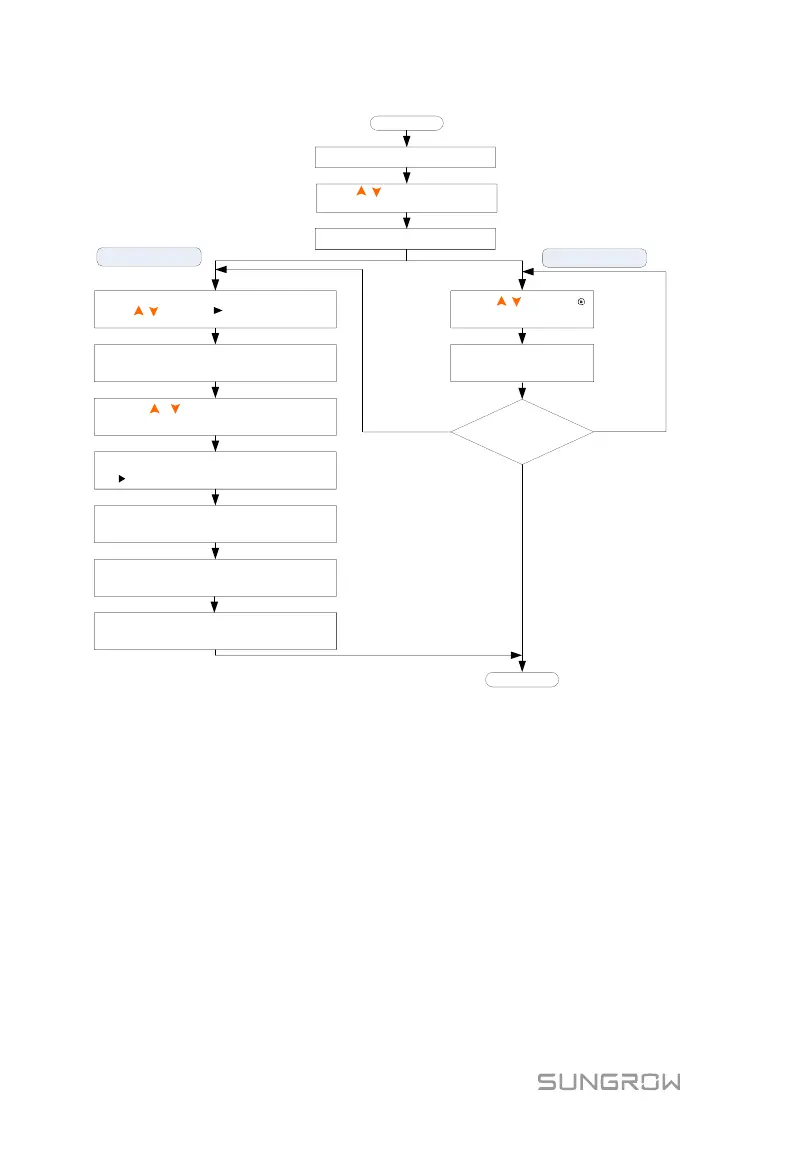
Selecting mode
Modifying mode
Press / to move to the desired item.
Press ENT and the first digit of the
value to be set flashes.
Press / to set the value and
Press ENT/ESC to move the cursor.
Press ENT if the whole value is OK and
the will move back to the item name.
Repeat the steps above for the
settings of the other items.
Press ESC to quit the menu and a
prompt will appear.
Press ENT to save and apply the setting.
To discard the setting, Press ESC.
Press ENT to enter the menu.
Press / to navigate through
the menu.
Press ENT to confirm a selection.
Press / to move
to the desired item.
Press ENT to confirm.
Sub-parameters
to be set?
End
Start
No
Yes
(modifying)
Yes
(selecting)
Fig. 7-1 Button Operations
7.3 Commissioning Procedure
If all the items mentioned in section 7.1 are OK, proceed as follows to start the
inverter for the first time.
1. Connect the AC circuit breaker.
2. Connect the DC circuit breaker between the inverter and the battery
pack.
3. (Optional) Power on the battery pack manually if a battery is equipped.
4. Rotate the DC switch to “ON”. The DC switch may be integrated in the
inverter or installed by the customer.
5. The LCD screen will be activated 5s later and enter the initial settings.



 To Next Page