6 Electrical Connection User Manual
52
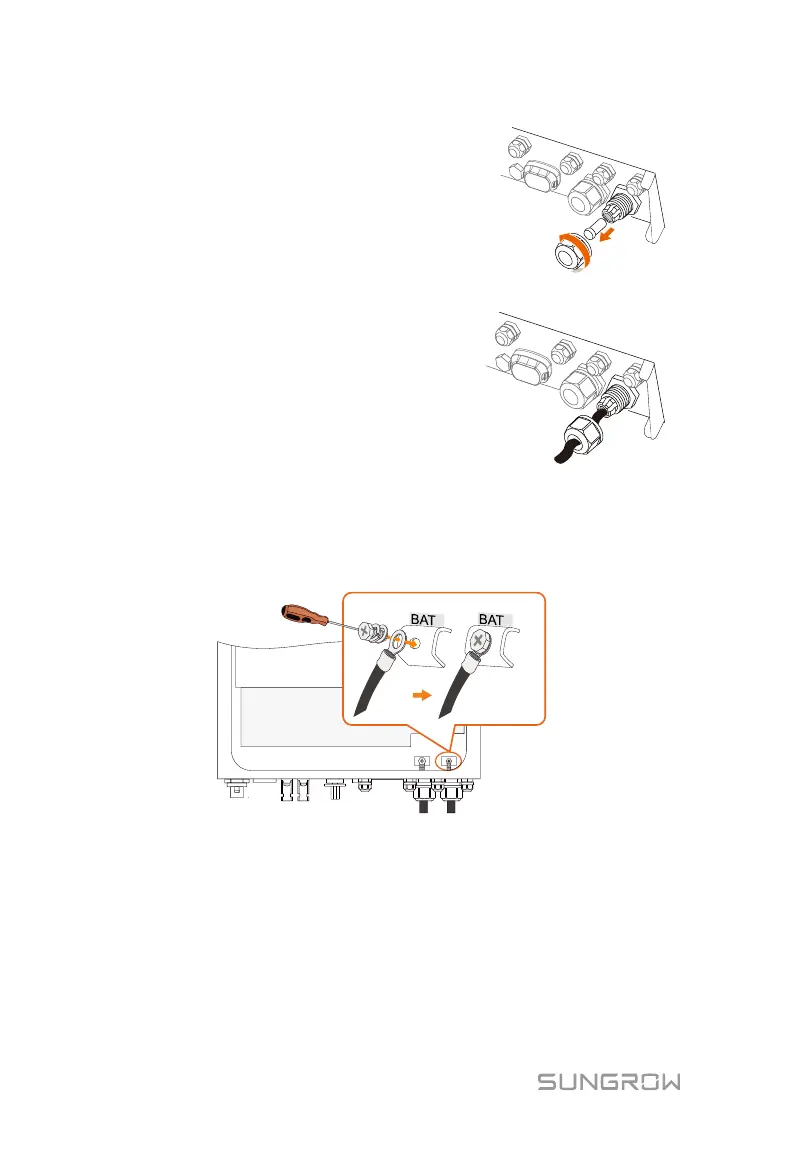
3. Unscrew the swivel nut from
the BAT+ and BAT- ports.
4. Lead the cable through the
cable gland.
5. Loosen and remove the screw sets on the BAT+ and BAT- terminal
blocks.
6. Fasten the cables to the corresponding terminals (torque 2.6 Nm). Be
sure to adhere to the following screw assembly sequence: screw head,
spring washer, fender washer, OT terminal.
6.6.2 Connecting the CAN Cable
The CAN cable enables the communication between the inverter and the Li-ion
battery from LG, GCL, Pylon (US2000B), BYD, SUNGROW or TAWAKI.
Procedure:
1. Take out the CAN cable (terminal marks CANH and CANL) and the
magnetic ring from the packaging.



 To Next Page