10 Appendix II: LCD Operation User Manual
86
10.4.8 Setting Active Power Response
For details, see “11.1.4 Over-frequency Response”, “11.2.4 Volt-watt
Response” and “11.2.5 Frq-watt Response”.
10.4.9 Setting Load Control
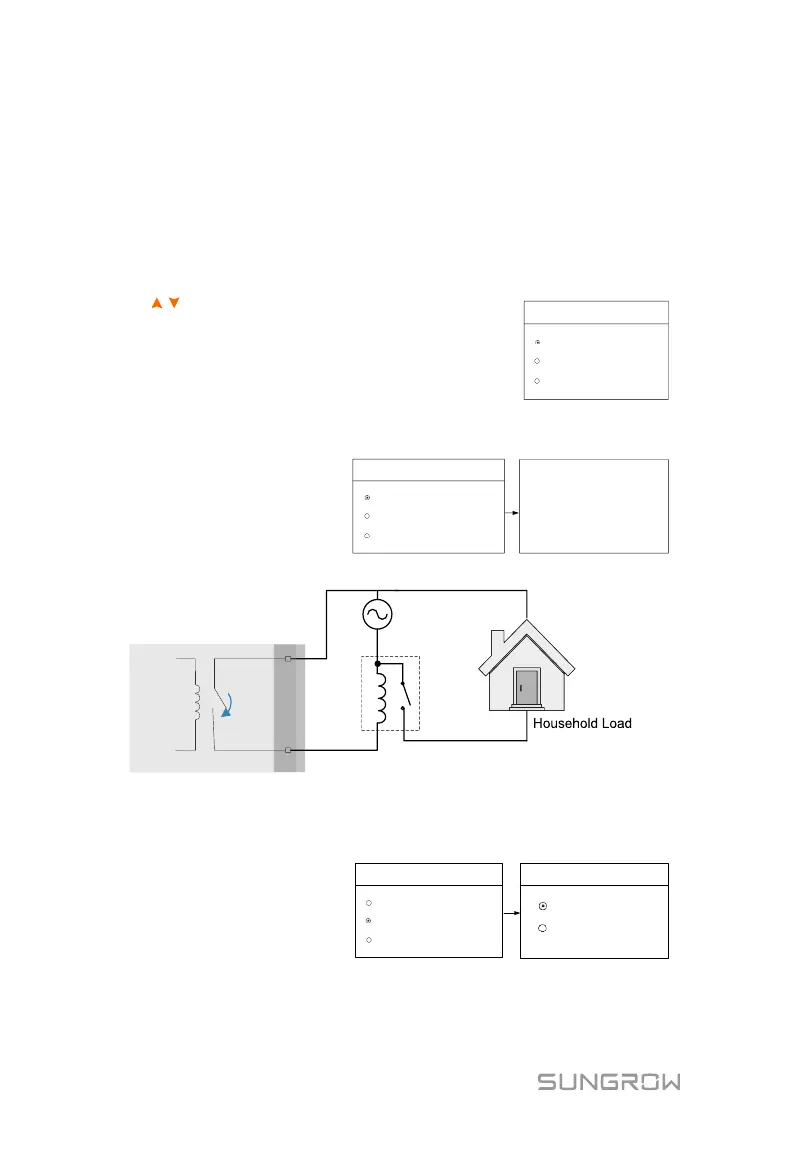
After connecting the load to the DO terminal, a relay control signal will be
transmitted. Users can flexibly set the control mode via the LCD menu.
Press / to choose the control mode. Press
ENT to confirm.
Load Control
Timer
ON/OFF
Optimized
In this mode, set the Start time
and End time, the system will
control the load operation
during the interval. Take 09:00
am–09:30 am as an example.
Load Control
Timer
ON/OFF
Optimized
Start Time1
End Time1
09:00
09:30
Start Time2
End Time2
09:00
09:30
Grid
Contactor
09
:
00
am
–
09
:
30
am
DO relay
ON1
COM1
Inverter
DO port
Fig. 10-2 DO Operation in Timer Control
ON/OFF Control
In this mode, the system will
control the load operation
according to the setting. Set to
OFF in the following example.
2/2
ON/OFF
ON
OFF
Load Control
Timer
ON/OFF
Optimized



 To Next Page