EasyManua.ls Logo

suprema FaceStation - RS485 Communication

suprema FaceStation
62 pages
Print Icon
To Next Page IconTo Next Page
To Previous Page IconTo Previous Page
Loading...
20
Connections
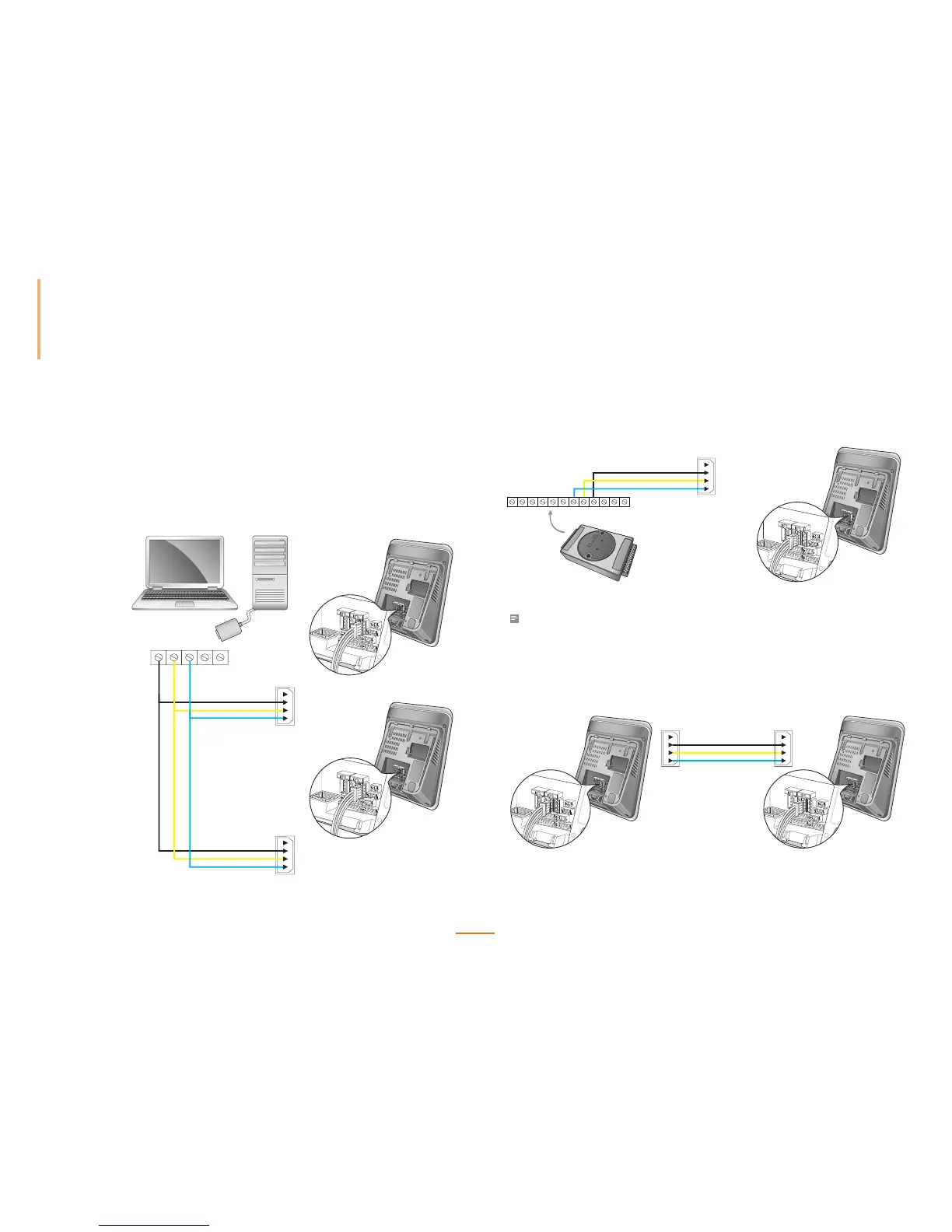
RS485 Connections
FaceStation can communicate with a PC, Secure I/O, or other devices via an RS485
connection.
Connecting with a PC
PIN1: GND (Black)
PIN2: TRXD - (Yellow)
PIN3: RS
TRXD + (Blue)
123
PIN3: RS-GND (Black)
PIN2: RS485-TRX-(Yellow)
PIN1: RS485-TRX+(Blue)
PIN3: RS-GND (Black)
PIN2: RS485-TRX-(Yellow)
PIN1: RS485-TRX+(Blue)
RS232-485
Converter
RS485 CH0
RS485 CH0
Connecting with Secure I/O
PIN1: RS485-TRX+(Blue)
PIN3: RS-GND(Black)
PIN2: RS485-TRX-(Yellow)
PIN6: RS485 TRX+(Blue)
PIN5: RS485 TRX-(Yellow)
PIN4: RS-GND (Black)
4 5 6
RS485 CH1
PIN1: RS485-TRX+(Blue)
PIN3: RS-GND(Black)
PIN2: RS485-TRX-(Yellow)
4 5 6
RS485 CH1
Note
• For added security, a Secure I/O is recommended as the door relay interface.
Connecting with Other Devices
PIN1: RS485-TRX+(Blue)
PIN3: RS-GND(Black)
PIN2: RS485-TRX-(Yellow)
RS485 CH1RS485 CH1
Master
Master
Slave
Slave

Table of Contents

Other manuals for suprema FaceStation

Related product manuals