22
Connections
Relay Connections
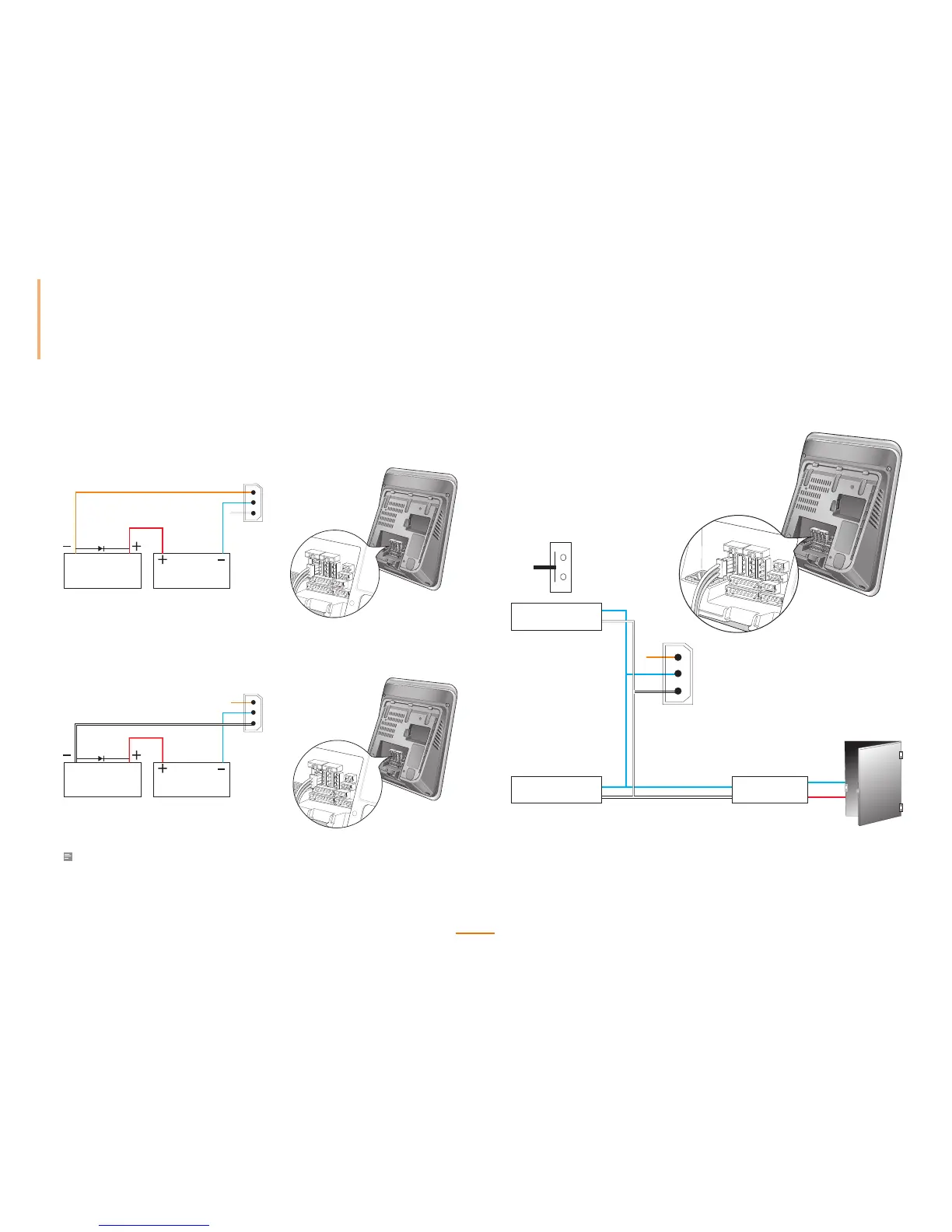
Connecting with a Fail Safe Lock
Deadbolt or
Door strike
DC
Power supply
Deadbolt or
Door strike
DC
Power supply
PIN3: N/C(Normal Close: Orange)
PIN2: Common(Blue)
PIN1: N/O(Normal Open: White)
PIN3: N/C(Normal Close: Orange)
PIN2: Common(Blue)
PIN1: N/O(Normal Open: White)
Connecting with a Fail Secure Lock
Deadbolt or
Door strike
DC
Power supply
Deadbolt or
Door strike
DC
Power supply
PIN3: N/C(Normal Close: Orange)
PIN2: Common(Blue)
PIN1: N/O(Normal Open: White)
PIN3: N/C(Normal Close: Orange)
PIN2: Common(Blue)
PIN1: N/O(Normal Open: White)
Note
• N.O. (Normally Open): A control signal closes the circuit.
• N.C. (Normally Closed): A control signal opens the circuit.
Connecting with Automatic Doors
PIN3: N/C(Normal Close: Orange)
PIN2: Common(Blue)
PIN1: N/O(Normal Open: White)
Presence Detector
RTE Switch
Door Controller



 To Next Page