Device Configuration
33
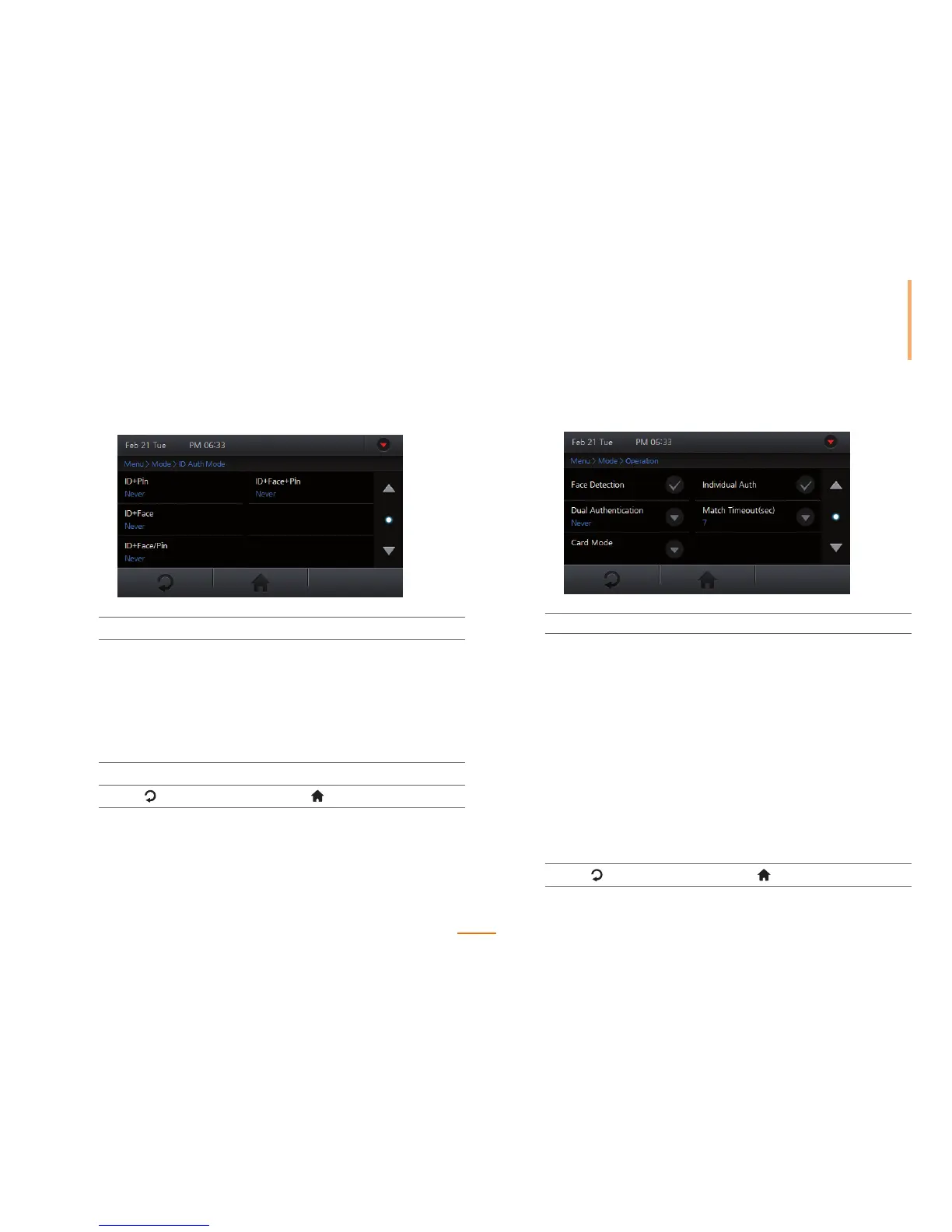
ID Authentication Mode
1
Go to Menu > Mode > ID Auth Mode.
2
Select a desired option.
ID + Pin Authenticates with both ID and pin number.
ID + Face Authenticates with both ID and face.
ID + Face/Pin Authenticates with both ID and either face or
pin number.
ID + Face + Pin Authenticates with ID, face, and pin number.
3
Check Never or Always to set the schedule.
4
Press to go to the previous screen or to go to the Home screen.
Setting General Operational Parameters
1
Go to Menu > Mode > Operation.
2
Check, or set the options and press OK.
Face Detection
Check to use Face Detection. On face authentication,
stores the detected face image as an image log. On ID
or card authentication, additionally authenticates and
stores the detected face image as an image log. If no
face is detected, the authentication will end up in failure.
Dual Authentication
Requires the authentication of two different users within
15 seconds and operates the associate relay.
Card Mode
Select whether or not to use the CSN card for
authentication.
Individual Auth
Check to enable individual authentication within the device.
Seer 'User Registration(page 45)' for more details.
Match Timeout(sec)
Sets the time-out period for an authentication attempt.
3
Press to go to the previous screen or to go to the Home screen.



 To Next Page